
Exit
  • Global community
    • Language:
      • Deutsch
      • English
      • Español
      • Français
      • Português
  • 日本語コミュニティ
  • 한국 커뮤니티
0

Using grep to delete text?

Explorer ,
Apr 15, 2019 Apr 15, 2019

How can I use grep to delete [pg xxx] where the xxx can be any length of a number or roman number (xi)? Any help would be greatly appreciated!

Thanks, Andras

4.1K
Translate
Report
Community guidelines
Be kind and respectful, give credit to the original source of content, and search for duplicates before posting. Learn more
community guidelines

correct answers 1 Correct answer

Guide , Apr 16, 2019 Apr 16, 2019

Two thoughts:

- what version of Indesign? could be related to the known CC2019 Grep bug

see GREP search fails to find all the matching instances in long InDesign documents for the fix

- Looks like cross-references to me... I second Michel : screenshot with "Invisible Chars … and Zoom on "[pg 004]"!" please ^^

Translate
Guide ,
Apr 15, 2019 Apr 15, 2019

\[pg\h[\dvxi]+\]

Translate
Report
Community guidelines
Be kind and respectful, give credit to the original source of content, and search for duplicates before posting. Learn more
community guidelines
Explorer ,
Apr 15, 2019 Apr 15, 2019

Thanks, do I use this with the Find/replace [grep] function? Because it does not seem to work.....

Translate
Report
Community guidelines
Be kind and respectful, give credit to the original source of content, and search for duplicates before posting. Learn more
community guidelines
Guide ,
Apr 15, 2019 Apr 15, 2019

Find this and Replace by nothing.

Translate
Report
Community guidelines
Be kind and respectful, give credit to the original source of content, and search for duplicates before posting. Learn more
community guidelines
Explorer ,
Apr 15, 2019 Apr 15, 2019

It won't find [pg xxx]

Translate
Report
Community guidelines
Be kind and respectful, give credit to the original source of content, and search for duplicates before posting. Learn more
community guidelines
Guide ,
Apr 15, 2019 Apr 15, 2019

It will! …

Translate
Report
Community guidelines
Be kind and respectful, give credit to the original source of content, and search for duplicates before posting. Learn more
community guidelines
Guide ,
Apr 15, 2019 Apr 15, 2019

… of course like here:  "… thanks to remove [pg 666] in the text! …"

Translate
Report
Community guidelines
Be kind and respectful, give credit to the original source of content, and search for duplicates before posting. Learn more
community guidelines
Community Expert ,
Apr 15, 2019 Apr 15, 2019

I don't know what this means.

Translate
Report
Community guidelines
Be kind and respectful, give credit to the original source of content, and search for duplicates before posting. Learn more
community guidelines
Guide ,
Apr 15, 2019 Apr 15, 2019

It’s what we call an example! ...

Translate
Report
Community guidelines
Be kind and respectful, give credit to the original source of content, and search for duplicates before posting. Learn more
community guidelines
Community Expert ,
Apr 15, 2019 Apr 15, 2019

It should. Make sure your GREP expression didn't get messed up when you copied and pasted. Michels solution works.

Translate
Report
Community guidelines
Be kind and respectful, give credit to the original source of content, and search for duplicates before posting. Learn more
community guidelines
Community Expert ,
Apr 15, 2019 Apr 15, 2019

Andras:

Is this a text string, or are you searching for the page number variable (added via Type > Insert Special Character > Markers > Current Page number? Are your Roman numerals lowercase as you showed in your example above? Do they include other Roman numerals like l, c, d and m?

The string provided does match what you asked for: [pg ] with digits and the lowercase Roman numerals v, x and i.

~Barb

Translate
Report
Community guidelines
Be kind and respectful, give credit to the original source of content, and search for duplicates before posting. Learn more
community guidelines
Explorer ,
Apr 15, 2019 Apr 15, 2019

It does not work for me! The string is [pg xxx] as xxx=either numbers or lower case roman numerals. The find gets nothing! What am I doing wrong? All it is is the find and using grep.

Translate
Report
Community guidelines
Be kind and respectful, give credit to the original source of content, and search for duplicates before posting. Learn more
community guidelines
Community Expert ,
Apr 15, 2019 Apr 15, 2019

Did you click the GREP tab? It worked fine for me.

~Barb

Screen Shot 2019-04-15 at 7.06.45 PM.pngScreen Shot 2019-04-15 at 7.06.49 PM.pngScreen Shot 2019-04-15 at 7.07.05 PM.png

Translate
Report
Community guidelines
Be kind and respectful, give credit to the original source of content, and search for duplicates before posting. Learn more
community guidelines
Community Expert ,
Apr 15, 2019 Apr 15, 2019

Also make sure that the scope of your search is set to something other than selection.

Translate
Report
Community guidelines
Be kind and respectful, give credit to the original source of content, and search for duplicates before posting. Learn more
community guidelines
Community Expert ,
Apr 15, 2019 Apr 15, 2019

Show your Find/Change dialog — maybe we can spot the error.

Translate
Report
Community guidelines
Be kind and respectful, give credit to the original source of content, and search for duplicates before posting. Learn more
community guidelines
Explorer ,
Apr 15, 2019 Apr 15, 2019

YAY ! It worked on [pg 4xx] only, it won't find [pg 00x] at all...

Untitled-1.png

Translate
Report
Community guidelines
Be kind and respectful, give credit to the original source of content, and search for duplicates before posting. Learn more
community guidelines
Guide ,
Apr 15, 2019 Apr 15, 2019

+ Invisible Chars … and Zoom on "[pg 004]"!

Translate
Report
Community guidelines
Be kind and respectful, give credit to the original source of content, and search for duplicates before posting. Learn more
community guidelines
Guide ,
Apr 16, 2019 Apr 16, 2019

Two thoughts:

- what version of Indesign? could be related to the known CC2019 Grep bug

see GREP search fails to find all the matching instances in long InDesign documents for the fix

- Looks like cross-references to me... I second Michel : screenshot with "Invisible Chars … and Zoom on "[pg 004]"!" please ^^

Translate
Report
Community guidelines
Be kind and respectful, give credit to the original source of content, and search for duplicates before posting. Learn more
community guidelines
Explorer ,
Apr 16, 2019 Apr 16, 2019

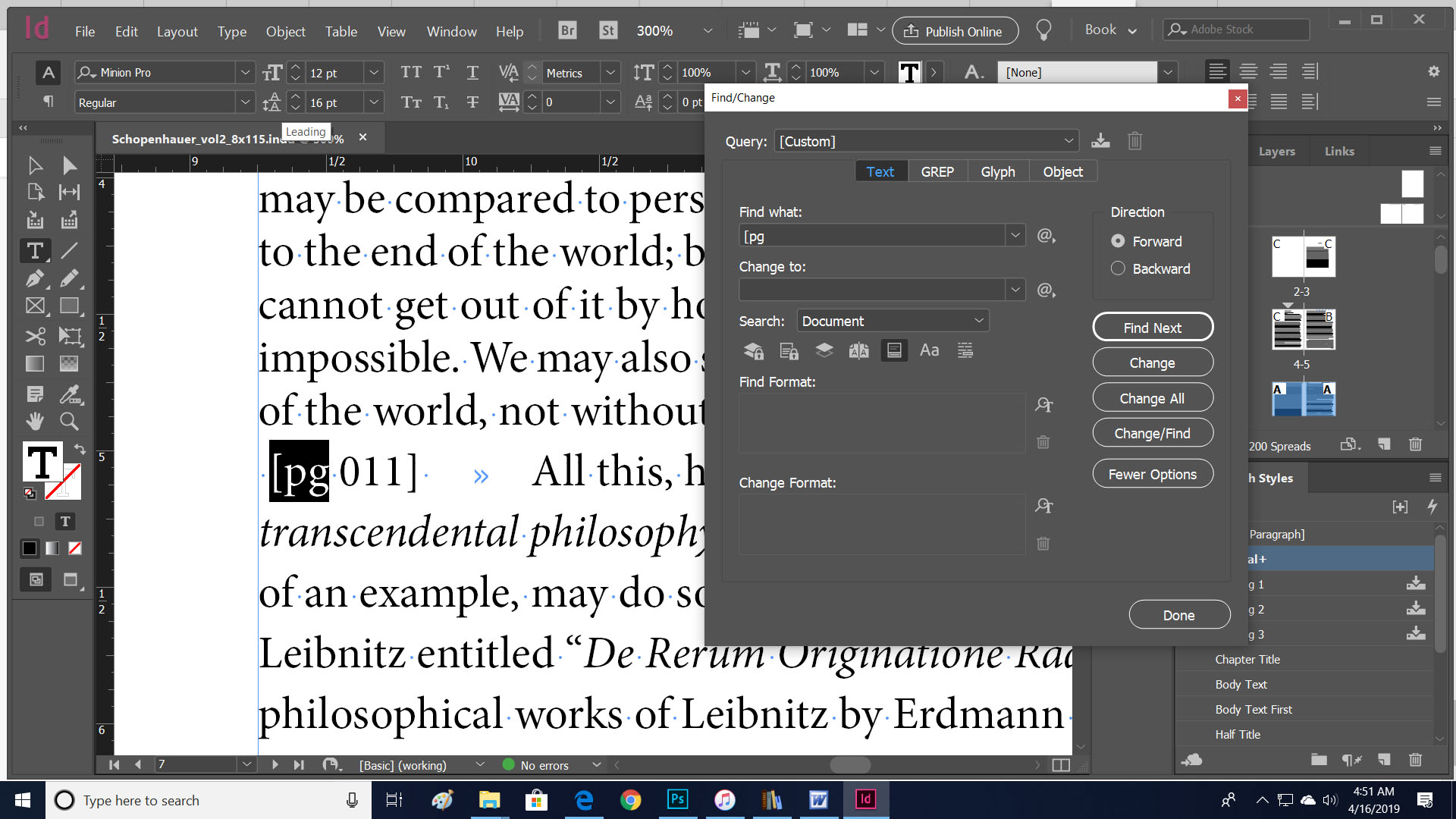
I have downloaded and found the CopyPlugin.app but it is a folder and I cannot run it. I hav e also looked at special characters but the file is clean!
Untitled-1.jpg

Translate
Report
Community guidelines
Be kind and respectful, give credit to the original source of content, and search for duplicates before posting. Learn more
community guidelines
Community Expert ,
Apr 16, 2019 Apr 16, 2019

noob1212121  wrote

I have downloaded and found the CopyPlugin.app but it is a folder and I cannot run it.

That is obviously the plugin for Mac OS X. You may not be aware of this, but you are working on Windows. Try again but make sure ti choose your own OS this time.
Translate
Report
Community guidelines
Be kind and respectful, give credit to the original source of content, and search for duplicates before posting. Learn more
community guidelines
Mentor ,
Apr 16, 2019 Apr 16, 2019

Jongware  wrote

You may not be aware of this, but you are working on Windows.

Translate
Report
Community guidelines
Be kind and respectful, give credit to the original source of content, and search for duplicates before posting. Learn more
community guidelines
Explorer ,
Apr 16, 2019 Apr 16, 2019
LATEST

IT WORKED! That was the bug! It worked for small sample files but not of the 3 volumes of Schopenhauer's The World As Will And Idea.

Thank you ALL who helped and made it possible not to tear my hair out with mundane editing...

I appreciate it wholeheartedly!

Translate
Report
Community guidelines
Be kind and respectful, give credit to the original source of content, and search for duplicates before posting. Learn more
community guidelines

