



Copy link to clipboard
Copied
I have [0-9a-zA-Z] GREP style as part of a paragraph style. The paragraph style uses an Asian font, and the GREP style changes any English characters to a different font. This is working, but Japanese doesn't use spaces (spacebar). I want to add a space before and after the English characters. What would I need to add to the GREP style so that each time an English word or phrase is encountered, a space would be added before and after the English phrase -- or is this even possible?


 1 Correct answer

That pink character is because you applied your western font to the last japanese char. You need a second character style for my grep that only applies the tracking, e.g. a value of 200 or alike. All font related fields should remain blank / unmodified.
Besides, adjust all those [A-z] to include all other western characters that you run into, e.g. [A-Za-z0-9] to match your original grep. I was just a little lazy in typing because my grep style editor appears broken - no cursor keys. ([A-Za-z0-9](
...
 15
Replies
15
15
Replies
15


Copy link to clipboard
Copied
Hi,
nested GREP is an option to apply a specific format to a specific content in current paragraph area. You can not modify a content (add/remove/replace).
There is a find...change feature to manage this unless this is not a dynamic solution.
Jarek
Copy link to clipboard
Copied
I don't have to use a grep style.
What would I type into Find/Change in order to insert spaces at the beginning and end of each English phrase?
Copy link to clipboard
Copied
If the exact width of a space character is not your concern, you might get along with tracking applied to the preceding character.
Add another grep style with look-ahead to recognize the changes between western and japanese script.
A very simplified grep works for me: ([A-z](?=[^A-z]))|([^A-z](?=[A-z]))
I also spent some time with unicode ranges such as [\u3000-\uFFFF], but that yielded strange results.
Dirk
Copy link to clipboard
Copied
Dirk,
Thanks for your suggestion. The exact width of the space is not important.
I need a space both before and after each English phrase. When I use the grep ([A-z](?=[^A-z]))|([^A-z](?=[A-z]))
it inserts a character before each English phrase, but not at the end of each English phrase.
The character looks like a box with a black outline and pink highlight, not a space.
The character being inserted is not always the same character -- if it was, I could use Find/Change to replace it with a standard space.
I'm hoping that this problem is solvable.
Copy link to clipboard
Copied
That pink character is because you applied your western font to the last japanese char. You need a second character style for my grep that only applies the tracking, e.g. a value of 200 or alike. All font related fields should remain blank / unmodified.
Besides, adjust all those [A-z] to include all other western characters that you run into, e.g. [A-Za-z0-9] to match your original grep. I was just a little lazy in typing because my grep style editor appears broken - no cursor keys. ([A-Za-z0-9](?=[^A-Za-z0-9]))|([^A-Za-z0-9](?=[A-Za-z0-9]))
Eventually use the following grep - it is still missing on accented western chars but should cover all plain english:
([[:ascii:]](?=[^[:ascii:]]))|([^[:ascii:]](?=[[:ascii:]]))
For that grep the japanese must not include ascii punctation characters.
Copy link to clipboard
Copied
DIrk,
I appreciate your help, and I think we're getting closer to a solution. I'm not a programmer, so I'm misunderstanding what needs to be done. I'm still getting boxes with pink highlighter and only before each English phrase, not after an English phrase. I made a sample file (below) so that you can see what it looks like.

It's more important for me to insert spacing than it is to use a non-Japanese font for the English text.
Can you help me figure out what I'm doing wrong?
Copy link to clipboard
Copied
Dirk,
I think I've got it now. As you suggested I made a second character style and rearranged the order of the two greps. It seems to be working.
Many thanks!!!

Copy link to clipboard
Copied
@Dirk – what version of InDesign had that problem or the strange results with using unicode ranges?
Uwe
Copy link to clipboard
Copied
I'm not Dirk, but just wanted to say that it would be great if unicode ranges could work so that even special characters could be included in the grep code.
Copy link to clipboard
Copied
@Dirk – just tested your idea with unicode ranges in InDesign CS5.5. And it worked very well:
1. GREP-Style for styling the English range (and something more, some punctuation etc.pp.):
Used character style colored in red:
"Latin"
[\x{0020}-\x{00FF}]
2. GREP-Style for styling the glyph that comes before that range and the last one in the found range:
Used character style colored in green:
"WhereLatinMeetsSomethingElse"
([\x{0020}-\x{00FF}](?=[^\x{0020}-\x{00FF}]))|([^\x{0020}-\x{00FF}](?=[\x{0020}-\x{00FF}]))
Screenshot of some mixed text with the two GREP Styles at work. Text is formatted with Arial Unicode MS:
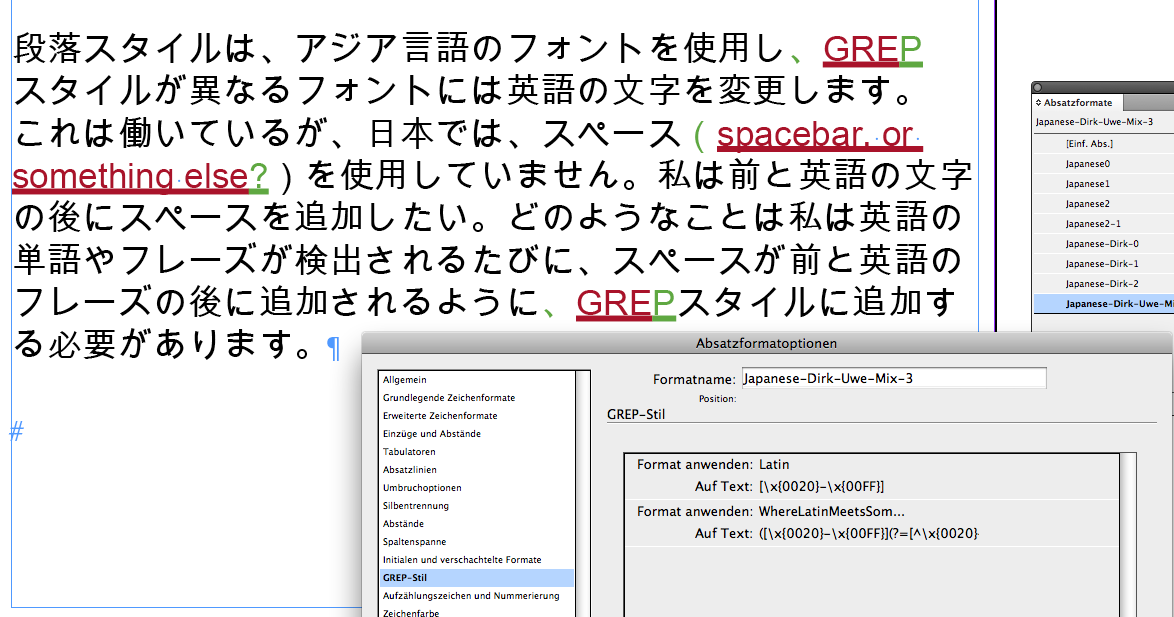
Here you can see, that we have some cases where it is unfortunate to use wider spaces before and after:
、 \x{3001}
。 \x{3002}
( \x{FF08}
) \x{FF09}
There may be some more…
Uwe
Copy link to clipboard
Copied
Here a screenshot where only the first GREP Style with the unicode range is at work.
I did the formatting with an underline so that spaces that are affected can be identified (as before, but did not mention this).
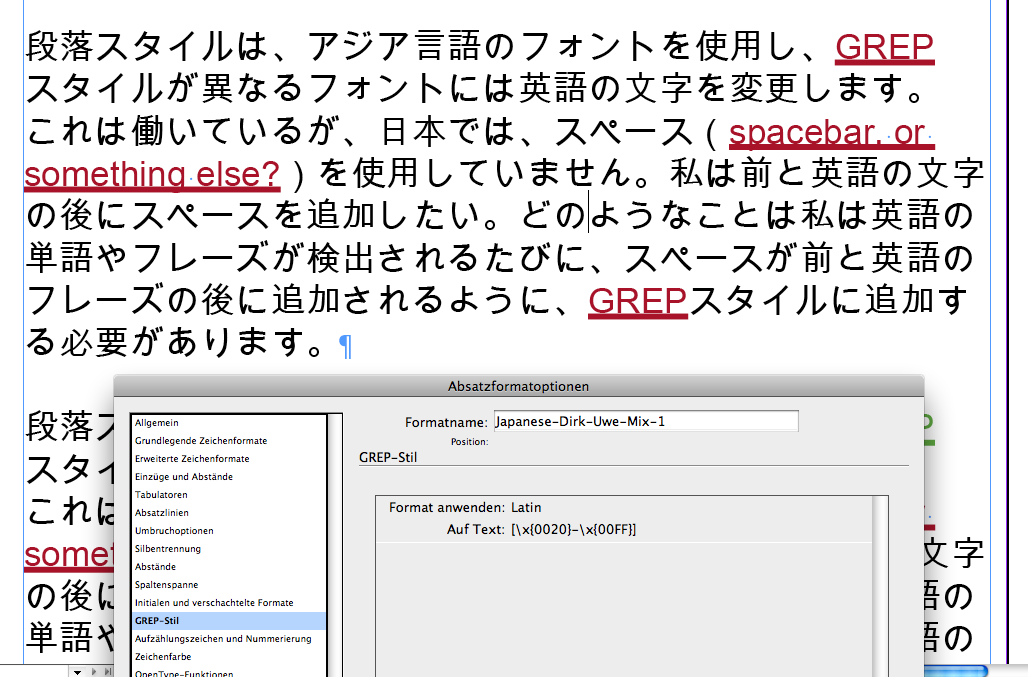
All InDesign CS5.5. Will test for more recent versions…
Uwe
Copy link to clipboard
Copied
Hi Uwe,
thanks for solving my problem with unicode ranges - I used just the wrong notation. Too much programming in different languages recently. You're right with handling punctuation and brackets differently. For the brackets I'd consider a separate grep and third character style with reduced tracking.
Btw, I hope Jay is aware that the info palette (F8) displays unicode values if the selection is a single character, so he can adjust the greps according to his document. If the grep expression gets too large, you can even split mine into two conditions:
([A-z](?=[^A-z]))|([^A-z](?=[A-z]))
=>
[A-z](?=[^A-z])
[^A-z](?=[A-z])
Dirk
Copy link to clipboard
Copied
Hi Dirk,
this solved the riddle.
For showing a unicode value (with the right notation) for asian ranges you can also copy a glyph and paste it to the GREP Search input field. It will be instantly translated into the right code. I did my example with 。 \x{3002} that way…
Uwe
Copy link to clipboard
Copied
Here an example where the four glyphs mentioned above can get special treatment.
Be it that no tracking is applied or different tracking values.
I just added four GREP Styles to the already existing ones.
The used character style "Reformat" just applies a yellow fill.
[\x{0020}-\x{00FF}](?=[\x{FF09}])
[\x{FF08}](?=[\x{0020}-\x{00FF}])
[\x{3001}](?=[\x{0020}-\x{00FF}])
[\x{3002}](?=[\x{0020}-\x{00FF}])
You could use four different character styles for the four added GREP Styles of course…
The closing bracket ) \x{FF09} is a special case.
Also: we could add some more styles. Eg. if the right space of a glyph like 。 \x{3002} followed by an English character is too wide. There are always things to refine…
Also note: Here in my example the English "?" has mixed formatting. The color is overridden from red to yellow, but the underline is not. So the yellow color is from the GREP Style [\x{0020}-\x{00FF}](?=[\x{FF09}]) and the underline is from the first GREP Style: [\x{0020}-\x{00FF}] .

Uwe
Copy link to clipboard
Copied
I am overwhelmed -- this is so much more than I could have hoped for! Thank you so much for your responses and explanations!


Get ready! An upgraded Adobe Community experience is coming in January.
Learn more
 AdChoices