


- Home
- InDesign
- Discussions
- ZIP-package from indesign (by script)
- ZIP-package from indesign (by script)

Copy link to clipboard
Copied
we have a javascript that writes lot´s of files from indesign... developers of the next step asked if it´s possible that indesign would package all those files to a ZIP-pacakge... is it possible?


 1 Correct answer

JsZip is not very fast when 'wrapped' in ExtendScript, but it works.
I think you only have to patch File / Folder access…
Just found this old piece of code in my drawers:
...#include 'jszip/jszip.js'
JSZip.prototype.addExistingFile = function(/*File*/f, newName)
{
var contents = false;
if( f.constructor == File && f.exists && (f.encoding = 'BINARY') && f.open('r') )
{
contents = f.read();
f.close();
return this.add(newName||f.name, contents, {binary: true, date:f.modified});
}
throw new

 35
Replies
35
35
Replies
35


Copy link to clipboard
Copied
The application object has the very intuitively named methods packageUCF and unpackageUCF, intended to handle IDML files which themselves are ZIP.
Dirk

Copy link to clipboard
Copied
IIRC, there were issues using those methods to create zips (most specifically with image files).
This might be useful:
http://jszip.stuartk.co.uk/
Copy link to clipboard
Copied
Thanks for the answers!
Harbs, have you ever used that jszip with indesign? I found references to web-browsers only.... do you think it could be possible to use that for compressing bunch of JPG image files as ZIP?


Copy link to clipboard
Copied
Does it matter JPEGs cannot be compressed very well? If all of this is just to get a single package of files, then I'm tempted to do the PNG trick once more and attempt to create a ZIP file that contains uncompressed files only ...
Copy link to clipboard
Copied
JsZip is not very fast when 'wrapped' in ExtendScript, but it works.
I think you only have to patch File / Folder access…
Just found this old piece of code in my drawers:
#include 'jszip/jszip.js'

JSZip.prototype.addExistingFile = function(/*File*/f, newName)
{
var contents = false;

if( f.constructor == File && f.exists && (f.encoding = 'BINARY') && f.open('r') )
     {
     contents = f.read();
     f.close();
     return this.add(newName||f.name, contents, {binary: true, date:f.modified});
     }
throw new Error("Unable to open the file "+f);
}
// SAMPLE CODE
/*
var folder = app.activeScript.parent;
var zip = new JSZip();
zip.add("Hello.txt", "Hello World\n");
zip.folder("images").
addExistingFile(File(folder+"/test.jpg"));
var content = zip.generate(true); // asBytes
var f = File(folder+'/test.zip');
f.encoding = 'BINARY';
if( f.open('w') )
{
f.write(content);
f.close();
}
*/
Hope that helps.
@+
Marc

Copy link to clipboard
Copied
JsZip
Hi,
if the script is working in windows.
Do u have the jszip script for windows.
Thanks in advance.
Regards
Ashok
Copy link to clipboard
Copied
Harbs,
could you please clarify - were the images distorted somehow or was it just suboptimal compression (file size) as Jongware indicates?
Thanks,
Dirk
Copy link to clipboard
Copied
Dirk,
I just checked my archives and found what I was remembering.
Teus de Jong (OBM) had tried to use it for packaging ePubs and it failed for that purpose. Fonts and images were missing data.
Harbs

Copy link to clipboard
Copied
I agree with John, zip system mechanism do that very well. I am quite sure code has been already been given for both platforms here :).

Copy link to clipboard
Copied
What OS? I really think you are much better off calling out to the operating system's zip utility. This is tricky under windows and trivial under Mac OS.
Copy link to clipboard
Copied
Thanks to everyone, specially Marc for the code sample...
This ZIP-thing is not for the compressing the size, it´s more for easing up the next face of the workflow. It´s much more nicer to handle only one file instead of hundreds of them....=)
Script is actually made by Marijan "Tomaxxi" Tompa so I probably ask him if he had time to give this a try at some point..... this is not a busy case....
@John, I thought using OS too, but I try to keep this whole solution as OS independent as possible, so if there is any deasent generic solution I rather test it first. If it´s too slow or there are some other flaws, I´ll consider using OS based compression methods.....

Copy link to clipboard
Copied
Good evening,
I can not use the script (on Mac) it gives me a syntax error ... but at first I want to open a used function without ".docx" "app.unpackageUCF () and app.packageUCF ()".
thank you
Bonsoir,
Je ne parvient pas à utilisé le script (sur Mac) il me donne une erreur de syntaxe... mais dans un premièr temps je veux ouvrir un ".docx" sans utilisé les fonction "app.unpackageUCF() and app.packageUCF()".
Merci
Copy link to clipboard
Copied
Philippe, you know your avatar image is stretched, right? You might want to fix that.
This script cannot and should not work on a Mac.
But on a Mac it is much much easier. Just use
app.doScript('do shell script "zip filename.zip file1 file2 file3"', ScriptLanguage.APPLECRIPT_LANGUAGE);
I cannot understand what you are saying about packageUCF().

Copy link to clipboard
Copied
John Hawkinson wrote:
app.doScript('do shell script "zip filename.zip file1 file2 file3"', ScriptLanguage.APPLECRIPT_LANGUAGE);
FWIW, ditto is a better choice than zip for Mac stuff.
Copy link to clipboard
Copied
FWIW, ditto is a better choice than zip for Mac stuff.
Gosh, that's an interesting question, Shane!
From a portability perspective, that's untrue, at least from my background.
zip works across all Unix systems, and even works under Windows if you have Cygwin or whatnot.
ditto is Mac-specific.
But you're right, ditto has signicant features that zip does not. Specifically it supports resource forks and and HFS metadata.
But ditto also has annoying command-line syntax do that. Is it truly neccesary to use "ditto -c -k --sequesterRsrc --keepParent srcdir srcdir.zip"?
In fairness, I guess one has to use "zip -r srcdir.zip srcdir" but it still seems a lot cleaner.
Ah well.
I guess I would use zip just for simplicity, but I see why others might disagree.

Copy link to clipboard
Copied
John, I also use ditto for zip and have done for some time… Never caused me any problems… Horses for courses…
Copy link to clipboard
Copied
Wha-huh? Mark, nobody said ditto caused anyone problems. It's just a Mac-only tool with a complex command-line syntax that is extremely verbose.
Copy link to clipboard
Copied
John Hawkinson wrote:
FWIW, ditto is a better choice than zip for Mac stuff.
Gosh, that's an interesting question, Shane!
From a portability perspective, that's untrue, at least from my background.
zip works across all Unix systems, and even works under Windows if you have Cygwin or whatnot.
ditto is Mac-specific.
Which is why I said "for Mac stuff". Your script included ScriptLanguage.APPLECRIPT_LANGUAGE, so I assumed that was a given.
The syntax is verbose, but it essentially lets you match what using the Finder's Compress command does. zip's syntax is simpler, but then you have to manually organize things like a wrapper folder, and so on.
Copy link to clipboard
Copied
Which is why I said "for Mac stuff". Your script included ScriptLanguage.APPLECRIPT_LANGUAGE, so I assumed that was a given.
Well, I'm living in a fantasy world where "portability" doesn't mean "Windows and Mac" it means "Linux, Solaris (umm), Unix, etc."
You're free to argue this is completely unreasaonble since InDesign won't be running on any such platforms any time soon.
The syntax is verbose, but it essentially lets you match what using the Finder's Compress command does. zip's syntax is simpler, but then you have to manually organize things like a wrapper folder, and so on.
Sure. Though if Philippe is really just editing IDML, this is all academic.
Copy link to clipboard
Copied
if I'm not saying error!
This function is two "app.unpackageUCF () and app.packageUCF ()" are passed by indesign me and I do not want.
for the command line with Toolkit, it returns me the error "app.doscript is not a function".
To open the docs, I guess I use the command "UNZIP".
thank you
Philippe
C'est deux fonction "app.unpackageUCF() et app.packageUCF()" me font passé par indesign et je ne veux pas.
pour la ligne de commande avec Toolkit, il me retourne l'erreur "app.doscript n'est pas une fonction".
Pour ouvrir le docs, je suppose que j'utilise la commande "UNZIP".
Merci
Philippe
Copy link to clipboard
Copied
I am having great difficulty understanding you.
app.doScript is not the same as app.doscript. The 'S' is capitalized.
Copy link to clipboard
Copied
Is it possible to have an example that fonctione?
Philippe
Bonjour et merci
Est-il possible d'avoir un exemple qui fonctione?
Philippe
Copy link to clipboard
Copied
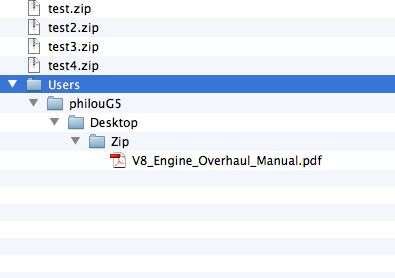
var test = app.doScript('do shell script "zip ~/Desktop/Zip/test3.zip ~/Desktop/Zip/test7/" ', ScriptLanguage.applescriptLanguage);
this command gives me this result as:
#target indesign
var test = app.doScript('do shell script "zip ~/Desktop/Zip/test3.zip RS125_96B.pdf V8_Engine_Overhaul_Manual.pdf" ', ScriptLanguage.applescriptLanguage);
this command gives me a file.
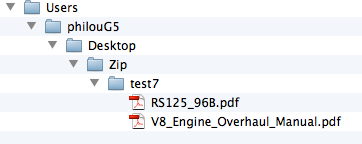
var test = app.doScript('do shell script "zip ~/Desktop/Zip/test3.zip test7/*.pdf" ', ScriptLanguage.applescriptLanguage);
this command does:
Copy link to clipboard
Copied
The command app.doScript () function does not free the code "# target indesign" or set of ESKT indesign??
I want to do a standalone script!
Thank you ...
Bonsoir ou bonjour
La commande app.doScript() ne fonction pas sans le code " #target indesign" ou réglé ESKT sur indesign???
Je veux faire un script autonome !
Merci ...

-
- 1
- 2

Get ready! An upgraded Adobe Community experience is coming in January.
Learn more
 AdChoices