Inspiring
October 4, 2020

P: not syncing photos in synced collection after editing in Photoshop and saving as a PSD.

  • October 4, 2020
  • 10 replies
  • 802 views

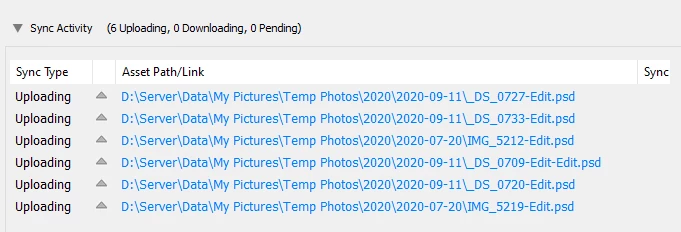
I have discovered , and others have confirmed, that if you sync a photo that has been edited in PS and saved as a PSD the syncing status will say the photos are not synced.  See photo below.  In fact they are synced but they remain in the un-synced status forever.  When you exit the program you get an error that there are un-synced photos.  Other photos edited in LR are not affected.  I believe the problem only occurs when you edit the photo a second time after it has been previously added to a synced collection.  The majority of my work flow involves editing raw in Lightroom Classic and then round-tripping to Photoshop resulting in a psd returned to Lightroom Classic. I frequently put the edited photos into a synced collection. If I re-edit the psd, the file appears to sync across platforms but Classic reports an endless sync in progress. When I remove the file from the collection, the sync status turns green almost immediately. When i put the edited file back into the collection it immediately syncs! I did find that Photoshop editing was the issue and the problem also occurs if round-tripped in tiff, not just psd. It also didn't matter if the file was complex or very large (note that psb large format files do not sync--that is a known limitation).  All programs are up to date.  I am using Windows 10 64 bit also up to date.


This topic has been closed for replies.

10 replies

ToReR1k
Participant
April 3, 2021

@Rick

I just run into same issues, cant sync any of my saved Tiff files, I have latest version of LrC (v10,2) and Ps (v22,3) and (Camera Raw v13,2)

I can see all my edited Tiff files in same folder as my LrC library are sync with, but did not show up in lightroom.

(I also run Win10)

ToReR1k
Participant
April 3, 2021

Hey

I just run into same issue, cant sync any of my saved Tiff files, I have latest version of LrC and Ps.

I can see all my edited Tiff files in same folder as my LrC library are sync with, but didnt show up in lightroom.

Rick Spaulding -
Legend
October 20, 2020

Greetings,


Updates for the Adobe Photography Products were released on 10.20.2020 that include fixes for these issues. Please install the most recent update and confirm that your issue is now fixed. Please let us know if you encounter any issues.


Thank you for your patience.

cpgillesAuthor
Inspiring
October 7, 2020

Thank you


There is a bug in 9.4 release which blocks the re upload of binary. We are fixing this in the coming update.


Adobe Employee
October 7, 2020

There is a bug in 9.4 release which blocks the re upload of binary. We are fixing this in the coming update.

Inspiring
October 6, 2020

Yep, I'm aware of that 200 MB limit too.  In this case though, my test PSD's & TIFF's were purposely <100K (didn't want to be waiting for large files to sync just for testing), so that definitely wasn't coming into play.

Rikk Flohr_Photography
Community Manager
October 6, 2020

Note: if the PSD file has the original in the cloud and is synced down to Lightroom Classic and any subsequent edit of that PSD file increases its size to over 200 MB the PSD will not sync back to the cloud. This is a Lightroom Classic-only limitation. 

Rikk Flohr: Adobe Photography Org
Inspiring
October 6, 2020

Just tested and same thing happens for me on LrC 9.4 / Win10.

  • Initial sync works fine, regardless of the initial image format (tested cr2, heic, jpg, psd, & tiff).
  • Edit any of them in Ps and the second sync of the resulting psd or tiff hangs.
  • Same behavior whether you choose PSD or TIFF as the file format in LrC's external editing options.
  • Removing & re-adding the psd or tiff to the collection gets it to successfully sync again.
Inspiring
October 6, 2020

Is this documented somewhere?  The LrC Sync FAQ only mentions PSB files in the "What does not sync" section.


I could be mistaken, but it certainly seems like I've synced PSD files in LrC before.

Adobe Employee
October 5, 2020

Hi,


Lightroom Classic doesn't support syncing of PSD files yet.