
P: Adjustment brush Auto Mask broken for 32bit TIFF image
Hello,
I am using Lightroom 4.2 (updated today) on Windows 7 64bit. I have an issue using the adjustment brush with the option "Auto Mask" within a 32 bit TIFF file: the Auto Mask magic there does not work.
I've created 32 bit TIFF files using the "merge to HDR Pro in Photoshop" workflow, where the resulting TIFF is automatically added back to Lightroom. There, I edit the TIFF just in the same way as I edit any other picture in Lightroom. Some of my TIFF files have very clear edges with high contrast. Example: 
I assume you agree with me that the adjustment brush Auto Mask must be able to detect this particular edge between the blue sky and the almost black wall of a building. However, when I use the adjustment brush on this edge (no feather, 100 density and flow, show selected mask overlay in green), it does not detect the transition: 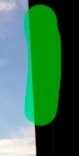
When I do the same in one of the RAW pictures that contributed to the TIFF above, Auto Mask works as expected: 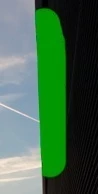
I tried this with various edges in various TIFF and RAW files. In the RAW files, basically all edges are detected, while the Auto Mask feature entirely fails in my TIFFs. I've first observed this in Lightroom 4.1. Then I updated to 4.2 which did not change the behavior.
Is there something I can do wrong? Note that in this tutorial: http://tv.adobe.com/watch/the-complet... Julieanne Kost is doing exactly this: first she merges a set of pictures to a HDR TIFF and then she uses the adjustment brush with Auto Mask in the resulting TIFF. In the video it looks like the edge detection works properly for her.
Any suggestion is welcome. Thanks!
 AdChoices