


Participant
March 21, 2025

P: Convert Photos to DNG not respecting uppercase ".DNG" file extension

Converting .DNG to .DNG files creates new files with lowercase ".dng" extension instead of ".DNG" extension, even if file extension in modal is set to "DNG".
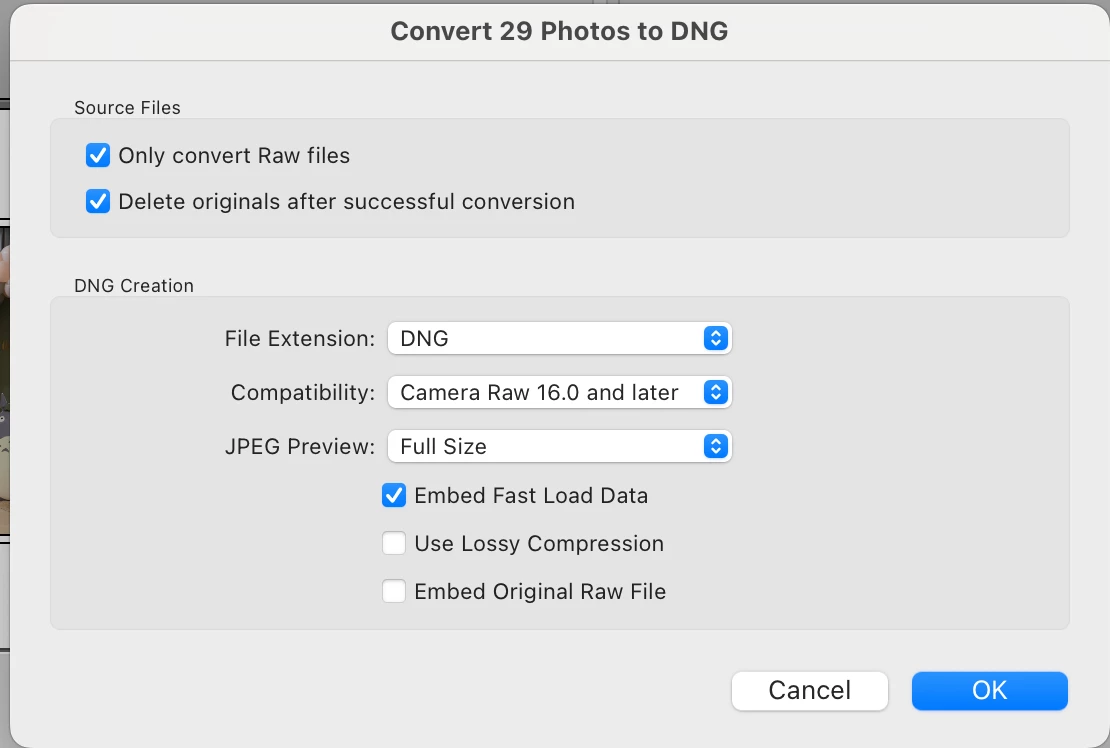


Reproduced by trying to convert photos that were already in DNG format, e.g. from Leica Q2 or Leica M11. This previously worked fine in past versions of Lightroom Classic.

This is also a problem because the new files get different createdAt and modifiedAt timestamps in apple finder, which is undesirable.


Operating System: Mac OS 15.3.1

Lightroom Classic version: 



4 commentaires

johnrellis
Legend
April 30, 2025

I confirmed the bug recipe works correctly in LR 14.3, thanks.

Rikk Flohr_Photography
Community Manager
Community Manager
April 24, 2025

Greetings all, 


A new update for Adobe Photography Products has been released.  The April updates contain an update for this issue. 

If you do not see the update in your Creative Cloud Application, you can refresh it by hitting [Ctrl/Cmd]+[Alt/Opt]+[ R ].

Note: It may take up to 24 hours for your update to be available in your Creative Cloud app.


Thank you for being so patient.

Rikk Flohr: Adobe Photography Org
Rikk Flohr_Photography
Community Manager
Community Manager
March 21, 2025

I've logged a bug with the team for this. 

Thanks for the report, @zykohl  and the extra data @johnrellis 

Rikk Flohr: Adobe Photography Org
johnrellis
Legend
March 21, 2025

[This post contains formatting and embedded images that don't appear in email. View the post in your Web browser.]


I see the misbehavior in LR 14.2, 14.1.1, 13.5.1, but not in 12.0. It only happens when I select Delete Originals After Successful Conversion; it doesn't happen when it's unselected.


Precise steps to reproduce in LR 14.2 / Mac OS 15.3.2:


1. Select a raw file.


2. Do Library > Convert Photo To DNG with these options:


Observe the newly generated DNG has the extension "DNG" (correct).


3. Select the newly generated DNG and do Library > Convert Photo To DNG again with these options (selecting Delete Originals):


Observe the newly generated DNG has the extension "dng" (incorrect).