

johnrellis
Legend
December 8, 2022

P: Exported JPEGs missing mandatory PixelXDimension and PixelYDimension EXIF tags

  • December 8, 2022
  • 4 replies
  • 1934 views

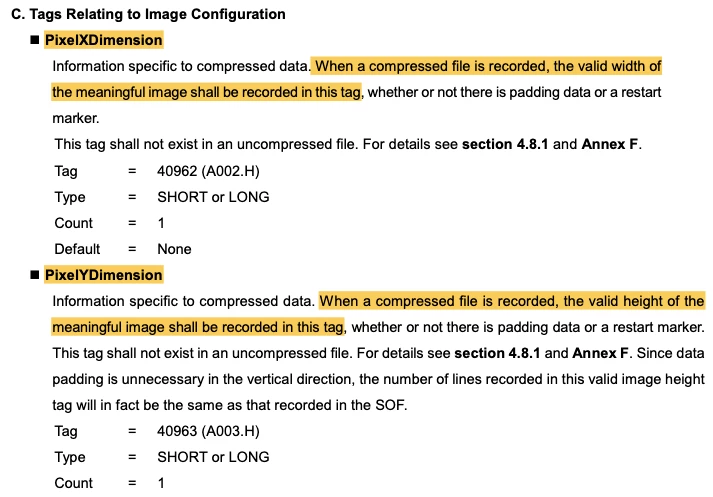
JPEGs exported by LR are missing the PixelXDimension and PixelYDimension EXIF tags (image width and height), required by EXIF Version 2.32 (and prior versions going back to at least EXIF Version 2.2, 2002).  This trips up software libraries expecting to find those mandatory tags. 


Tested on LR 12.0.1 / Mac OS 12.6.1 and LR 6.14 / Windows 10.


To reproduce:


1. Export any photo from LR as a JPEG.


2. Run this Exiftool command on the exported JPEG:


exiftool -a -G -EXIF:ExifImageWidth -EXIF:ExifImageHeight file.jpg


(Exiftool calls PixelXDimension and PixelYDimension "ExifImageWidth" and "ExifImageHeight".)


Here's the relevant section from the EXIF Version 2.32 specification (page 44):
 

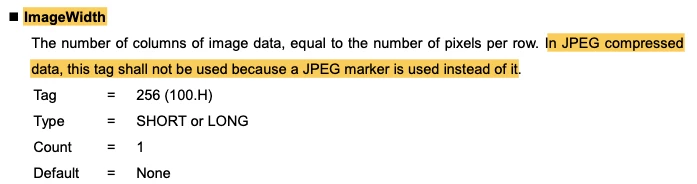
Note that Photoshop correctly writes those tags, though it also writes EXIF:ImageWidth and EXIF:ImageLength, which violates the standard in a different way (page 28):


This topic has been closed for replies.

4 replies

Rikk Flohr_Photography
Community Manager
January 12, 2023

Missing status

Rikk Flohr: Adobe Photography Org
johnrellis
Legend
December 9, 2022

"All JPEG files are compressed"


Right, I was imprecisely copying the usage from the EXIF spec, which frequently uses the terms "uncompressed data" and "JPEG compressed data".  The spec encompasses images with uncompressed RGB data, uncompressed YCbCr data, and JPEG compressed data.


Files with JPEG compressed data should have the PixelX/YDimension tags and should not have ImageWidth/Length tags, and vice versa for files with uncompressed data.

Legend
December 9, 2022

All JPEG files are compressed. However, JPEG compression is a different thing, for example TIFF layers can use JPEG compression.

Also, there is NOT a standard for how JPEG compression is done, only how it is decompressed. That allows newer compression methods to be used as long as the finished file can be properly opened.

Participating Frequently
December 8, 2022

I can not get Lightroom to export any pixel dimensions.


I have all metadata export enabled. When I use a Windows EXIF viewer, no dimensions are present. When using the JS EXIFR package, same thing, nothing is present.


Other users are having this same issue: https://www.reddit.com/r/Lightroom/comments/yheq9r/image_dimensions_not_included_in_exif_data_for/

johnrellis
Legend
December 8, 2022

All the export formats require the image pixel dimensions to be included -- it's not possible to have a JPEG, for example, without specifying the width and height in pixels.  Otherwise, how could the image be displayed by viewers?


Attach one of the exported JPEGs here and we'll put it under the microscope.

Participating Frequently
December 8, 2022