

Salir
  • Comunidad global
    • Idioma:
      • Deutsch
      • English
      • Español
      • Français
      • Português
  • 日本語コミュニティ
  • 한국 커뮤니티

P: Garbled tool tip for Remove > Next Variation in French on Windows

LEYENDA ,
Jun 25, 2024 Jun 25, 2024

The tool tip for Remove > Next Variation is garbled in LR 13.4 / Windows running in French:
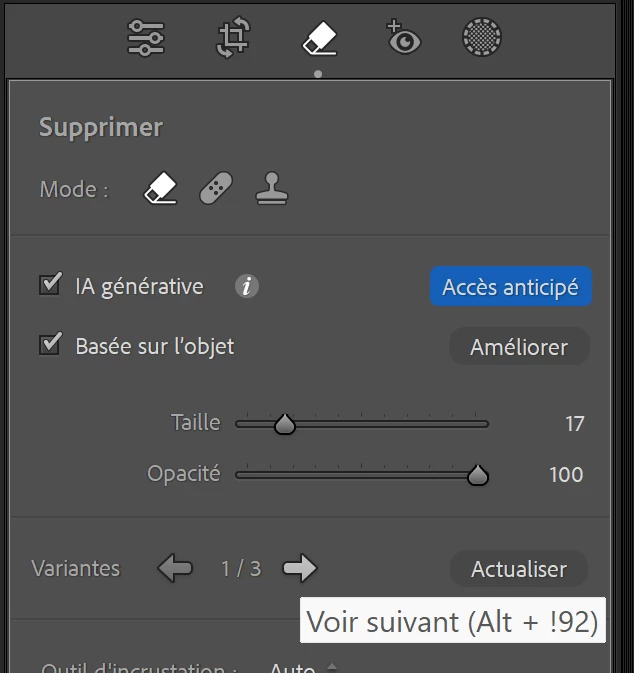
johnrellis_0-1719363669256.png


This is caused by a typo in TranslatedStrings_Lr_fr_FR.txt:


"$$$/AgDevelop/Dust/GenRemove/NextVariation/Shortcut/Win=Alt + ^U + 2192"


It should be:


"$$$/AgDevelop/Dust/GenRemove/NextVariation/Shortcut/Win=Alt + ^U+2192"


Of course, this wouldn't have happened if the tool tip followed the convention used everywhere else in LR, with "Left Arrow" and "Right Arrow" used instead of ←and →, and if the developers used the Any Shortcut plugin to catch errors before release. (There's plenty of room in the tool tips for spelling out Left Arrow and Right Arrow.)

Error Corregido
TEMAS
macOS
839
Traducir
Informe
Directrices de la comunidad
Sé amable y respetuoso, muestra títulos de crédito de la fuente de contenido original y busca duplicados antes de publicar. Más información
community guidelines
2 Comentarios
Empleado de Adobe ,
Aug 14, 2024 Aug 14, 2024

Greetings all, 


Updates for the Adobe Photography Products are released.  The August 2024 updates contain an update for this issue. 

If you do not see the update in your Creative Cloud Application, you can refresh it by hitting [Ctrl/Cmd]+[Alt/Opt]+[ R ].

Note: It may take up to 24 hours for your update to be available in your Creative Cloud app.


Thank you for being so patient.

Rikk Flohr: Adobe Photography Org
Estado Corregido
Traducir
Informe
LEYENDA ,
Aug 14, 2024 Aug 14, 2024
MÁS RECIENTES

Confirmed this is fixed in my LR 13.5 / Windows.

Traducir
Informe