Salir
  • Comunidad global
    • Idioma:
      • Deutsch
      • English
      • Español
      • Français
      • Português
  • 日本語コミュニティ
  • 한국 커뮤니티

P: (Japanese) "Select the Spot Removal tool" and "Flag photo as a pick" wrong shortcut
Community Expert ,
Aug 13, 2023 Aug 13, 2023

alpha7_0-1691918570406.png
alpha7_1-1691918690312.png


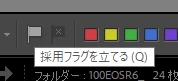
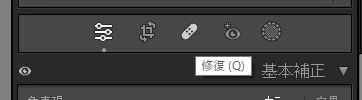
The shortcuts for "Select the Spot Removal tool" and "Flag photo as a pick" have been swapped. (P&Q)

The manual says "Select the Spot Removal tool" is Q and "Flag photo as a pick" is P.

In Lightroom, both shortcuts are written as Q.

https://helpx.adobe.com/lightroom-classic/help/keyboard-shortcuts.html

Win10、Win11、Japanese version

Error Corregido
TEMAS
Windows
3.1K
Traducir
Informe
Directrices de la comunidad
Sé amable y respetuoso, muestra títulos de crédito de la fuente de contenido original y busca duplicados antes de publicar. Más información
community guidelines

correct answers 2 respuestas fijadas

Empleado de Adobe , Aug 15, 2023 Aug 15, 2023

Creating bug - setting status

Estado Investigando
Traducir
Empleado de Adobe , Dec 13, 2023 Dec 13, 2023

Greetings all,


Updates for the Adobe Photography Products have been released.  The December 2023 updates contain an update for this issue. 

If you do not see the update in your Creative Cloud Application, you can refresh it by hitting [Ctrl/Cmd]+[Alt/Opt]+[ R ].

Note: It may take up to 24 hours for your update to be available in your Creative Cloud app.


Thank you for your patience.

Estado Corregido
Traducir
6 Comentarios
LEYENDA ,
Aug 13, 2023 Aug 13, 2023

@Rikk Flohr: Photography, I've confirmed this bug. It's clearly a mistake -- all languages except Japanese assign P to Toggle Flagged and Q to Go To Healing.  And of course the tool tips should reflect the current assignments.


The relevant lines from TranslatedStrings_Lr_ja_JP.txt:


"$$$/AgLibrary/Menu/ToggleFlag/Key=q"
"$$$/AgLibrary/Help/Shortcuts/ToggleFlagKey=Q"
"$$$/AgLibrary/ViewBar/Flag=採用フラグを立てる (Q)"

"$$$/AgLibrary/Menu/View/SpotRemovalInDevelop/Key=p"
"$$$/AgDevelop/Menu/View/SpotRemoval/Key=p"
"$$$/AgDevelopShortcuts/Enter_Spot_Healing_Mode/Key=P"
"$$$/AgDevelop/LoupeView/Tool/SpotsTooltip=修復 (Q)"


Traducir
Informe
Empleado de Adobe ,
Aug 15, 2023 Aug 15, 2023

Creating bug - setting status

Rikk Flohr: Adobe Photography Org
Estado Investigando
Traducir
Informe
Empleado de Adobe ,
Dec 13, 2023 Dec 13, 2023

Greetings all,


Updates for the Adobe Photography Products have been released.  The December 2023 updates contain an update for this issue. 

If you do not see the update in your Creative Cloud Application, you can refresh it by hitting [Ctrl/Cmd]+[Alt/Opt]+[ R ].

Note: It may take up to 24 hours for your update to be available in your Creative Cloud app.


Thank you for your patience.

Rikk Flohr: Adobe Photography Org
Estado Corregido
Traducir
Informe
LEYENDA ,
Dec 14, 2023 Dec 14, 2023

@Rikk Flohr: Photography, this isn't fixed.  The relevant lines in TranslatedStrings_Lr_ja_JP.txt haven't changed in LR 13.1:

"$$$/AgLibrary/Menu/ToggleFlag/Key=q"
"$$$/AgLibrary/Help/Shortcuts/ToggleFlagKey=Q"
"$$$/AgLibrary/ViewBar/Flag=採用フラグを立てる (Q)"

"$$$/AgLibrary/Menu/View/SpotRemovalInDevelop/Key=p"
"$$$/AgDevelop/Menu/View/SpotRemoval/Key=p"
"$$$/AgDevelopShortcuts/Enter_Spot_Healing_Mode/Key=P"
"$$$/AgDevelop/LoupeView/Tool/SpotsTooltip=修復 (Q)"


Traducir
Informe
Community Expert ,
Dec 19, 2023 Dec 19, 2023

@Rikk Flohr: Photography 


It is necessary to check whether the current Lightroom Classic shortcuts "P" and "Q" are working properly.
If it is normal, please modify the Help text.

P:Select the Spot Removal tool

Q:Flag photo as a pick


The incorrect notation of the shortcut that is displayed when you hover the mouse over a tool icon has not been fixed, so it needs to be corrected.

Confirmed with Win11, LRC13.1, Japanese version

Traducir
Informe
LEYENDA ,
Aug 14, 2024 Aug 14, 2024
MÁS RECIENTES

@Rikk Flohr: Photography, the release notes say this bug was fixed in LR 13.5:

https://helpx.adobe.com/lightroom-classic/kb/fixed-issues.html 


But the incorrect tool tip was fixed in LR 13.2.  The JA shortcuts for Tools > Remove and Set Flag > Flagged remain gratuitously different from all other languages.

Traducir
Informe