

johnrellis
Legend
November 2, 2023

P: Lens Blur's Focal Range histogram doesn't update when Use Device Map is toggled

  • November 2, 2023
  • 5 respuestas
  • 1624 visualizaciones

Checking and unchecking Use Device Map in Lens Blur doesn't update the Focal Range histogram.


To reproduce in LR 13.0.1:


1. Import this HEIC with a camera depth map:

https://www.dropbox.com/scl/fi/us562okxbc76t2q8gzxd7/depth-map.2023.11.01.heic?rlkey=182qxsw53lmpiqrvk1pwc1502&dl=0


2. Apply Lens Blur and click Visualize Depth.


3. Toggle .... > Use Device Map in the upper-right corner of the Lens Blur panel. Observe that the visualized depth map changes but the histogram remains the same:
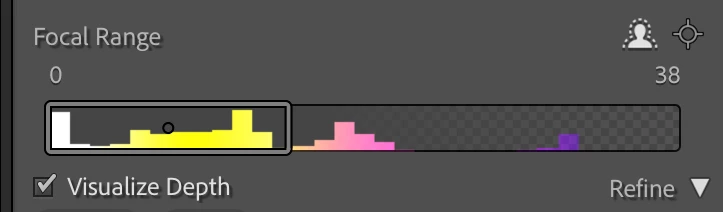
 

The histogram should change to match the currently display depth map.


Este tema ha sido cerrado para respuestas.

5 respuestas

johnrellis
Legend
December 14, 2023

I tested the bug recipe, and it now works correctly in LR 13.1.

Rikk Flohr_Photography
Community Manager
Community Manager
December 14, 2023

Greetings all,


Updates for the Adobe Photography Products have been released.  The December 2023 updates contain an update for this issue. 

If you do not see the update in your Creative Cloud Application, you can refresh it by hitting [Ctrl/Cmd]+[Alt/Opt]+[ R ].

Note: It may take up to 24 hours for your update to be available in your Creative Cloud app.


Thank you for your patience.

Rikk Flohr: Adobe Photography Org
Rikk Flohr_Photography
Community Manager
Community Manager
November 2, 2023

Assigning bug number - setting status

Rikk Flohr: Adobe Photography Org
C.Cella
Inspiring
November 2, 2023

Adding to this I find the Ui is not helping at all as there is no immediate way to tell whether or not the Device Depth is in use.

It is a find a waste of time having to click the 3 dots icon to discover what's is in use.


The following UI would have been clearer.


C.Cella
Inspiring
November 2, 2023

@johnrellis 

LrCC and ACR are actually refreshing the Depth Map representation but LrC is not.


LrCC has better UI than the other apps and clearly informs users about which Depth Mask is in use.


LrC is left behind as usual.


.


C.Cella
Inspiring
November 2, 2023

@johnrellis 


I am a bit confused here.


First of all the Device Depth is already in use/checked as I open the image.


Now if one Un-Applies/Deactivates lens blur then and then re-Applies the LrC Depth Map representation/histogram appears.


At this point the Device Depth Map is not ticked and must be chosen.


In any case there is no refresh of the Depth Mask/Map representation as we switch from Device Depth to LrC Depth so I confirm your bug.

.