

Matrix_mdt
Known Participant
October 30, 2022

P: (Mac) Memory Leak when syncing files with the cloud

  • October 30, 2022
  • 21 replies
  • 9350 views

Hallo zusammen,

seit der Version 12 (auch 12.01) scheint Lightroom den Programmspeicher immer weiter zu füllen, bis dieser überläuft.


Dabei arbeite ich nicht mal in Lightroom, sondern Lightroom läuft im Hintergrund und lädt lediglich die in der Cloud liegenden Fotos runter.
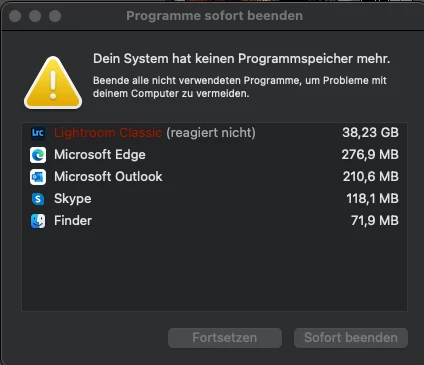
 

Technische Daten:


Lightroom: V12.01

Computer: MacBook Pro

Chip: Apple M1

RAM: 16GB

macOS: Ventura (13.0)

This topic has been closed for replies.

21 replies

Known Participant
April 17, 2023

I'm very sad to see that this problem thread has been running for months with no fix from Adobe. I considered rolling back my Lightroom Classic to v11.5. Since v12 came with a catalog update that would require many hours of work to recreate catalog entries made since the update. 

Ian Lyons
Community Expert
Community Expert
April 13, 2023

Thanks for merging the threads, Rikk. 

Rikk Flohr_Photography
Community Manager
Community Manager
April 13, 2023

Added missing bug report supplied by @Ian Lyons 

Rikk Flohr: Adobe Photography Org
Kristof Göttling
Participant
March 27, 2023

Great....
bin gerade von einer Reise zurück und muss beim synchronisieren von 5700 Fotos den gleichen Fehler feststellen... LRC läuft 3-4 Minuten, dann hängt es sich auf bzw. muss neu gestartet werden ("Lightroom Classic reagiert nicht").
Arbeite auf einem neuen MacBook Pro M1 Max mit 64gb. Das sollte ja normal bisschen was ab können, aber selbst das geht hier in die Knie. Klarer fall von Bug, der hoffentlich bald behoben wird.
So ist LRC in der Kombination mit Mobile nicht nutzbar 😞

DdeGannes
Community Expert
Community Expert
March 27, 2023

@Kristof Göttling , Just a thought here, if you are syncing 5700 raw image files from Adobe Creative Cloud Storage to LrC the original images will be downloaded to a folder on your Computer. From LrC you can decide wher that folder is located.

From my experience it takes between two to five seconds per image so the completion of the exercise will take several hours.

Make sure the folder you select for the storage of the downloaded images has sufficient storage space.

The speed of your internet connection will also impact on the exercise.


Regards, Denis: iMac 27” mid-2015, macOS 11.7.10 Big Sur; 2TB SSD, 24 GB Ram, GPU 2 GB; LrC 12.5,; Lr 6.5, PS 24.7,; ACR 15.5,; (also Laptop Win 11, ver 24H2, LrC 15.0.1, PS 27.0; ) Camera Oly OM-D E-M1.
Matrix_mdt
Known Participant
March 27, 2023

Hallo @DdeGannes , ja das ist allen hier bekannt. Der Bug, dass der Programmspeicher vollläuft (nicht die Festplatte), konnte von Adobe nachgestellt werden und soll mit einem der nächsten Updates behoben werden.

Matrix_mdt
Known Participant
March 27, 2023

Hallo zusammen,


nun hat Adobe das Problem als Bug eingestuft und teilt über den Support folgendes mit (Klarnamen wurden entfernt):


Speicherplatz voll (Die Photos von der LR zu der LR Classic importieren) 

Guten Tag,


vielen Dank, dass Sie sich an den Adobe Support gewandt haben, und ich bedanke mich für das angenehme Gespräch. Und natürlich,
vielen Dank für Ihre Geduld.

Wie wir im Chat miteinander besprochen haben, handelt es sich in diesem Fall um einen der Fehler (Bug), die wir lösen, und dieses Problem wird in zukünftigen Updates behoben.

Ich schließe Ihren Fall unter der Grundlage, dass die Informationen, die ich Ihnen erwähnt habe, soll Ihre Anfrage erfüllen.
Aber Sie können sich jederzeit wieder an den Kundendienst wenden, und wir werden das Gespräch gerne fortsetzen.

Vielen lieben Dank für Ihre Geduld und Ihre Verständnis im Voraus.

Ich wünsche Ihnen einen schönen Tag noch.


Danke für die Zusammenarbeit mit uns

Adobe-Kundendienst  

Participant
March 25, 2023

Habe das gleiche Problem mit eiem MAC Mini 2Pro mit 32 GB Speicher. Programm bricht immer wieder beim Syncronisieren ab. Die neue Version 12.2.1 funktioniert überhaupt nicht mit diesem Mac. Bin auf 12.1 zurückgegangen,.

Participant
March 12, 2023

Hier das gleiche Problem? Gibt es im März 23 wirklich immer noch keine Lösung?

Matrix_mdt
Known Participant
March 13, 2023

Nein, noch immer nicht. 


Ich habe mich nun an den Support direkt gewendet. Dort gibt es noch keine Lösung. Das Ticket wird nun an die Technik gesendet und ich soll vom technischen Support eine Nachricht bekommen. 
Werde mich melden, sollte es eine Lösung geben.

Participant
March 13, 2023

Super – danke Dir! Ich hab einen ganz ähnlichen Workflow wie du und so ist LR CC und LR Classic in Kombination leider nicht mehr nutzbar

Participant
January 16, 2023

Das gleiche Problem aktuell auch bei mir bei mir, wenn ich größere Mengen an Bildern über Lightroom Classic mit der Adobe Cloud synchronisiere. Nach einiger Zeit meldet Mac OS, dass der Programmspeicher voll ist und Lightroom Classic reagiert nicht mehr. Die Aktivitätsanzeige zeigt dann bis zu 100 GB verwendeten Swap Speicher an.


Gibt es inzwischen eine Lösung?


Mein System:

Macbook Pro mit M1 Pro Prozessor

32 GB RAM 

Mac OS Monterey 12.6.2

Lightroom Classic 12.1

Matrix_mdt
Known Participant
January 16, 2023

Hallo Christian,

nein leider noch nicht. Mittlerweile sind bereits mehrere Updates von Lightroom Classic rausgekommen. Der Fehler besteht aber weiterhin.

Participant
January 16, 2023

Danke für die Info. Liest Adobe denn hier überhaupt mit? Sprich, wird an der Lösung gearbeitet?

Participant
December 14, 2022

Apologies since I know it's farily difficult to debug from little information like this, but I think there is a memory leak in the latest Lightroom versions for Apple Silicon. After keeping the app open for awhile and going through my catelog, I notice the app gets extremely slow and starts to hitch really bad. Switching between pictures is a crawl and I'll occasionally see some visual artifacts while pictures try to load in. I've seen peak memory usage in excess of 16GB while when I first open the app, usage is only in the range of 6-8GB.
Let me know if there's any information I can provide to help reproduce the issue or retrieve logs.

Ian Lyons
Community Expert
Community Expert
December 14, 2022

The best thing you can provide at this point is your 'System Info'. You can obtain same from the LrC Help > System Info menu item.


Note that there's a Copy button at top right corner of the System Info panel. Press this , then paste the info into your next forum post. Also, note that your post may not appear for a while as the forum spam filters may kick in. So, best not trying to repost.

Participant
December 14, 2022

Sure thing, here's my system info:

Lightroom Classic version: 12.1 [ 202212072312-d7ab524b ]
License: Creative Cloud
Language setting: en-US
Operating system: Mac OS 13
Version: 13.0.1 [22A400]
Application architecture: arm64
Logical processor count: 10
Processor speed: NA
SqLite Version: 3.36.0
Built-in memory: 32,768.0 MB
Real memory available to Lightroom: 32,768.0 MB
Real memory used by Lightroom: 3,567.9 MB (10.8%)
Virtual memory used by Lightroom: 412,659.0 MB
Memory cache size: 288.9MB
Internal Camera Raw version: 15.1 [ 1329 ]
Maximum thread count used by Camera Raw: 5
Camera Raw SIMD optimization: SSE2
Camera Raw virtual memory: 1013MB / 16383MB (6%)
Camera Raw real memory: 1046MB / 32768MB (3%)
Standard Preview Size: 5120 pixels
Displays: 1) 3024x1964, 2) 5120x2880

Graphics Processor Info: 
Metal: Apple M1 Max
Init State: GPU for Export supported by default
User Preference: Auto

Application folder: /Applications/Adobe Lightroom Classic
Library Path: /Users/evanlissoos/Pictures/Lightroom/Lightroom Catalog-v12.lrcat
Settings Folder: /Users/evanlissoos/Library/Application Support/Adobe/Lightroom

Installed Plugins: 
1) AdobeStock
2) Aperture/iPhoto Importer Plug-in
3) DxO PureRAW 2
4) DxO PureRAW 2 Importer
5) Flickr
6) LRT Export 5
7) Nikon Tether Plugin

Config.lua flags: None
Participant
November 22, 2022

Habe aktuell das selbe Problem. Letzte Woche lief es noch ohne Probleme.

Gibt es schon Lösungen?

iMac M1

16GB

2TB

Genug Speicherplatz vorhanden, beim Synchronisieren läuft der RAM und der SWAP Voll, bis bei 50GB die Meldung kommt.

Matrix_mdt
Known Participant
November 22, 2022

Hallo, leider bis jetzt noch nicht.