

P: Preset works all the time with raw files but only some of the time with a JPG file
Lightroom 7.3 and osx 10.13.4
First, I would like to note that this is not the same as RAW and non-RAW specific presets. In this case the preset does work with both RAW and JPG files, just not consistently.
A preset in certain scenarios will work ALL the time with a RAW but only works SOME of the time with a JPG
Create a preset using the following method
Select photo and do a RESET so no settings are applied
Create a Preset called ZeroSaturation (I think this can be any slider)
Save the preset with ONLY Saturation selected 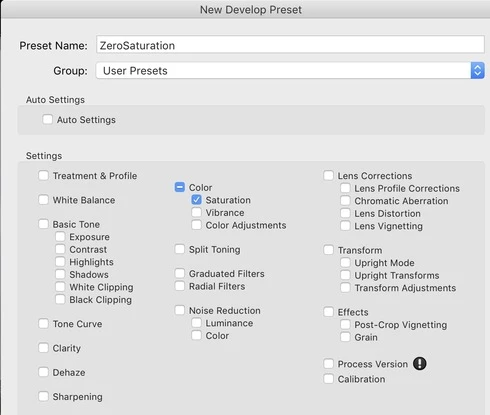
DO THE FOLLOWING WITH BOTH RAW AND JPG FILES
Select photo
Do a RESET
Apply a Saturation that is not Zero
Apply the ZeroSaturation Preset. (The Preset works with BOTH JPG and RAW)
Apply Dehaze
Apply Clarity
Select Dehaze
Apply the ZeroSaturation preset. (The Preset did NOT work the JPG)
History on RAW
As you can see the preset works all the time on the RAW. When you execute the preset on the Dehaze step the history is cleared above Dehaze and the preset is executed and registered as a history step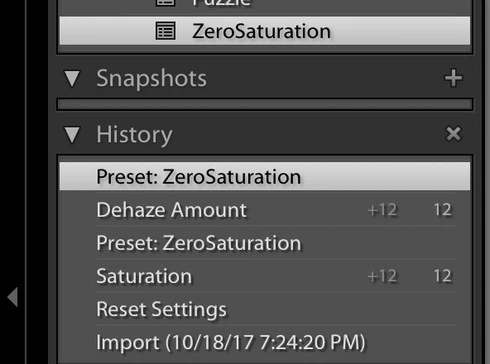
History on JPG.
As you can see the preset works on the JPG when the saturation is not zero but it does not not execute when the saturation is zero. When you select Dehaze and execute the preset the history above Dehaze is Not cleared and the preset is not registered in history. APPARENTLY NOTHING HAPPENS. 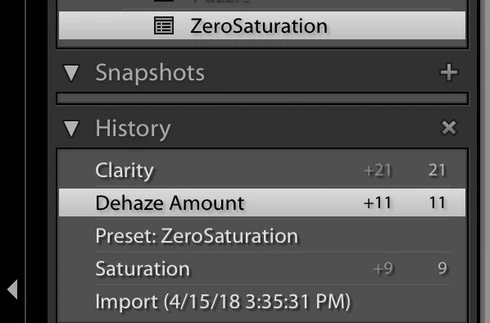
I realize Saturation is already ZERO and the preset is not needed but the the behavior should be the same for both JPG and RAW and the preset should execute and be registered in history when pressed.. The JPG behavior is very disconcerting to the user because NOTHING happens.
 AdChoices