

johnrellis
Genius
May 1, 2024

P: Set Tracklog Time Offset shows wrong starting time for tracklogs

  • May 1, 2024
  • 4 replies
  • 1834 views

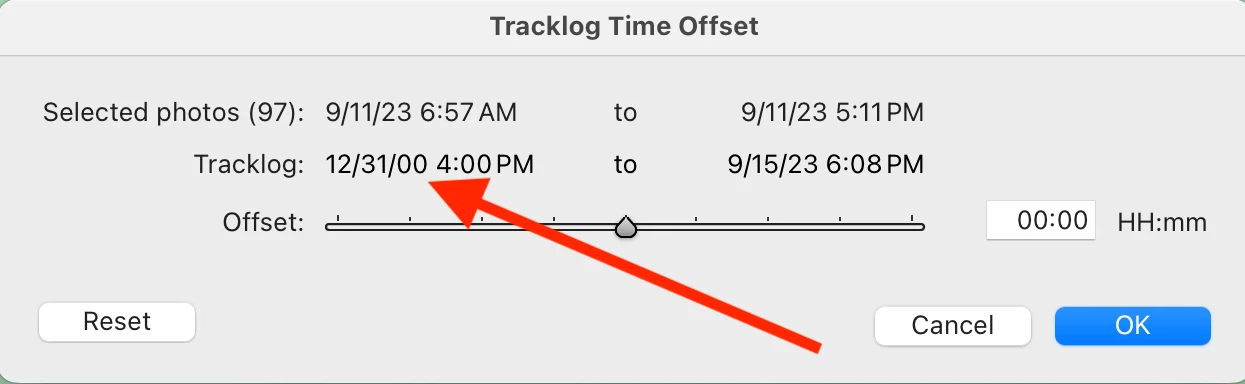
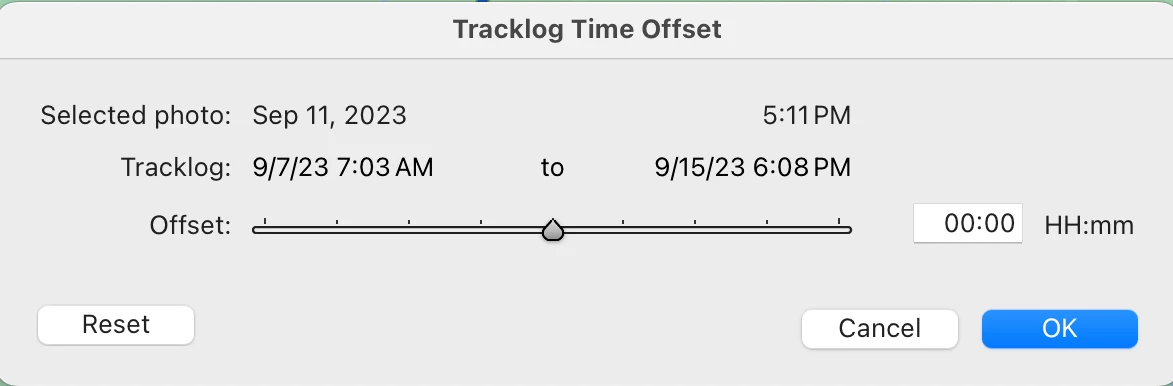
The Map module command Map > Tracklog > Set Tracklog Time Offset always shows the wrong starting date/time for a tracklog, 12/31/00 4:00 PM PST (which is represented internally as the number 0).  LR 13.1 and prior versions showed the correct starting date/time.  Tested on LR 13.2 / Mac OS 14.4.1.


For example, download this tracklog:

https://www.dropbox.com/scl/fi/j76cd3q3aavr3fz8hhnz4/Big-Lake-2023-Tracks.gpx.20234.05.04.zip?rlkey=ow8vsa0wn3bl1hfyo2pgk837l&dl=0


and load it into the Map module. Observe that in LR 13.2, the Set Tracklog Time Offset command displays the incorrect starting date/time:
 

But LR 13.1 displays the correct date/time:
 

This topic has been closed for replies.

4 replies

johnrellis
Genius
June 25, 2024

Very good. I verified it's fixed.

Rick Spaulding -
Legend
June 25, 2024

Greetings everyone,


Updates for the Adobe Photography Products have been released. The June 2024 updates contain an update for this issue.

If you do not see the update in your Creative Cloud Application, you can refresh it by hitting [Ctrl/Cmd]+[Alt/Opt]+[ R ].

Note: It may take up to 24 hours for your update to be available in your Creative Cloud app.


Thank you for your patience.

Inspiring
June 8, 2024

I thought until this bug report my recently recorded GPS tracks are damaged ...

Participant
May 1, 2024

In LR CC (Mac) the Map module no longer uses a user’s external tracklog file correctly to assign gps locations to photos.  This has worked correctly up thru version 13.1, but as of v.13.2 every tracklog is listed as starting 12/31/2000 (displayed using the Tracklog Time Offset window).  The Tracklog ending time remains correct, but the start time error results in Auto-Tag now doing wrong photo/gps assignments . 

    I’ve demo’d this with new albums using tracklogs from multiple GPSr’s for each album. It also appears with albums previously geotagged by LRCC where LRCC v13.1 displayed expected results, and upgrading to v13.2 generates the start-time error.  I’ve demo’d this with LRCC on two different Macs, Intel/Ventura and M1/Sonoma.

    My settings for ‘Apply During Import’ are for no metadata to be imported. 

    Using Friedl’s “Geoencoding Support” Plugin in LRCC works correctly with these same photos and tracklogs.

Eh?

    LRCC is ver 13.2 (202402141005-bflaeb84)

Participant
May 2, 2024

(This is in Lightroom Classic, not "LR CC", of course.  Oops, thanks for the edit.  Gotta stay current with the ephemera...)

johnrellis
Genius
May 2, 2024

[This post contains formatting and embedded images that don't appear in email. View the post in your Web browser.]


I also observe that the Set Tracklog Time Offset command displays the incorrect starting date of the track log in LR 13.2:


but not in LR 13.1:


However, in my LR 13.2 Auto-Tag continues to tag photos along the track log correctly.


To submit this as a bug, please upload a .gpx and .jpg showing the problem, i.e. that Auto-Tag doesn't properly tag the location of the .jpg.  If you rename the .gpx to have the .txt extension, then you can attach both the .gpx and the .jpg here.


Without an easy way to reproduce the full problem, Adobe won't pay much attention.