
Inspiring
June 15, 2013

P: Slideshow - Black screen

  • June 15, 2013
  • 49 replies
  • 873 views

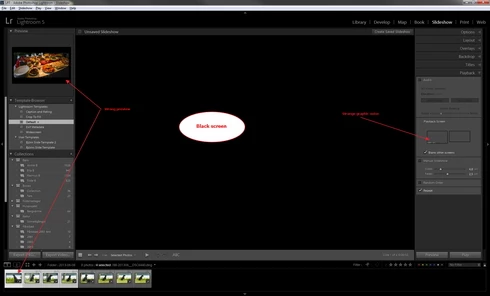
Entering Slideshow after selecting a few pictures gives me a black screen and a wrong preview, see atached picture. This happened after upgrade to LR5 earlier this week and was not a problem in any version of LR4. I have tried with both NEF and DNG files.The only thing working is Export to PDF.

I am running a Dell Studio XPS with Windows 7 64-bit and ATI 4850 graphic.
49 replies

Participating Frequently
January 17, 2016
No. Still an issue with up-to-date Lightroom CC 2015.3. Can't make slideshow work at all.
F. McLion
Community Expert
Community Expert
May 21, 2015
Has this been fixed in LR6?
--- Got your issue resolved? Please label the response as 'Correct Answer' to help your fellow community members find a solution to similar problems. ---
Inspiring
January 19, 2015
Windows 7 64bit, LT 5.7.
Slideshow problem still there, just a black screen on each slide's image. But shows my optional text / caption overlays (only) when I have that option turned on, so slides are advancing, rest of screen black.
Inspiring
January 10, 2015
My slideshow was working prior to the latest cc update to 5.7.1. Now I have this problem. System Win8.1 Pro X64 Intel(R) Core(TM) i5-2450M CPU @ 2.50GHz, 6GB RAM. No special characters in username.
Participating Frequently
November 17, 2014
Adobe sucks! Fix this problem or give me my $$ back. This is an unacceptable software glitch. Stop denying it and fix it! I to have no accent characters in my user name...Whatever that means. What user name? I purchased this software...there is no user name associated with this software.
Inspiring
November 16, 2014
I have the same problem also. One of the biggest reasons I puchased Lightroom 5 was to create Slideshows. I get a black screen every time.

There is no accented character in my username.

This is the thread in which Adobe mistakenly attributed the problem as happening with accented characters in usernames: https://forums.adobe.com/thread/12368...

ONE user commented that changing his username to remove the accented character seemed to solve the problem, and Adobe Staff responded to this comment but seemingly didn't read through every other comment prior to that one. (And seems to have ignored all comments afterwards too). There are many people with this issue and for the rest of us it has absolutely nothing to do with accented characters in usernames.

I've been playing around with all of my slideshow settings but nothing is working.
HELP!!!! I'm so disappointed that I spent all this money and can't use the program for my intended use. Really frustrating.
Inspiring
August 20, 2014
Get emotional? Describe how this topic makes me feel?

Frustrated! Swindled!
Participating Frequently
August 1, 2014
Upgraded to 5.6 today. Still no fix for black screen in the slide show module.
Participating Frequently
August 1, 2014
Same problem. Upgraded to 5.6 today. Still black screen!
bkahn0206
Participant
July 31, 2014
Update:
Just upgraded from Lightroom Mac 5.5 to 5.6.
Per my post above, creating an impromptu slideshow (CMD-Return) or using the Slideshow module produces either a completely black preview or a completely black full-screen slideshow.
While Adobe addressed other issues and bugs in Lightroom 5.x, they apparently did not address the slideshow functionality in this release, alas....