
Participating Frequently
February 1, 2017

P: Small text/UI in email dialog

  • February 1, 2017
  • 16 replies
  • 521 views

I've upgraded to a new Aspire V17 nitro 4K Ultra HD.
I've had trouble with small text in Lr CC (fully updated) on the Aspire.
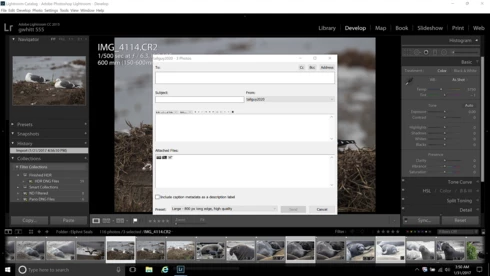
I got around some of the small font size using Windows 10 settings. But still a problem is in the dialog box that opens when emailing photos from Lr directly. The photos appear so tiny they're not discernible. The icons for setting text appearance in the  message area of the email are tiny as well and appears partially blocked out by the upper left portion of the box where text is written. Also the pointer actuated tools in Develop mode are tiny and barely discernable.  I hope I made that understandable enough. This is not a problem in my old Toshiba Satellite laptop that has Lr CC as well. Enclosed screen shot of the email dialog box.
This topic has been closed for replies.

16 replies

Participating Frequently
October 18, 2017

Hi Arjun,

Yes I am still dealing with this issue. I no longer think this problem is Lr specific. I find similar behavior in other areas.

When using the scroll wheel on the mouse. When I press the scroll wheel a circle with up and down arrows appears. I can control the speed the page scrolls up or down by moving the mouse or using the up and down arrows on the keyboard.

This "circle/icon" is significantly smaller than the one that appears on my other laptop.

I'd sure like a remedy. If nothing else a direction to go from here.

Anything you can do or suggest would be greatly appreciated.

Thank you, George.

arjunhaarith
Adobe Employee
Adobe Employee
October 17, 2017
Hi George,

Are you still facing this issue ?

Thanks,
Arjun
Participating Frequently
April 21, 2017

Hello Kanheiya,

I have already done just that. I have in fact, tried every font size available in preferences>interface with no changes.

Thank you. George.

Adobe Employee
April 19, 2017
Hi George,
Can you please change Preferences > Interface... Font Size in Lightroom to 250% and restart Lightroom?

-Kanheiya
Participating Frequently
April 19, 2017

Hello Jeffrey,

Both laptops have been updated to 2015.10. Old laptop is working as usual but I'm sorry to say the new laptop Acer V17 is still the same. I went back and forth between laptops for a while then learned to trust that the email d box will send it off. I'm just disappointed that after spending all the money for a sub to CC and a new laptop that a much used feature is substandard. Still waiting for a remedy.

I thank you for asking though.

Legend
April 18, 2017
Hi George, are you still seeing this issue in the current version (CC 2015.10)?
Participating Frequently
February 3, 2017
Thanks. I sure hope ya'll can figure it out and remedy this problem soon.
Legend
February 2, 2017
Thanks. Our engineers will look into this issue.
Participating Frequently
February 2, 2017

Current scaling level? Settings>Display>size of text, apps, and other items. 250% (recommended).

Advanced display settings>Resolution. 3840x2160 (recommended).

Control Panel>Display>change only the text size. All set at 9. Changing these had no effect on the email dialog box.

Lr font size. Automatic (default) 250% (current). I've changed this setting but no change visible. My Satellite setting is at Large and everything works fine.

Legend
February 1, 2017
There are two places to change the scaling of applications: The OS, and in Lightroom.

What is your current scaling setting at the OS level?

What is your current scaling setting under Preferences > Interface... Font Size?