

Exit
  • Global community
    • Language:
      • Deutsch
      • English
      • Español
      • Français
      • Português
  • 日本語コミュニティ
  • 한국 커뮤니티
1

P: Smart-collection Has Raw Details doesn't match raws with Denoise or Super Resolution

LEGEND ,
Jul 01, 2025 Jul 01, 2025

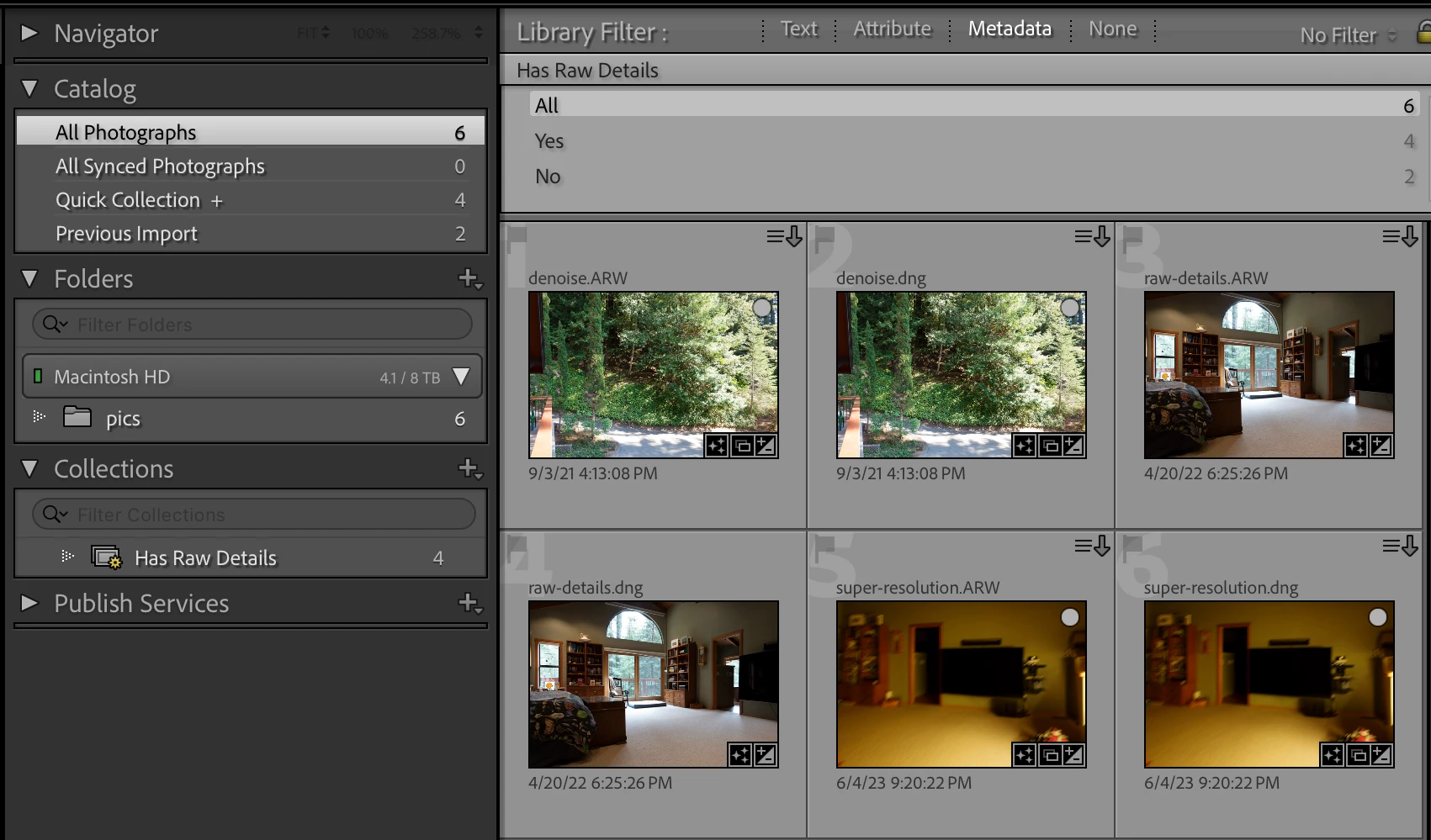
The smart-collection/filter criterion Has Raw Details doesn't match proprietary raw photos with Denoise or Super Resolution applied in LR 14.4, even though the Develop > Detail panel shows Raw Details checked, and even though Has Raw Details matches Denoise and Super Resolution DNGs created by LR 14.3.


To reproduce on LR 14.4 / Mac OS 15.5:


1. Download and open this catalog with six photos:

https://www.dropbox.com/scl/fi/nj7ogdzogvgsy5p0g0203/has-raw-details.2025-07-01.zip?rlkey=0lxlbxp1zn...


There are six perspicuously named photos: raw-details.arw, raw-details.dng, super-resolution.arw, super-resolution.dng, denoise.arw, denoise.dng. The DNGs were made by Enhance in LR 14.3, and the ARWs had the corresponding option applied in LR 14.4.


2. Observe that the Metadata > Detail panel shows Raw Details checked for all six photos (correct).


3. Observe that the smart collection Has Raw Details and the filter column Has Raw Details only match 4 photos, the three DNGs and raw-details.arw. They don't match denoise.arw and super-resolution.arw (incorrect).
 

johnrellis_3-1751436649362.png


Bug Fixed
TOPICS
macOS , Windows
306
Translate
Report
Community guidelines
Be kind and respectful, give credit to the original source of content, and search for duplicates before posting. Learn more
community guidelines

correct answers 1 Pinned Reply

Adobe Employee , Oct 28, 2025 Oct 28, 2025

Hello everyone,


An update for Adobe Photography products has been released as part of the MAX cycle. This update addresses the reported issue.


If you don’t see the update in your Creative Cloud app, refresh it using [Ctrl/Cmd] + [Alt/Opt] + [R].

Please note: It may take up to 24 hours for the update to appear.


Thank you for your continued patience.

Status Fixed
Translate
6 Comments
Adobe Employee ,
Jul 02, 2025 Jul 02, 2025

Hi @johnrellis


Thanks for sharing the details. I tried to reproduce the issue on my Windows machine, but wasn’t able to. I’ve shared this with the product team and am currently waiting for their response. Please allow me some time to get back to you.


Regards,

Srishti

Translate
Report
Adobe Employee ,
Jul 02, 2025 Jul 02, 2025

Thank you so much for your patience. We were able to reproduce the bug and have moved the discussion to the bug tracking section. The product team is looking into it now.

Translate
Report
LEGEND ,
Jul 02, 2025 Jul 02, 2025

[This post contains formatting and embedded images that don't appear in email. View the post in your Web browser.]


@Srishti Bali, I just verified the bug recipe on my Windows machine. Let me know if there's anything I can do to clarify the instructions.


Windows screenshots:

johnrellis_0-1751478201674.png


The Develop > Detail panel shows the photo denoise.arw has Denoise and Raw Details checked, but the smart collection and filter criterion Has Raw Details isn't matching it:

johnrellis_1-1751478436490.png


Whereas the Develop > Detail panel shows the photo denoise.dng has Denoise and Raw Details checked, and it does match the smart collection and filter criterion Has Raw Details:

johnrellis_2-1751478604171.png


Translate
Report
LEGEND ,
Jul 02, 2025 Jul 02, 2025

Thanks.

Translate
Report
Adobe Employee ,
Oct 28, 2025 Oct 28, 2025

Hello everyone,


An update for Adobe Photography products has been released as part of the MAX cycle. This update addresses the reported issue.


If you don’t see the update in your Creative Cloud app, refresh it using [Ctrl/Cmd] + [Alt/Opt] + [R].

Please note: It may take up to 24 hours for the update to appear.


Thank you for your continued patience.

Status Fixed
Translate
Report
LEGEND ,
Oct 28, 2025 Oct 28, 2025
LATEST

The new behavior in LR 15.0 makes logical sense. The filter and smart-collection criterion Has Raw Details was renamed to Has Raw Details Only, and it only matches a photo if it has Raw Details checked but not Denoise or Super Resolution.  (I verified this with the test catalog in the bug recipe.)

Translate
Report