
Known Participant
August 15, 2021

P: Special characters in folder locations causing troubles with catalogue

  • August 15, 2021
  • 4 replies
  • 717 views

Hi,

When trying to synchronize folders, Lightroom Classic treats differently folders having a special character (e.g., an a vowel with an accent).

For example, on the folder "Mickaël", all pictures are treated as missing, and need to be removed then reimported. See screenshot below:
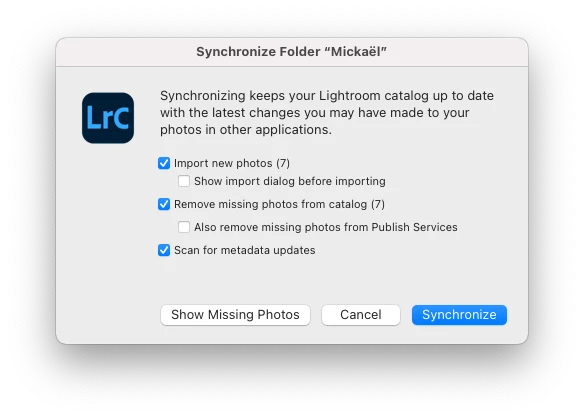
Conversely, folders without special characters are treated normally.
Note that this happens on all folders having special characters, which means around 12,000 photos are affected. Needless to say, I am not interested in doing a massive synchronization at this stage because of this problem.
 
I recently imported my catalogue from Lightroom 6 to Lightroom Classic CC.
My photos are stored on a Synology NAS and mounted as SMB remote folders.
 
Thanks
This topic has been closed for replies.

4 replies

johnrellis
Legend
April 2, 2024

I'm not able to reproduce this behavior in LR 13.2 on Mac or Windows.

Participant
April 7, 2023

I have a similar issue. Sometimes it fixes the problem when I copy the entire folder to another location, but not always. Renaming the folder is not a good idea in my case, as it leads to a total mess in Lightroom - two folders with similar names but different content (one is empty). Both of them point to the same folder on the disk, so you cannot delete the empty one or rename it.

Known Participant
August 21, 2021

Hi Rikk, rename in the Finder directly, you mean? Surprisingly, even in the folder panel still shows an exclamation mark, using the "Show in Finder" on any picture in the folder works. It means that the folder is correctly recognized, but there's somewhat a bug in the folder panel. So definitely a bug. Can we escalate that? 

Rikk Flohr_Photography
Community Manager
Community Manager
August 16, 2021

If you locate the folder in your folder's panel and rename it to a value without special characters - allow a moment and then rename it back to the original name, what happens?

Rikk Flohr: Adobe Photography Org