
Known Participant
June 22, 2013

P: thumbnails won't load correctly on import from "device" in LightRoom 5

  • June 22, 2013
  • 6 replies
  • 405 views

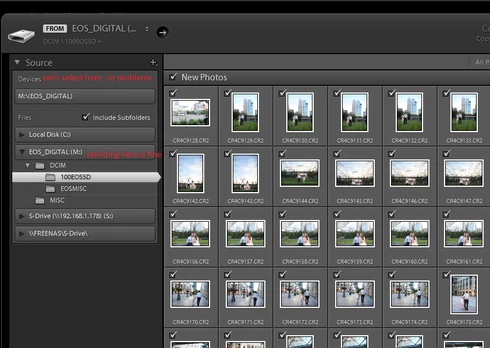
When importing photos into LR5 from a memory card if you choose to import from source: "device" the thumbnails will take extremely long to populate or will not populate at all.

However, if you navigate under the "files" section and choose your memory card the thumbnails populate correctly.

Clearly this is a bug!
This topic has been closed for replies.

6 replies

Participant
June 21, 2014
This Bug is still there, from Version 5.0 to 5.5
Wasn't there with 4.X on same WIN7 system.
Even the workaround doesn't work, in both ways each single preview thumbnail takes at least a second to build up.
Changed already my workflow due to this bug, but have to give a presentation on Lightroom were the import dialog is one important thing to understand for newbies.
But what would those potentially new customers think about LR if they see this sloooowiness in showing thumbnails?
Inspiring
April 24, 2014
How can I comment I don't know !!! Please help me now ..of course if repair it done ... I'll
Very happy Please...
Inspiring
April 24, 2014
Yes everything I need your help and please.
Inspiring
April 24, 2014
Hi all, I have this same issue on LR 5.4 now. it's a new install, new laptop and happens whether I have the default import location on import or I choose the card from the source drop down.
Adobe Employee
July 31, 2013
This has been fixed in the Release Candidate of Lightroom 5.2, available now at http://labs.adobe.com/technologies/li...
Pete.Green
Community Manager
July 16, 2013
Thanks Dan -- We're aware of this and working on a fix
Stay tuned.