Salir
  • Comunidad global
    • Idioma:
      • Deutsch
      • English
      • Español
      • Français
      • Português
  • 日本語コミュニティ
  • 한국 커뮤니티

P: Tips of point color dropper is wrong

Explorador ,
Oct 18, 2023 Oct 18, 2023

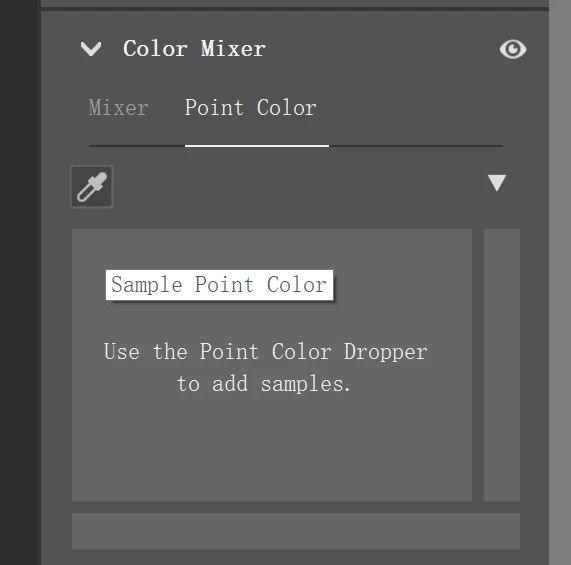
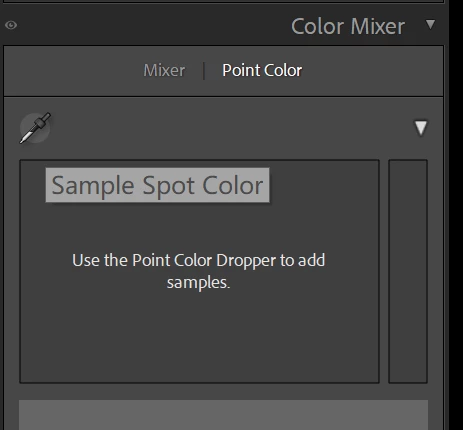
The tips should be "Sample Point Color", not "Sample Spot Color". And all the localization are wrong.

And the the notes in Chinese is still English, it is not localized 

This is LRC
Snipaste_2023-10-18_20-38-03.png


This is PS CR. It is correct.

Snipaste_2023-10-18_20-31-52.png

Error Corregido
TEMAS
macOS , Windows
1.7K
Traducir
Informe
Directrices de la comunidad
Sé amable y respetuoso, muestra títulos de crédito de la fuente de contenido original y busca duplicados antes de publicar. Más información
community guidelines

correct answers 2 respuestas fijadas

Empleado de Adobe , Oct 18, 2023 Oct 18, 2023

I've forwarded this to the localization team. Thank you for the report. 

Estado Investigando
Traducir
Empleado de Adobe , Dec 13, 2023 Dec 13, 2023

Greetings all,


Updates for the Adobe Photography Products have been released.  The December 2023 updates contain an update for this issue. 

If you do not see the update in your Creative Cloud Application, you can refresh it by hitting [Ctrl/Cmd]+[Alt/Opt]+[ R ].

Note: It may take up to 24 hours for your update to be available in your Creative Cloud app.


Thank you for your patience.

Estado Corregido
Traducir
3 Comentarios
Empleado de Adobe ,
Oct 18, 2023 Oct 18, 2023

I've forwarded this to the localization team. Thank you for the report. 

Rikk Flohr: Adobe Photography Org
Estado Investigando
Traducir
Informe
Colaborador ,
Oct 18, 2023 Oct 18, 2023

W polskim tłumaczeniu tez jest tam błąd

Jest "Próbka koloru dodatkowego" a pwoninno być "Próbka punktu koloru"

Traducir
Informe
Empleado de Adobe ,
Dec 13, 2023 Dec 13, 2023
MÁS RECIENTES

Greetings all,


Updates for the Adobe Photography Products have been released.  The December 2023 updates contain an update for this issue. 

If you do not see the update in your Creative Cloud Application, you can refresh it by hitting [Ctrl/Cmd]+[Alt/Opt]+[ R ].

Note: It may take up to 24 hours for your update to be available in your Creative Cloud app.


Thank you for your patience.

Rikk Flohr: Adobe Photography Org
Estado Corregido
Traducir
Informe