


Inspiring
October 18, 2022

P: Unable to view System info

  • October 18, 2022
  • 7 답변들
  • 2642 조회

Hi.

I just updated to Lightroom Classic 12.0, running it on Windows 10 x64 21H2 (same thing happens on Windows 11).

When I'm trying to view system info (Help > System Info...) LrC gives error message:
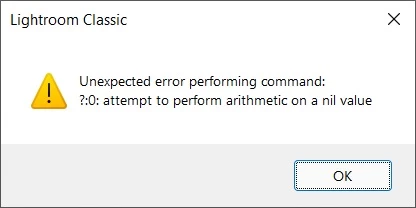
So it is unable to view system information, which is frequently reqested by support or here on forums.

Please fix this.

Thank you.

이 주제는 답변이 닫혔습니다.

7 답변

johnrellis
Genius
October 28, 2022

Great, it's a "small" issue but it will help me help others troubleshooting on Windows.

Rikk Flohr_Photography
Community Manager
Community Manager
October 28, 2022

Lightroom 12.0.1 was released today and contains a fix for this issue. Please refresh your Adobe Creative Cloud App ([Ctrl/Cmd]+[Alt/Opt]+[ R ]) and download the updated version.


Thank you for your patience. 

Rikk Flohr: Adobe Photography Org
johnrellis
Genius
October 19, 2022

On my main Windows 10 / LR 12.0, similar output:


FSt0p작성자
Inspiring
October 19, 2022

Can you please run my script?
It's interesting to see what it will show on your systems.

johnrellis
Genius
October 19, 2022

On my Windows VMs, the OpenGL devices reported by Photoshop's Help > System Info show VRAM: 0 MB -- perhaps LR 12's System Info is getting confused by these devices:

  Start platform OpenGL
    # displays:                   1
    Display 0
      Display:                      \\.\DISPLAY1
      Main:                         TRUE
      Built in:                     FALSE
      Stereo:                       FALSE
      Bounds:                       (0, 0) -> (2,048, 1,152)
      Dimensions:                   (2,048 1,152)
      Physical size:                (0 0)
      Pixel size:                   (0 0)
      Dynamic range:                (0 1)
      Potential dynamic range:      (0 1)
      Reference dynamic range:      (0 0)
      Attached Device:              (DeviceID name=Parallels using AMD Radeon Pro Vega 20 OpenGL Engine (Compat) index=0 preferred=1)
    
    # devices:                    1
    Device 0
      Name:                         Parallels using AMD Radeon Pro Vega 20 OpenGL Engine (Compat)
      Preferred:                    TRUE
      Power Envelope:               INTEGRATED
      Attachment:                   UNKNOWN
      # attached displays:          1
        \\.\DISPLAY1
      GPU accessible RAM:                8,589 MB
      VRAM:                                  0 MB
      Dedicated System RAM:                  0 MB
      Shared System RAM:                 8,589 MB
      API version:                  3.3 (3.3 ATI-4.8.101)
      Device version:               3.3 (3.3 ATI-4.8.101)
      Vendor name:                  AMD
      Driver date:                  2022-05-30  000000.000000-000
      Driver age:                   5 months
      Driver version:               17.1.4.51567
      GLSL version:                 3.30 (3.30)
  End platform OpenGL
FSt0p작성자
Inspiring
October 19, 2022

@Rikk Flohr: Photography 

So I've debugged this a bit a here is what I've found.

The issue is with AgImageIO.gpuVRAMTotalBytes() - on my systems it returns nil

Lightroom then tries to convert returned value (nil) to megabytes by dividing by 1024*1024 which leads to formentioned error.

Here is how to check:

use my small script to test

-- Copy this script to %APPDATA%\Adobe\Lightroom\Scripts

-- Main code
local LrDialogs = import("LrDialogs")
local AgImageIO = import("AgImageIO")
local AgGCCache = import("AgGCCache")
local AgSystemInfo = import("AgSystemInfo")

-- Show dialog with message
LrDialogs.message(
	"Debug",
    "System info:"..
	"\nmemSize="..tostring(AgSystemInfo.memSize() or "nil")..
    "\nusableAddressSpace="..tostring(AgSystemInfo.usableAddressSpace() or "nil")..
    "\ntotalCachedSize="..tostring(AgGCCache.main:totalCachedSize() or "nil")..
    "\ngpuVRAMTotalBytes="..tostring(AgImageIO.gpuVRAMTotalBytes() or "nil"),
	"info"
)

Copy all this code and save it to file Debug.lua
Then navigate to %APPDATA%\Adobe\Lightroom and create folder named "Scripts" there if it does not exist.

Put Debug.lua into this folder (%APPDATA%\Adobe\Lightroom\Scripts)

Then restart Lightroom, in the main menu select Scripts>Debug - it will show message box with some info.

On my system I get this:


Why AgImageIO.gpuVRAMTotalBytes() returns nil I don't know, debug info is stripped and it's hard to debug...

GoldingD
Legend
October 18, 2022

Another member has this problem:

https://community.adobe.com/t5/lightroom-classic-discussions/nvidia-error-message/m-p/13276814#M293890

mind you, that is not what the members posting is on, bu as you sated, other members will ask for Sys Info, and that is a problem in is own.


Sounds like a BUG.

Rikk Flohr_Photography
Community Manager
Community Manager
October 18, 2022

I've tried two Windows Systems in my office and neither reports this message. 
Can you reproduce @GoldingD ?

Rikk Flohr: Adobe Photography Org
GoldingD
Legend
October 18, 2022

I do not have this problem, the Op of the above post, and the author of the post I linked have the issue.

OP has WIN 11, Author of the other post, did not state, my rig WIN 10.