
Known Participant
August 13, 2025

P: v14.5 Lightroom has encountered problems reading this photo | Round circle ‘!’ warning on Images

  • August 13, 2025
  • 80 replies
  • 7430 views

OS: Windows 11
LrC VERSION: 14.5

A couple of days ago I upgrade to v14.5.
As for every update, I regurlay empty cache, optimise catalog, remove all previews and generate new standard ones (also, I wanted to test how was was the new option to use GPU for generating previews).
Never had a problem with this workflow.
After previews generation process was completed (1h 30m for 29.000 files, 23.000 jpegs and 6.000 raws) I got an error: for 21 RAWs the preview could not be generated. Looking in the catalog at those files, I realised they have an exclamation mark on a dark circle: this is not the missing photo mark. If I click on the exclamation mark, I see error "Lightroom has encountered problems reading this photo, you are not allowed to edit this image. "

Yet, I can still enter develop module and edit the photos without any problem: the editing history is there, I can zoom in at 100% (generating the 1:1 preview), I can change sliders, export... Everything... (PS: I do not use smart previews).


The 21 problematic photos are in different folders and have different dates.
The files can be opened by any other program, including Fast raw Viewer.

For a couple of problematic photos, I tried deleting the photos from file explorer, and the square light missing photo question mark replaced the round dark question mark.
I restored the files from three sources:
1- the original file
2- a backup from a second HD
3- a backup from Amazon Photos


In all three cases above the black round exclamation mark came back: this should prove that it's not a problem of corrupted files, I instead believe it's an issue in LrC.
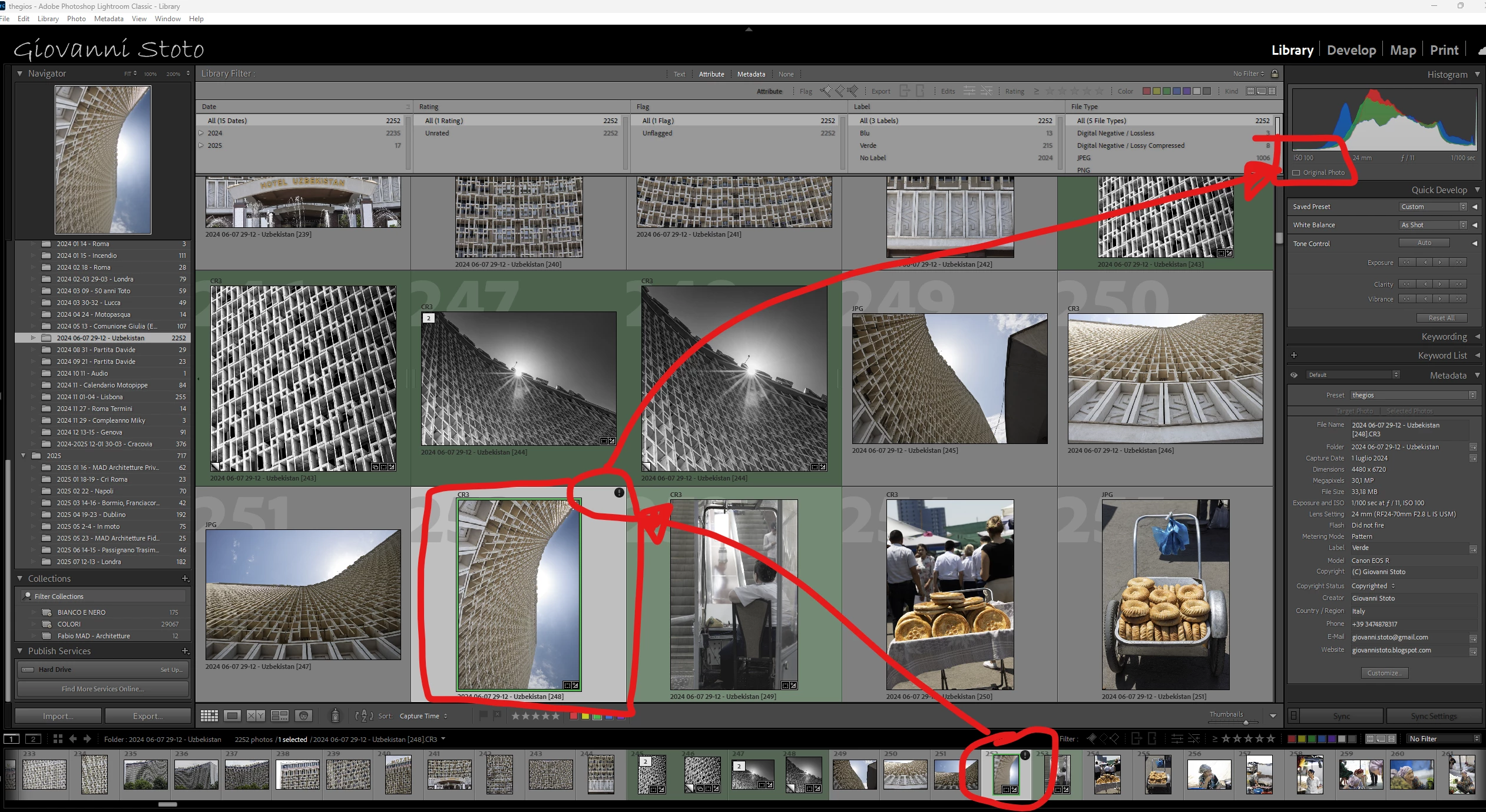
80 replies

Participating Frequently
September 27, 2025

I was having this bug and today I tried to do one of those problematic masks and it didn't happen. Maybe they fixed something in their end that didn't require an software update? Try it and let us know if the problem persists for you.

Known Participant
September 27, 2025

@Sameer K it's been over a month since I reported this bug for the very first time.


First of all, it took days to persuade Adobe this was a bug, even if I explicitly said that it is my profession and I'm used to distinguishing between a misconfiguration and a bug.


Second, it's been at least 3 weeks since the bug has been acknowledged by Adobe. Now, acknowledging a bug doesn't mean you know how to solve it, which I start doubting.


Since we are paying money for a broken software, and we have been paying for years, the least you can do is to update us and to provide an ETA for this fix.


Thx

jm68902488
Known Participant
September 27, 2025
Yes totally agree and unfortunately the way Adobe takes their sweet time to
fix something after taking weeks denying it is their problem and throwing
the blame everywhere else.
Participant
September 21, 2025

@Sameer K -- Any updates on when this bug fix will reach public release?

Sameer K
Community Manager
Community Manager
September 23, 2025

Hey, @scottsinger. We currently don't have a specific timeline to share. We'll update this thread when a fix is available. 

Thanks for your patience. 
Sameer K

Known Participant
September 18, 2025

Just confirming that I have that same issue, starting with LRC Vs. 14.5.1. I can edit these normally, but often the thumbnails shows the imported file, but the E and Dvlp views show the edited version. No limitation on editing, it's clearly a glitch. 

Participant
September 15, 2025

Ola boa Noite pessoal, gostaria de uma ajuda pf, o meu Lightroom, começou a dar uns erros que nao havia visto, eu estava iniciando nas edicoes e comecou a aparecer ( Erro Desconhecido ) em cima das fotos, e em alguns momentos quando sincronizava algumas fotos aparece um ponto de  exclamaçao com a seguinte mensagem ( Problema ao ler essa foto ) ja tentei desativar o drive de video, ja tentei voltar para atualizacoes antigas e ate mesmo atualizar pra mais recente.

AxelMatt
Community Expert
Community Expert
September 16, 2025

Try resetting the preferences of Lightroom Classic:  How to reset Lightroom Classic preferences (adobe.com)

It's recommended to backup your preferences before you reset the preferences to the default settings: 

https://helpx.adobe.com/lightroom-classic/kb/preference-file-and-other-file-locations.html


Check if your system is up-to-date. Do you have installed all recent updates and patches for the operating system and the device drivers, especially the graphic driver? If you have a NVidia graphic card installed, make sure that you are using the recent Studio version of the driver, not the Game Ready version.


Please provide a copy of your 'System Info'. This can be get from the LrC Help > System Info menu item. There's a copy button in the System Info dialog. Press this button and paste the info into your next forum post.


My System: Intel i7-8700K - 64GB RAM - NVidia Geforce RTX 3060 - Windows 11 Pro 25H2 -- LR-Classic 15 - Photoshop 27 - Nik Collection 8 - PureRAW 6 - Topaz Photo AI
Known Participant
September 12, 2025

@Sameer K this is very good news.

As both a photographer and a computer engineer, out of curiosity, may I know what the issue was? 😀

Sameer K
Community Manager
Community Manager
September 12, 2025

I appreciate your curiosity. As far as I can say, the issue ties back to the preview rendering pipeline via Camera Raw engine embedded in Lightroom Classic.


Thanks! 
Sameer K
(Type '@' and type my name to mention me when you reply)

Known Participant
September 12, 2025

@dj_paige please stop suggesting this exclamation mark means corrupted. Yes, in general this means corrupted but it is obvious by what @Anshul_Saini has clearly stated (thanks to me being the first to report this issue, after exchanging many logs and screen recordings and photo samples) THIS IS A BUG IN THE NEW 14.5 VERSION IF LrC.


Please @Anshul_Saini I believe this thread should be kept on topic: people who randomly get on very few images the exclamation mark on dark circle due to a combination of two things:

1. A brush in a mask (not all brushes, though)

2. GPU enables for preview


By removing either one, the ! disappears.


By the way, the images showing the ! ARE NOT actually corrupted: you can keep on editing them.


This thread is becoming a mess...


@Anshul_Saini is there any news from the development team? Thanks for your support.

Sameer K
Community Manager
Community Manager
September 12, 2025

Hey, @Giovanni Stoto. The team has identified the issue and the fix will be released soon. We will announce a fix as soon as it is out. 


Thanks!

Sameer K
(Type '@' and type my name to mention me when you reply)

dj_paige
Legend
September 9, 2025

@Sarah_Kanable5742 

Yes, this is the exclamation point you get when your file is corrupted. Please try restoring a backup of the file, as I suggested earlier.


Although it might be a bug as well, Adobe is investigating.

Gary Duan
Participant
September 9, 2025

I am using the lastest version of Lightroom classic 14.5.1. Started recently, some photos start showing "lightroom has encountered problems reading this photo" icon and message. It seems that photos with more editing steps/history are more likely to have this issue.


I searched the forum. They all said that disk might be the cause, but it cannot explain why it only happens on a few pictures and pictures of more editing steps.


Plus, although the message indicates that I "will not be able to make adjustments to this photo", in fact, I still can edit and export the photo. The preview might have the issue sometimes so it is annoying.


I wonder if this is a known issue.

Participant
September 8, 2025

I was editing photos on Sept 1st and didn't finish so I was working on them on Sept 5th and kept getting an exclamation point on my photos that I tried adding a mask and typically the mask wouldn't even do anything. 


If I tried the mask first and then add a preset, it would add the exclamation point to the photo.


I noticed that LRC recently updated to 14.5.1 so I tried going back 1 and 2 versions but that didn't help.  


I tried using default masks incase the ones I purchased got corrupted and still have the issue.


Anyone know what could be happening?

Community Manager
September 8, 2025

Hi @Sarah_Kanable5742, welcome to the community!


Could you share a bit more about the type of masks you're creating? Are they AI masks? If you can include a screenshot of what you're seeing on your end, that would be super helpful.


If this issue pops up when using AI masks and Lightroom Classic keeps asking you to update them, there’s a quick fix you can try. With the app closed, head to your catalog’s folder and move the .lrcat-data file out of it. Lightroom Classic will regenerate that file the next time you launch it. Since that file stores AI mask data, this can often clear up the issue. Once it’s regenerated, try updating the masks again and see if the prompt still appears.

Let me know how it goes or if you have any questions!

Alek

*(If you mention me with an @, like @Aleke, I’ll get a notification and can respond faster.)*