

johnrellis
Legend
October 31, 2016

P: View > Sort > Last Comment Time incorrectly greyed out

  • October 31, 2016
  • 15 replies
  • 1040 views

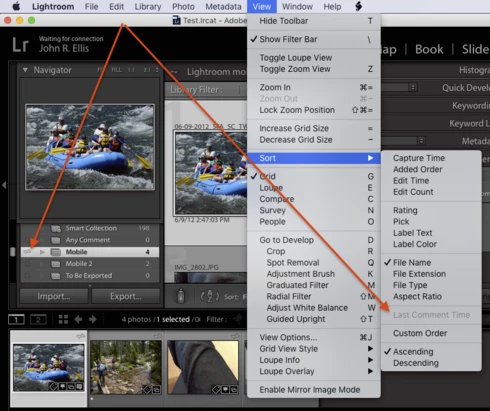
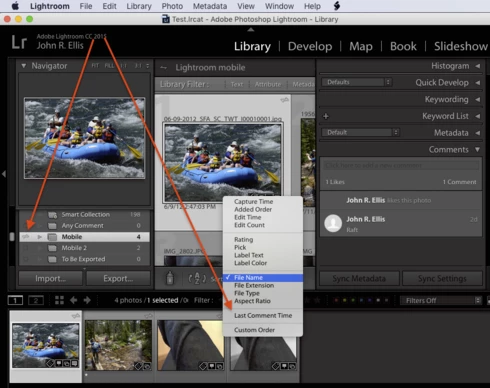
The View > Sort > Last Comment Time is incorrectly greyed out for a synced collection, though I'm able to select Sort: Last Comment Time in the bottom tool bar.  (LR CC 2015.7 / OS X 10.11.5.)

Screenshot showing View > Sort > Last Comment TIme incorrectly greyed out:

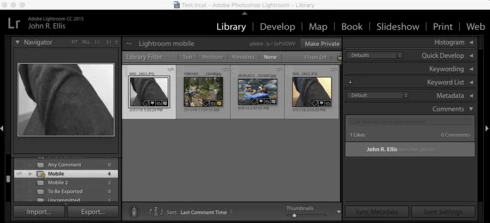
Screenshots showing the tool bar's Sort: Last Comment Time working:
15 replies

Participating Frequently
May 10, 2023

I am trying to sort comments bu using this feature.  Can anyone tell me why the "Last Comment Time" s grayed-out in Sort?  

Jim Wilde
Community Expert
Community Expert
May 10, 2023

That looks like a bug to me. Instead of using the View menu, try using the sort order on the toolbar to select Last Comment Time, that should work correctly.


Sean McCormack
Community Expert
Community Expert
May 10, 2023

You may have to click on 'Review Comments' via the yellow dialog box on the collection first. 

For me with a huge catalog (675k) Lightroom can take a while to update collections sync info, so sometimes I just have to wait a little. 


Sean McCormack. Author of 'Essential Development 3'. Magazine Writer. Former Official Fuji X-Photographer.
Inspiring
June 4, 2018
I had the same issue and this was the first result from a Google search.
For anyone else finding this you can still sort by last comment by going to:
Library -> Review Comments
johnrellis
Legend
February 1, 2017
"Why isn't likes and comments a Smart Collection?"

I see that you already voted on that topic, good: https://feedback.photoshop.com/photoshop_family/topics/lightroom-better-support-for-comments-and-lik...
Inspiring
February 1, 2017
I'm having that greyed out menu item as well. The bottom tool bar does work.

Why isn't likes and comments a Smart Collection?
johnrellis
Legend
November 3, 2016
That's too bad you couldn't get it to work.  But at least we have two concrete, reproducible bug reports filed.
Participating Frequently
November 2, 2016
I give up, the reset not worked, then I decided lost all comments that I have, and use the option to delete all data  in Lightroom Mobile, this work out.

I lost the olds comment, but all working again

Tanks for help
Participating Frequently
November 2, 2016
I will try Reseting the preferences
Participating Frequently
November 2, 2016
The option View > View Options > Thumbnail Badges was checked. I had created a new collection with photos that hadn't been edited. 

Now, I edit some.

johnrellis
Legend
November 2, 2016
Those screenshots should be very helpful to Adobe. 

Regarding the lack of the comment badge in the lower-left corner of the thumbnails, it looks like all badges are missing, including the badge that indicates a photo is in a collection.   Verify that the option View > View Options > Thumbnail Badges is checked:


If that doesn't help, try resetting LR's preferences: http://www.lightroomforums.net/showthread.php?25197-Resetting-the-lightroom-preferences-file-updated. LR sometimes soils its preferences, causing the user interface to go weird, and resetting often fixes things.
Participating Frequently
November 2, 2016