


Salir
  • Comunidad global
    • Idioma:
      • Deutsch
      • English
      • Español
      • Français
      • Português
  • 日本語コミュニティ
  • 한국 커뮤니티

P: Custom pages in book module overlaps in selection dialog

Explorador ,
Feb 13, 2025 Feb 13, 2025

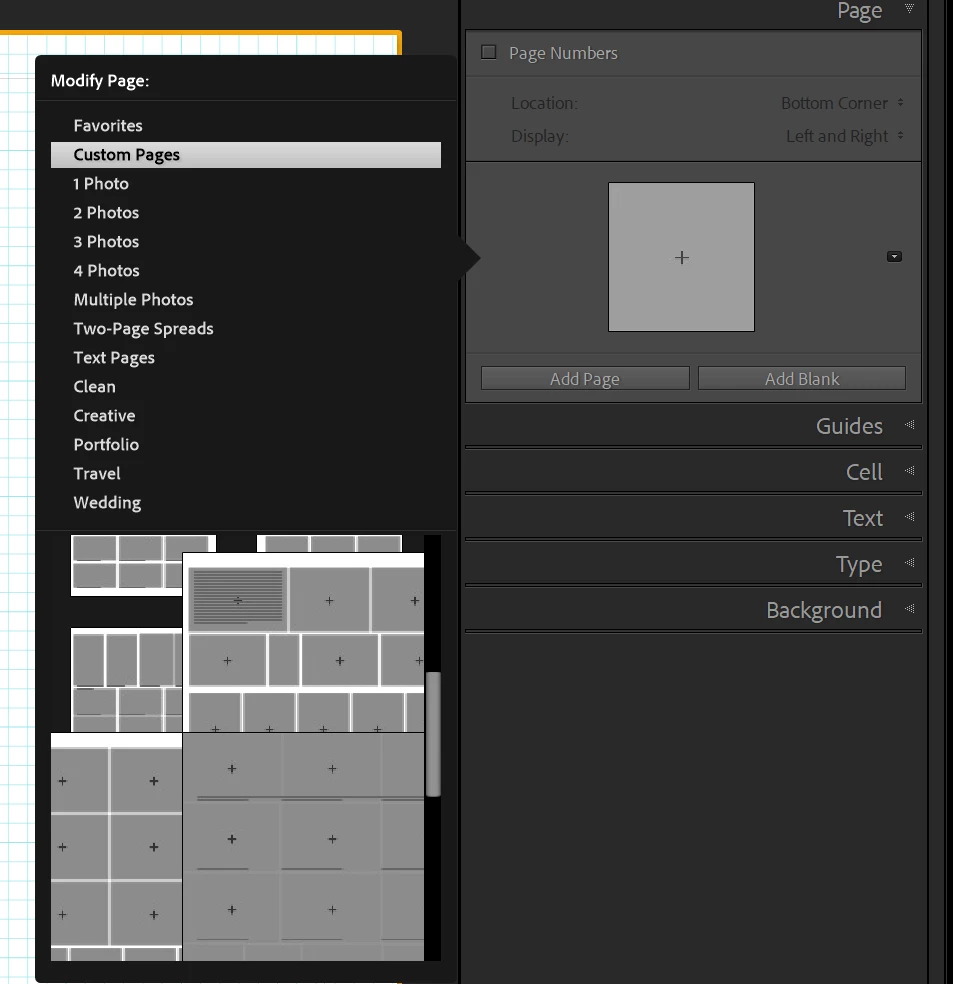
I have created customs pages in the book module and some of them overlaps so they are very difficult to see and select. Is there any trick to fix this or is it a bug? I have tried with different font sizes in the application prefs but not difference, now I use the default Automatic setting.

I find now way to expand the page selection dialog.

Here an example.
stenp_0-1739455421662.png

Cheers

Sten Palmqvist

Error Corregido
TEMAS
Windows
939
Traducir
Informe
Directrices de la comunidad
Sé amable y respetuoso, muestra títulos de crédito de la fuente de contenido original y busca duplicados antes de publicar. Más información
community guidelines

correct answers 1 respuesta fijada

Empleado de Adobe , Feb 17, 2025 Feb 17, 2025

(Windows only) It looks like this has been around a couple of versions (was present in 14.1.1 also). We've opened a ticket for this. 

Thank you for your report. 

Estado Investigando
Traducir
10 Comentarios
Community Expert ,
Feb 13, 2025 Feb 13, 2025

Weird.!  I doubt it is a "bug" as I see Custom Pages as expected with the scroll bar-  (No overlap as your screen-clip shows, and multi-cell pages show OK )

2025-02-14 11_38_18-Lightroom.jpg   2025-02-14 11_49_51-.jpg

First try a Reset of the Preferences file- It often fixes unusual problems.

PREFERENCES RESET (Lr Queen)

Or try removing some of the problem page templates [Right Click] > [Remove from Custom Pages]


Regards. My System: Windows-11, Lightroom-Classic 15.1, Photoshop 27.2, ACR 18.1.1, Lightroom 9.1, Lr-iOS 10.4.0, Bridge 16.0.1 .
Traducir
Informe
Explorador ,
Feb 14, 2025 Feb 14, 2025

Thanks for your help and suggestions, I have tested them.

Preferences reset did not help, Custom Pages where not affected and still the same problem.

Removing from Custom Pages does not help, as soon as I add a page to Custom Pages it will appear in the same large size in the selection dialog.

I have also tried to add the Custom Page to Favorites so Favorites only contain one Custom Page but it is still displayed in the same large way and adding another Custom Page to Favorites overlaps the first one.

Traducir
Informe
Explorador ,
Feb 14, 2025 Feb 14, 2025

To reset preferences was a dangerous advice. Even though I made a copy of the whole Lightroom settings folder and restored it, all my color labels disappeared, who knows what else is gone. As I am working on a book I have made several pages in the book before noticing this so it is not really an option to restore a backup of the catalog.

I am not happy.

Traducir
Informe
Community Expert ,
Feb 14, 2025 Feb 14, 2025

So sorry to hear you lost color labels.  Co-incidently I just upgraded to LrC v14.2 and all my color labels seemed to disappear in my master catalog, but this apparently was a temporary thing until extreme disk activity ceased and color labels re-appeared.

Also I just did a Preferences reset and my user-defined Color Label Sets did not disappear- Look in the top menu Metadata > Color Label Set >

You also mention "a copy of the whole Lightroom settings folder"-

{C:\Users\{YourName}\AppData\Roaming\Adobe\CameraRaw\Settings}  - does not contain the Preferences file.

Preferences are to be found at- {C:\Users\{YourName}\AppData\Roaming\Adobe\Lightroom\Preferences}  - unless you have set preferences to store with the catalog.


I must admit that the 'Preferences Reset' link I gave above should state the following quote right at the very top of the article-

"* Moving or renaming that preferences file, rather than deleting it, means you can put it back if it doesn’t solve the problem, to save you recreating your preferences again."


I don't have an answer for your errant custom page templates, sorry, but keep this question going with more posts, or make another under the "Bug" category.


Regards. My System: Windows-11, Lightroom-Classic 15.1, Photoshop 27.2, ACR 18.1.1, Lightroom 9.1, Lr-iOS 10.4.0, Bridge 16.0.1 .
Traducir
Informe
Explorador ,
Feb 15, 2025 Feb 15, 2025

Thank you for your extensive answer that surely explain why the color labels disappeared as I had also a automatic update to 14.2. I am sorry I was a bit too harsh in my comment, I really appreciate every effort to help.


I have an idea that my setup contains books created with different sizes and that might confuse the system. Will try to test with a new empty catalog and cleared settings. After that test I will probably file a bug report.


Thanks again.

Traducir
Informe
Community Expert ,
Feb 15, 2025 Feb 15, 2025

FYI Re: "books created with different size"-  Custom Page templates are specific to one Book size.  eg. Custom pages in a 'Portrait' book will not be available in a 'Landscape' book. Custom page templates should only appear in the Book size for which they were created.


Regards. My System: Windows-11, Lightroom-Classic 15.1, Photoshop 27.2, ACR 18.1.1, Lightroom 9.1, Lr-iOS 10.4.0, Bridge 16.0.1 .
Traducir
Informe
Explorador ,
Feb 15, 2025 Feb 15, 2025

Thank you for this info. Then it should not be a problem with different book sizes.

Traducir
Informe
Empleado de Adobe ,
Feb 17, 2025 Feb 17, 2025

(Windows only) It looks like this has been around a couple of versions (was present in 14.1.1 also). We've opened a ticket for this. 

Thank you for your report. 

Rikk Flohr: Adobe Photography Org
Estado Investigando
Traducir
Informe
Explorador ,
Feb 17, 2025 Feb 17, 2025

Great news!

Traducir
Informe
Empleado de Adobe ,
Aug 12, 2025 Aug 12, 2025
MÁS RECIENTES

Greetings all, 


A new update for the Adobe Photography products has been released.  The August update contains an update regarding this issue. 

If you do not see the update in your Creative Cloud Application, you can refresh it by pressing  [Ctrl/Cmd]+[Alt/Opt]+[ R ].

Note: It may take up to 24 hours for your update to be available in your Creative Cloud app.


Thank you for being so patient. 

Rikk Flohr: Adobe Photography Org
Estado Corregido
Traducir
Informe