



Copy link to clipboard
Copied
Hello,
I recently started taking night sky pictures and starting looking online to find out the best way to edit them. In almost every single article they say to use the Dehaze slider, however I do not have this option in the Basic Panel or Effects Panel. Do I have to add this? I updated Lightroom last night but I still do not have the Dehaze option.
Thanks in advance for the help!


 1 Correct answer


mitchellp95567772 wrote
Lightroom version: CC 2015 [1014445]
License: Creative Cloud
Operating system: Windows 8.1 Home Premium Edition
Version: 6.3 [9600]
6.3 is the operating system version number.
You have Lightroom CC 2015, which doesn't have Dehaze, it was added in CC 2015.1.
I would normally advise you to update to the current version, which is Lightroom Classic 8.3.1, but version 8 is not supported on Windows 8, you need to upgrade your OS to Windows 10 to use it.
The latest (and final) version
...
 18
Replies
18
18
Replies
18


Copy link to clipboard
Copied
If you updated to 8.3.1, it's in the Basic panel.


Copy link to clipboard
Copied
mitchellp95567772 wrote
Hello,
I recently started taking night sky pictures and starting looking online to find out the best way to edit them. In almost every single article they say to use the Dehaze slider, however I do not have this option in the Basic Panel or Effects Panel. Do I have to add this? I updated Lightroom last night but I still do not have the Dehaze option.
Thanks in advance for the help!
What version of Lightroom do you use? Dehaze is not available in Lightroom 6 or earlier.
Copy link to clipboard
Copied
Hello, I am using Version 6.3. Please see below:
Lightroom version: CC 2015 [1014445]
License: Creative Cloud
Operating system: Windows 8.1 Home Premium Edition
Version: 6.3 [9600]
Application architecture: x64
System architecture: x64
Logical processor count: 8
Processor speed: 2.5 GHz
Built-in memory: 16236.1 MB
Real memory available to Lightroom: 16236.1 MB
Real memory used by Lightroom: 983.8 MB (6.0%)
Virtual memory used by Lightroom: 990.0 MB
Memory cache size: 307.8 MB
Maximum thread count used by Camera Raw: 4
Camera Raw SIMD optimization: SSE2,AVX,AVX2
System DPI setting: 144 DPI (high DPI mode)
Desktop composition enabled: Yes
Displays: 1) 1920x1080
Input types: Multitouch: No, Integrated touch: No, Integrated pen: No, External touch: No, External pen: No, Keyboard: No
Graphics Processor Info:
Intel(R) HD Graphics 530
Check OpenGL support: Passed
Vendor: Intel
Version: 3.3.0 - Build 21.20.16.4627
Renderer: Intel(R) HD Graphics 530
LanguageVersion: 3.30 - Build 21.20.16.4627
But no Dehaze:


Copy link to clipboard
Copied
Which process version do you use?
The Dehaze slider is only available on the latest version .
Copy link to clipboard
Copied
https://forums.adobe.com/people/Axel+Matt wrote
Which process version do you use?
The Dehaze slider is only available on the latest version .
Dehaze is available from Version 3 onwards.
Copy link to clipboard
Copied
Dehaze was introduced in Lightroom CC 2015.1.
Since this was a new feature, it was never added to the corresponding standalone Lightroom 6, which only received bug fixes and support for new cameras.

Copy link to clipboard
Copied
LR 6 is functionally identical to CC 2015, but access to some "hidden" features has bee left out of the LR 6 GUI. Dehaze is there but LR 6 owners can't get to it. Thus plugin will open it.
LRHazeFilters – Dehaze controls for Lightroom 6 – Cut through the fog
Copy link to clipboard
Copied
https://forums.adobe.com/people/Per+Berntsen wrote
Dehaze was introduced in Lightroom CC 2015.1.
Since this was a new feature, it was never added to the corresponding standalone Lightroom 6, which only received bug fixes and support for new cameras.
Not sure why you are telling me this, because I already mentioned that Dehaze is not available in Lightroom 6 or earlier. The OP still hasn’t told us the Lightroom version, so perhaps we should wait for that instead of giving all kind of information that may or may not be relevant for his problem.
Copy link to clipboard
Copied
JohanElzenga wrote
Dehaze is available from Version 3 onwards.
I misread this, thought you were referring to the Lightroom version.
I realize now that you were referring the process version.
Sorry for the confusion.

Copy link to clipboard
Copied
In LR, click on Help, then System Information, then Copy. Paste results in a reply. Include from first line down to just past plug-ins (slight overkill)
Copy link to clipboard
Copied
Lightroom version: CC 2015 [1014445]
License: Creative Cloud
Operating system: Windows 8.1 Home Premium Edition
Version: 6.3 [9600]
Application architecture: x64
System architecture: x64
Logical processor count: 8
Processor speed: 2.5 GHz
Built-in memory: 16236.1 MB
Real memory available to Lightroom: 16236.1 MB
Real memory used by Lightroom: 1139.0 MB (7.0%)
Virtual memory used by Lightroom: 1130.9 MB
Memory cache size: 3.5 MB
Maximum thread count used by Camera Raw: 4
Camera Raw SIMD optimization: SSE2,AVX,AVX2
System DPI setting: 144 DPI (high DPI mode)
Desktop composition enabled: Yes
Displays: 1) 1920x1080
Input types: Multitouch: No, Integrated touch: No, Integrated pen: No, External touch: No, External pen: No, Keyboard: No
Copy link to clipboard
Copied
The Dehaze slider isn't available in Lightroom 6.

Copy link to clipboard
Copied
mitchellp95567772 wrote
Lightroom version: CC 2015 [1014445]
License: Creative Cloud
Dehaze is not available in CC 2015, it was introduced in CC 2015.1, and so you need to update your Lightroom CC 2015 to the most recent version that runs on your operating system, which is CC 2015.14.
Copy link to clipboard
Copied
mitchellp95567772 wrote
Lightroom version: CC 2015 [1014445]
License: Creative Cloud
Operating system: Windows 8.1 Home Premium Edition
Version: 6.3 [9600]
6.3 is the operating system version number.
You have Lightroom CC 2015, which doesn't have Dehaze, it was added in CC 2015.1.
I would normally advise you to update to the current version, which is Lightroom Classic 8.3.1, but version 8 is not supported on Windows 8, you need to upgrade your OS to Windows 10 to use it.
The latest (and final) version of CC 2015 is 2015.14. So your Lightroom is not up to date.
What do you see when you click on Help > Updates?
Copy link to clipboard
Copied
Also please note that in Lightroom CC2015.14 the Dehaze slider is under Effects, not in the Basic tab under Presence. The move to the Basic tab took place with Lightroom Classic 7.3.
Copy link to clipboard
Copied
Hello,
I just downloaded Lightroom Classic 8.3.1 and Dehaze is working. I actually do have Windows 10 but for some reason it says Windows 8 in Lightroom.
Thanks for all the help!
Copy link to clipboard
Copied
Odd, perhaps a WIN OS issue.
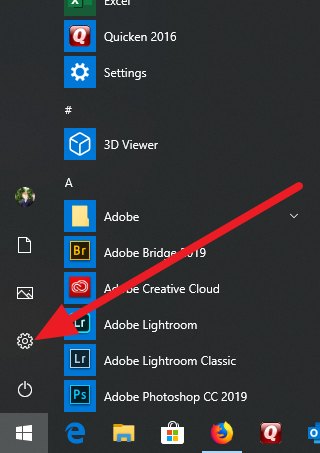
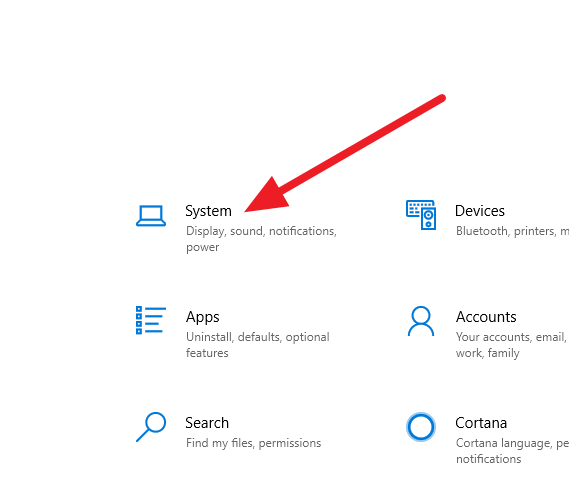
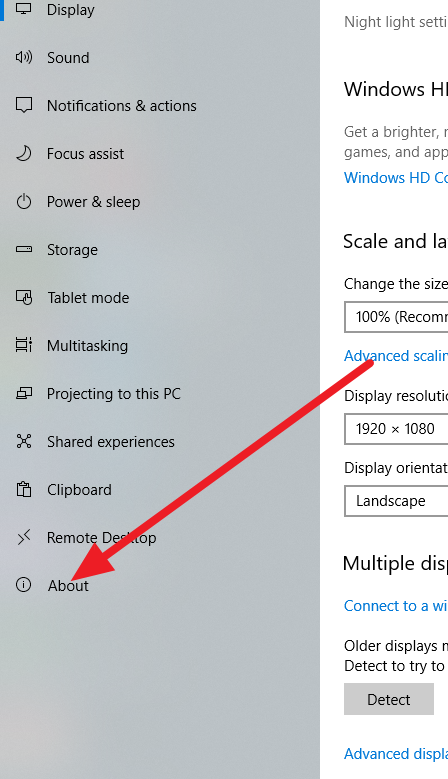
In Windows 10, clcik on the Start icon (bottom left), then the Settings Icon (cog wheel), Then System, , then About. OS should show up near bottom. What does it state?


Copy link to clipboard
Copied
Oh, and just in case, alternate way to do that, but one that actually shows a System Information screen.
Right clcik on the start icon bottom left, select run, type in "msinfo32.exe" (without the quotes), clcik Ok.
Should see:


Get ready! An upgraded Adobe Community experience is coming in January.
Learn more
 AdChoices