Exit
  • Global community
    • Language:
      • Deutsch
      • English
      • Español
      • Français
      • Português
  • 日本語コミュニティ
  • 한국 커뮤니티
0

DEVELOP WINDOW IN LIGHTROOM

New Here ,
Mar 29, 2017 Mar 29, 2017

Hi there,

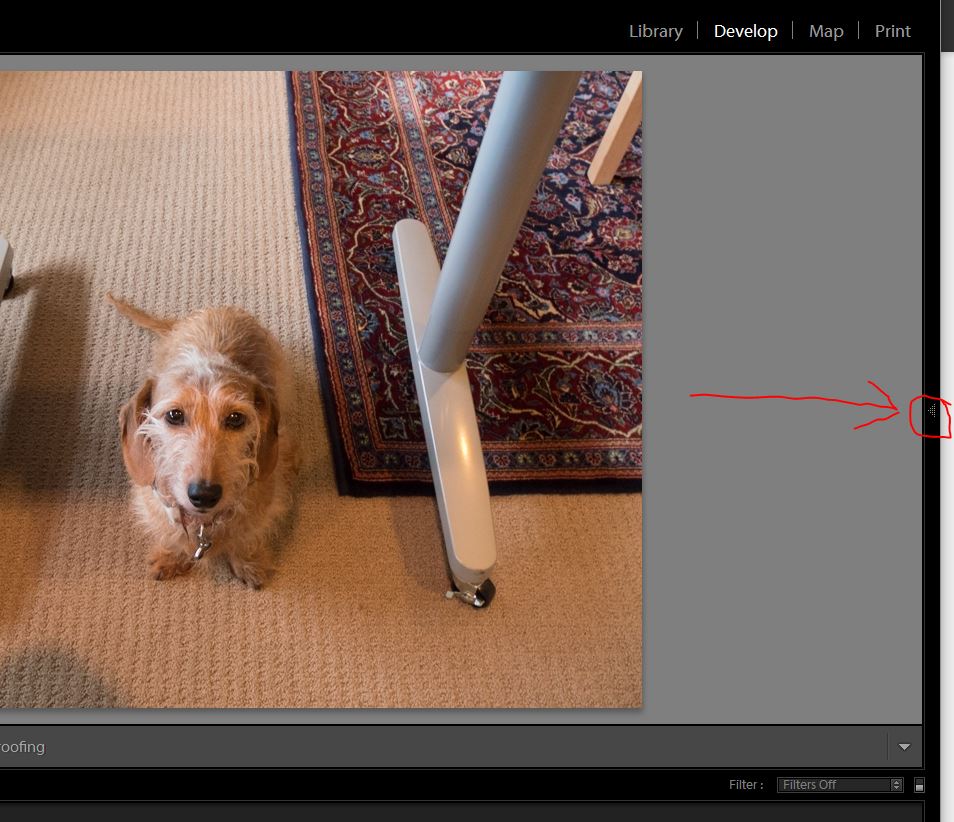
I have just updated my Lightroom software, when opening the Develop window the entire Develop adjustments have disappeared from the window. All there is, is my foto  

476
Translate
Report
Community guidelines
Be kind and respectful, give credit to the original source of content, and search for duplicates before posting. Learn more
community guidelines

correct answers 1 Correct answer

Adobe Employee , Mar 29, 2017 Mar 29, 2017

Also, you can press F8 to show the right panel.

Lightroom shortcuts: https://www.lightroomqueen.com/keyboard-shortcuts/lrcc6/

Thanks,

Mohit

Translate
Community Expert ,
Mar 29, 2017 Mar 29, 2017

Click on the little arrow....

Capture.JPG

Translate
Report
Community guidelines
Be kind and respectful, give credit to the original source of content, and search for duplicates before posting. Learn more
community guidelines
Adobe Employee ,
Mar 29, 2017 Mar 29, 2017

Also, you can press F8 to show the right panel.

Lightroom shortcuts: https://www.lightroomqueen.com/keyboard-shortcuts/lrcc6/

Thanks,

Mohit

Translate
Report
Community guidelines
Be kind and respectful, give credit to the original source of content, and search for duplicates before posting. Learn more
community guidelines
New Here ,
Mar 29, 2017 Mar 29, 2017

thank you Mohit

Translate
Report
Community guidelines
Be kind and respectful, give credit to the original source of content, and search for duplicates before posting. Learn more
community guidelines
Adobe Employee ,
Mar 29, 2017 Mar 29, 2017
LATEST

Your welcome.

Thanks,

Mohit

Translate
Report
Community guidelines
Be kind and respectful, give credit to the original source of content, and search for duplicates before posting. Learn more
community guidelines