- Home
- Lightroom Classic
- Discussions
- Re: Developing Pictures without "Profile: Adobe Co...
- Re: Developing Pictures without "Profile: Adobe Co...

Copy link to clipboard
Copied
Hi Guys,
my question would be:
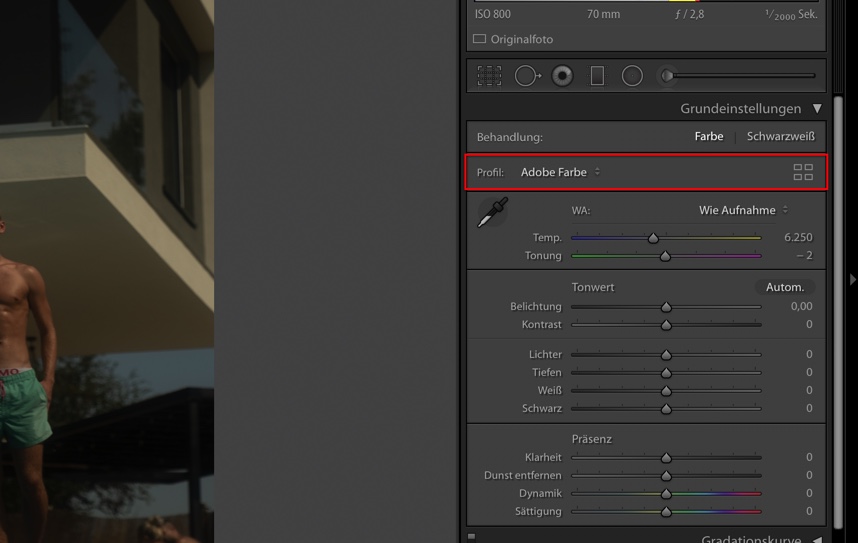
How can I edit my images without having Lightroom Classic -under Basic Settings- include a "Profile: Color"? (see picture marked in red)
I want to edit the pure RAW file without the presets applied by Adobe. Because as soon as I switch to the development area, Adobe applies preset colors. Which in my opinion darkens the image too much or takes up space for editing.

On the left you can see the picture from the "development" area and to the right you can see the picture without presets in the "libary" area, before Adobe applies color prestets by itsself.

I hope someone knows how I can handle this problem and start editing the pictures all by myself.
Thank you very much in advance!
Best regards
Rob


 3 Correct answers

How did you get the picture on the right with no Adobe profile applied?
As far as I know, every photo has a profile applied, can't be avoided or turned off. If you don't like the appearance of the photos, you can certainly make your own presets and apply them at import. Also ... I don't think the photos are darkened or lightened by the Adobe profiles, I think they mostly adjust color and saturation.



Most likely you imported the images with 'Embedded & Sidecar' as preview setting. That means you are comparing apples and oranges. The previews you see in the library are not 'pure' raw development previews, but embedded previews from the camera. As soon as you start editing, they need to be replaced by Lightroom generated previews. The profiles that Adobe supplies are not just preset colors, they are part of the raw demosaicing process so you cannot develop raw files without any profile. You ca
...
Robin5FDD wrote:
I want to edit the pure RAW file without the presets applied by Adobe.
That isn’t really possible because a raw file is literally a single channel of monochrome data. To convert raw data into a color image for normal editing, many decisions have to be made (color, tone, sharpness, etc.) about how it is going to be interpreted from the monochrome sensor data through the sensor color filter pattern and into a three-channel RGB image. In other words, every RGB image that comes fr
... 5
Replies
5
5
Replies
5

Copy link to clipboard
Copied
How did you get the picture on the right with no Adobe profile applied?
As far as I know, every photo has a profile applied, can't be avoided or turned off. If you don't like the appearance of the photos, you can certainly make your own presets and apply them at import. Also ... I don't think the photos are darkened or lightened by the Adobe profiles, I think they mostly adjust color and saturation.
Copy link to clipboard
Copied
Most likely you imported the images with 'Embedded & Sidecar' as preview setting. That means you are comparing apples and oranges. The previews you see in the library are not 'pure' raw development previews, but embedded previews from the camera. As soon as you start editing, they need to be replaced by Lightroom generated previews. The profiles that Adobe supplies are not just preset colors, they are part of the raw demosaicing process so you cannot develop raw files without any profile. You can choose 'Adobe Neutral' or 'Camera Neutral' if you want to start as 'pure' as possible.
Copy link to clipboard
Copied
Robin5FDD wrote:
I want to edit the pure RAW file without the presets applied by Adobe.
That isn’t really possible because a raw file is literally a single channel of monochrome data. To convert raw data into a color image for normal editing, many decisions have to be made (color, tone, sharpness, etc.) about how it is going to be interpreted from the monochrome sensor data through the sensor color filter pattern and into a three-channel RGB image. In other words, every RGB image that comes from any digital camera has to have some kind of interpretation. If the camera’s preview of the raw file was literally “pure raw,” it would be an unrecognizable gray blob.
So what you see is not “Adobe version vs pure camera image,” it’s really “Adobe interpretation vs. camera maker’s interpretation.” Everybody has to apply a “profile,” even if we don’t realize it, and even if they have a different name for it.
A lot of people want the Adobe version to look like the camera version, so Adobe provides Camera Matching profiles for many cameras. If you see a Camera Matching category in the Profile Browser, choose the one that goes with the picture mode that was set in the camera. Because again, there is no “pure” version; even the camera-generated embedded raw preview you see in the Library module was biased by the settings you chose in the camera. Change the camera settings and the preview would look different…with the actual raw data being unchanged, just interpreted differently by the raw-to-JPEG processor in the camera itself.
In addition to a lot of people wanting to see the camera version in Lightroom, a lot of people want to be able to make it work like that all the time. To take care of that, Adobe made it possible to set a default camera profile to whatever you think is best. You might want to do this.
How to Customize Lightroom Classic’s Default Develop Settings
Copy link to clipboard
Copied
Thank you very much!
I think I understand now. I usually come from video editing, so I mixed up Picture-Profiles from videos with pictures. Normally I edit my videos in Log-profiles to get the maximum range out of the files. I thought it would be the same for pictures, but there is defenetly more to learn for me.
I will try to follow the instruction served by Julieanne Kost and try out how it works. Thank you again!

Copy link to clipboard
Copied
"I want to edit the pure RAW file without the presets applied by Adobc e."
This statement is heard often from unexperienced and unknowledgeable photographers and it unfortunately reveals a lack of understanding of exactly what a Raw file is. Raw data, because it is a direct digitalization of output from the sensor - which is color-blind - is mono-toned. The color is added by the prrocessor, camera or computer. Moreover, Raw data is linear and therefore appears dark and flat. The second step in lprocessing is the application of a tone curve in order to move the image closer to human taste and expectations. Do you really want to start from the Raw?
It is essential that those first two steps are done by the Raw converter, but LrC maked it eassy to control step two and any other subsequent steps to enance the image.


Find more inspiration, events, and resources on the new Adobe Community
Explore Now
 AdChoices