


Editing in another program

Copy link to clipboard
Copied
Don't do it all that frequently, but I don't remember any of this happening. I have Windows 10, LR Classic 8.3.1. System has 32G of Ram with another 8 on the Video Card.
Doesn't matter if I send the image to PS or Topaz Studios the results are always the same...sometimes. When sending the image to Topaz, from a Collection, it goes as a copy with LR edits. Make the changes in Topaz. Hit the save button. Get the do you want to save changes pop up. Hit yes, which sends it back to LR. The one constant is when I go back to LR this is what I find...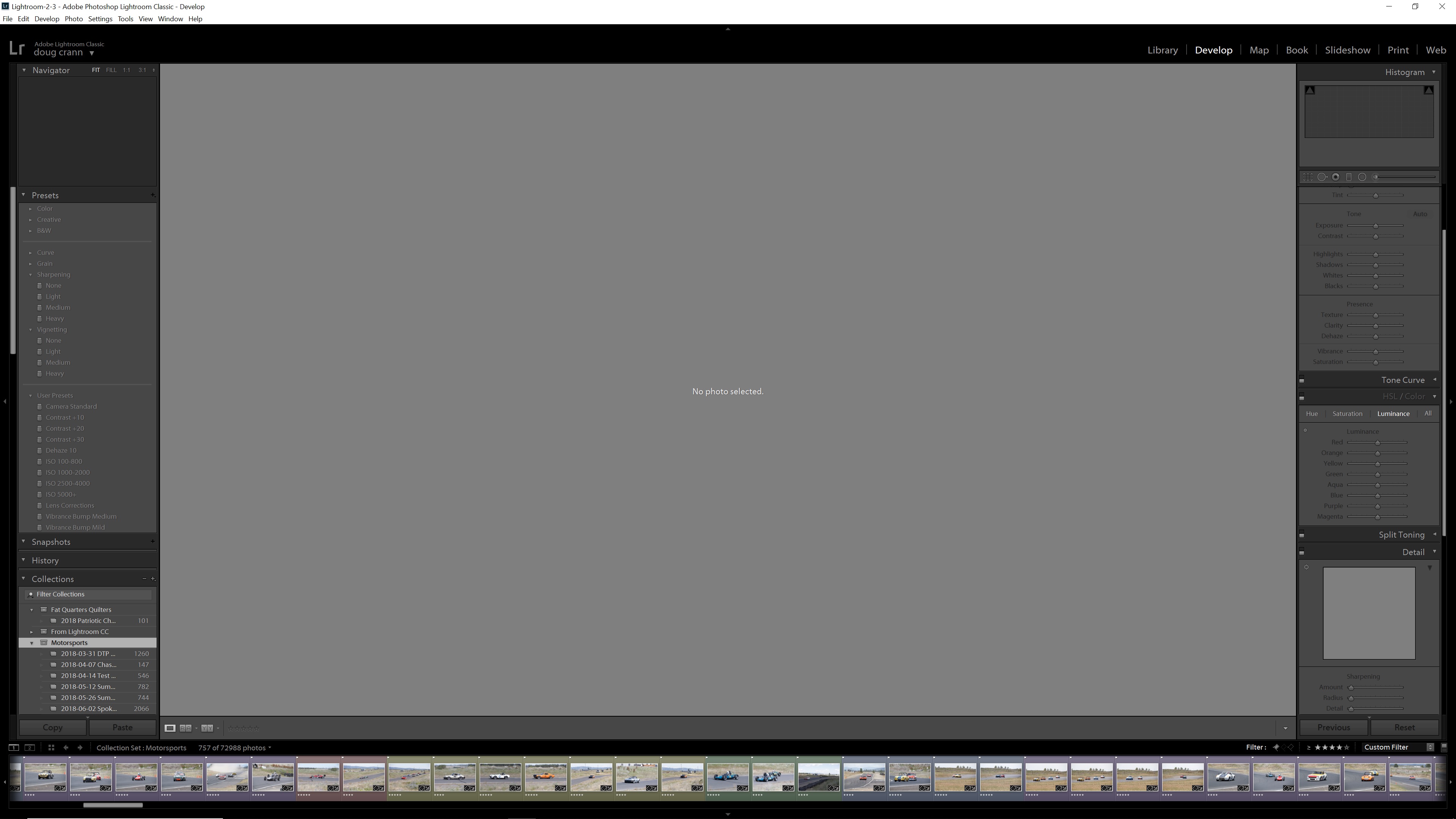
Sometimes the original is in the Collections filmstrip, most times it is no longer there. Occasionally the edited TIFF will be in the Collections film strip stacked with the original.
If I go to the Original (dated) folder, both images will be there. I was told by a few members of another group that I have to right click on the Original (dated) and hit sync then hit select all and drag the entire thing back to the Collection folder that they will then appear. Thing is, I don't remember having to do ANY of that. What I remember doing is sending the image (from the collections folder) to the external editor, making the changes, hitting the save button and having both the original and the edited TIFF in the Collections folder.
Thing is, if what is happening is normal why is it not consistent? One time things will be as I remember. Next time the original image is gone from the Collections folder...next time the original is missing from the collections...but it will be in the original (dated) folder along with the TIFF....without the edits from the other program.
All of my images are on separate drives. I am about ready to wipe out the C: drive and just start over....


 14
Replies
14
14
Replies
14


Copy link to clipboard
Copied
Your screenshot shows that you have a collection set "Motorsports" selected. (A collection set is a group of collections.) That's causing the confusing behavior you're observing.
When you've got just a single plain collection selected as the source (e.g. "2018-05-12 Summer") and you do Photo > Edit In, LR will put the edited copy in that collection.
But when you've got multiple collections selected as the source, or you have a collection set selected as the source, in general Photo > Edit In doesn't know which collection to put the newly edited copy in, so it doesn't put it in any collection. To find the copy, you can right-click the original and do Go To Folder In Library.
Copy link to clipboard
Copied
Correct, I am in the Motorsports set. Thing is, this problem did not exist last time I used an External Editor. I found this is the "manual" I found for LR....
To stack the edited photo with the original in the containing folder, select Edit (Win)/Lightroom Classic CC (macOS) > Preferences > External Editing > Stack With Original. If you edit a photo while viewing a collection, two stacks will be created, one in the folder and one in the collection.
It obviously does not mention a collection "set". Hmmm.......
Copy link to clipboard
Copied
Thing is, this problem did not exist last time I used an External Editor.
Hard to know the details of what might have been going on there without a screenshot. In general the interaction between collections, folders, stacks, smart collections, and filters can produce very confusing behavior. They're powerful mechanisms but even long-time users can get confused (I do).
If you see anomalous behavior again, grab a full-resolution screenshot(s) again. They make troubleshooting so much easier...
But I'm confident that LR's behavior with regard to Edit In and collections hasn't changed for many years. (It's always possible you were tripping over an obscure bug.)
To stack the edited photo with the original in the containing folder, select Edit (Win)/Lightroom Classic CC (macOS) > Preferences > External Editing > Stack With Original. If you edit a photo while viewing a collection, two stacks will be created, one in the folder and one in the collection.
It obviously does not mention a collection "set". Hmmm.......
I edited those words for Adobe a couple years ago 😆 (Stacking in LR is excessively complicated and I helped them update their docs, which were quite inaccurate.) Reading it now, I see that "viewing a collection" is ambiguous. That should read:
"If you edit a photo when the current source is a single collection, ..."
There are probably a number of other similar ambiguous instances of "in a collection", "viewing a collection", etc.
Copy link to clipboard
Copied
Well....I was in the Original folder, not even the collection. Sent an image to Topaz, made some changes. Both images are now gone. Have checked the Collection, the Original folder as well as the Windows folder....neither image is anywhere to be found...
Copy link to clipboard
Copied
Take that back. The original RAW file is missing, the TIFF is in the Windows folder.
Copy link to clipboard
Copied
Zero disrespect here...but what EXACTLY am I supposed to do a screen capture of? I have been using Topaz in addition to LR today. Have been in the individual Collections. Things have been working "normal"...up until the last one....one that someone is waiting on me to edit as they want a poster of it for their trailer. Sadly it is one of the dates I have not copied onto Blue-Ray discs yet so the original is now MIA.
The procedure I am following is...make edits in LR. Right click on the image, and hit edit in Topaz. I then get the pop up asking me how I want it sent to Topaz...I ALWAYS use the Copy with LR edits 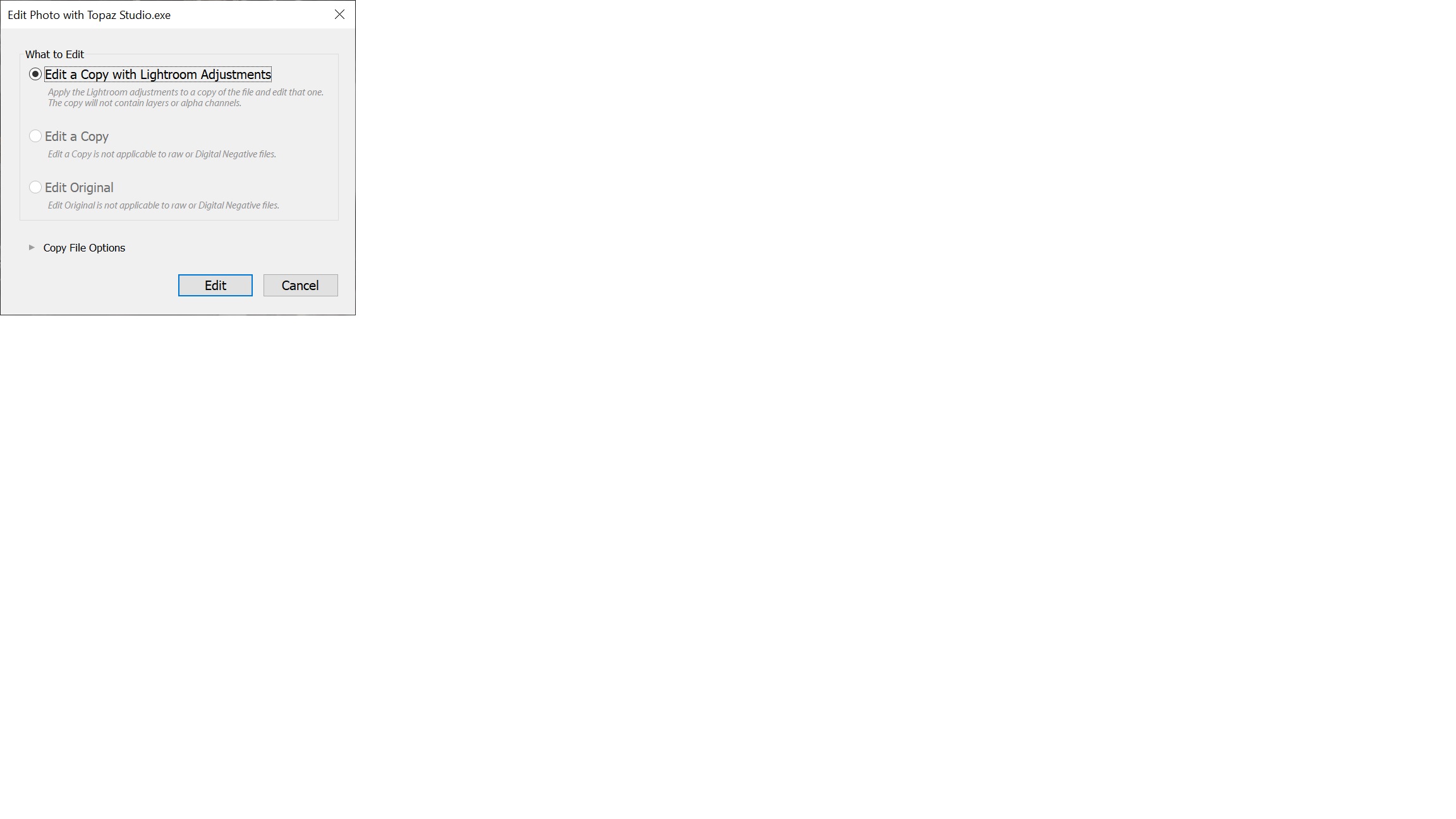
I then go into Topaz, make some adjustments. Hit the Apply button. After it is one making the changes I then hit save, which, in theory, sends it back to LR. This particular time it did not...in addition I no longer have the original in LR. Not in the Collections, nor in the Original folder. I went into the Windows folder, the original RAW image is gone, but I do have the TIFF that was created.
I can not speak for THIS particular image but....what has been happening is if after I tell LR to send the image to another Editor, and I have tried this with PS as well, when I am in the other editor if I go back into LR I will often find this 
If I am editing a "Copy with LR Adjustments" why is the original one gone from the Develop panel?
Copy link to clipboard
Copied
Since my last post I have been using the Collections folders....and have had 4 out 5 images disappear from the LR library entirely. They are all still in the Windows folder....so tell me again how I need to be in the Collections folder in order for this to work....
Copy link to clipboard
Copied
Being in a collection set rather than a collection was causing the edited copy not to appear in any collection. But that doesn't have anything to do with missing originals. Can you post a screen shot right before you invoke Edit In?
Copy link to clipboard
Copied
 Taken right before I invoked "edit in".
Copy link to clipboard
Copied
That before-Edit-In screenshot doesn't show symptoms of issues/bugs with filters, ruling out one possible source of confusion.
But regarding Edit A Copy causing originals to disappear from their containing folder on disk (as shown by Windows File Explorer), I don't know of any reports of that happening over the years (or of Edit Original doing it, for that matter).
I have just two suggestions at this point:
1. Use Windows File Explorer to search the entire disk for the missing original, and also check the Windows Recycle Bin. I don't have any hypothesis for how it might have gotten moved to another location, but it's worthwhile to double-check.
2. See if you can narrow down the conditions under which it is happening and then post a problem report at the official Adobe feedback forum: Lightroom Classic | Photoshop Family Customer Community . Adobe product developers read everything posted there but rarely participate here. They're more likely to engage if you've got a repeatable recipe for the problem, but even if you don't, posting there is worthwhile if others encounter similar symptoms going forward.
Copy link to clipboard
Copied
I will start creating virtual copies, just in case. But I will post a problem report if it continues. Just to clarify this on my end. I can not be in the Motorsport tab while sending images to an External Editor but I can be in a single collection that is with in the Motorsport set?
Copy link to clipboard
Copied
Oops, forgot to follow-up:
Just to clarify this on my end. I can not be in the Motorsport tab while sending images to an External Editor but I can be in a single collection that is with in the Motorsport set?
If you're in the Motorsport collection set, then the copy created by Edit A Copy won't appear in any collection or collection set, but it will appear in the folder with the original.
If you're in a collection under Motorsport, then the copy created by Edit A Copy will appear both in that collection and in the folder with the original.
Copy link to clipboard
Copied
if after I tell LR to send the image to another Editor, and I have tried this with PS as well, when I am in the other editor if I go back into LR I will often find this [screenshot showing "The file appears to be unsupported or damaged".]
This may not indicate anything abnormal. When you're in Develop and do Edit A Copy, LR creates the copy and selects it, making it the current photo shown in Develop; simultaneously, LR invokes the external editor. It could be that, before LR gets a chance to read the copy into Develop, the Topaz editor has opened it with Windows file locking and left the file locked. LR then tries to read the copy to display it but can't because it is locked and it displays that error message. (LR's error messages often don't accurately reflect the underlying operating-system error message.)
Copy link to clipboard
Copied
That's kind of what I figured was happening.


Get ready! An upgraded Adobe Community experience is coming in January.
Learn more
 AdChoices