Copy link to clipboard
Copied
I would like to export keywords for a specific folder, but can't seem to find out if that is possible. For example, I put all of my photos from a birding outing in a specific folder, add keywords (bird names), and then want to see how many different types of birds I photographed that day. Any help would be greatly appreciated, including using a different workflow to get the same result.
Thank you - tim
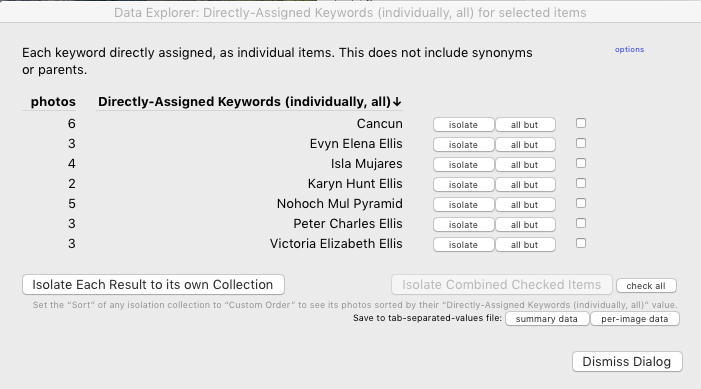
The Data Explorer plugin provides this functionality. For example, here are the counts of keywords assigned to a selection of 20 photos:

That plugin, and a number of others, let you export a comma-separated text file containing the list of keywords assigned to each photo: Any Filter, List View, LR/Transporter. Each of these plugins provides unique functionality other than exporting metadata fields.
Copy link to clipboard
Copied
Hi Tim,
Thanks for posting on Adobe forums. I cannot recall a set way of exporting keywords only for a specific folder.
I'd recommend that you to suggest this as a feature request on our Feedback community here: Lightroom Classic CC | Photoshop Family Customer Community
Our Engineers do monitor this space and look for major feature requests from our valuable users like you to shape the product further.
Regards,
Akash
Copy link to clipboard
Copied
Thank you Akash!
Copy link to clipboard
Copied
The Data Explorer plugin provides this functionality. For example, here are the counts of keywords assigned to a selection of 20 photos:

That plugin, and a number of others, let you export a comma-separated text file containing the list of keywords assigned to each photo: Any Filter, List View, LR/Transporter. Each of these plugins provides unique functionality other than exporting metadata fields.
Copy link to clipboard
Copied
Thank you John, the Data Explorer is perfect for my needs!
Copy link to clipboard
Copied
I would like to export keywords for a specific folder
Being curious I found a work-around method without plugins that seems to achieve an answer to the post- (that is not too difficult
)
Select the specific Folder and images,
Right-Click to {Export this folder as a Catalog}, (Uncheck "Export Negative Files")
Menu: {File>Open Recent} and swap to the exported catalog,
Menu: {Metadata>Export Keywords},
Return to the Master Catalog- Menu: {File>Open Recent}
(Delete the temporary exported catalog with the OS browser.)
Copy link to clipboard
Copied
Thank you!
Get ready! An upgraded Adobe Community experience is coming in January.
Learn more