Exit
  • Global community
    • Language:
      • Deutsch
      • English
      • Español
      • Français
      • Português
  • 日本語コミュニティ
  • 한국 커뮤니티
5

📸 From MAX London: New Features in Lightroom Classic 14.3
Adobe Employee ,
Apr 24, 2025 Apr 24, 2025

LrC Banner (1).png

Lightroom Classic 14.3: Select Landscape, Catalog Management, and more from MAX London!

We’re excited to announce the release of Lightroom Classic 14.3, available now as part of the April 2025 MAX London update. This release includes new features designed to streamline your workflow and expand your creative control—plus support for the latest cameras and lenses, along with important bug fixes.

 

lrc_appicon_128.png

Try Lightroom Classic

Download the latest version and dive into the new Adobe Lightroom Classic features.

To update Lightroom Classic to 14.3, click "Update" in the Creative Cloud desktop app next to Lightroom. More detailed instructions for updating.


Here’s what’s new in Lightroom Classic 14.3:

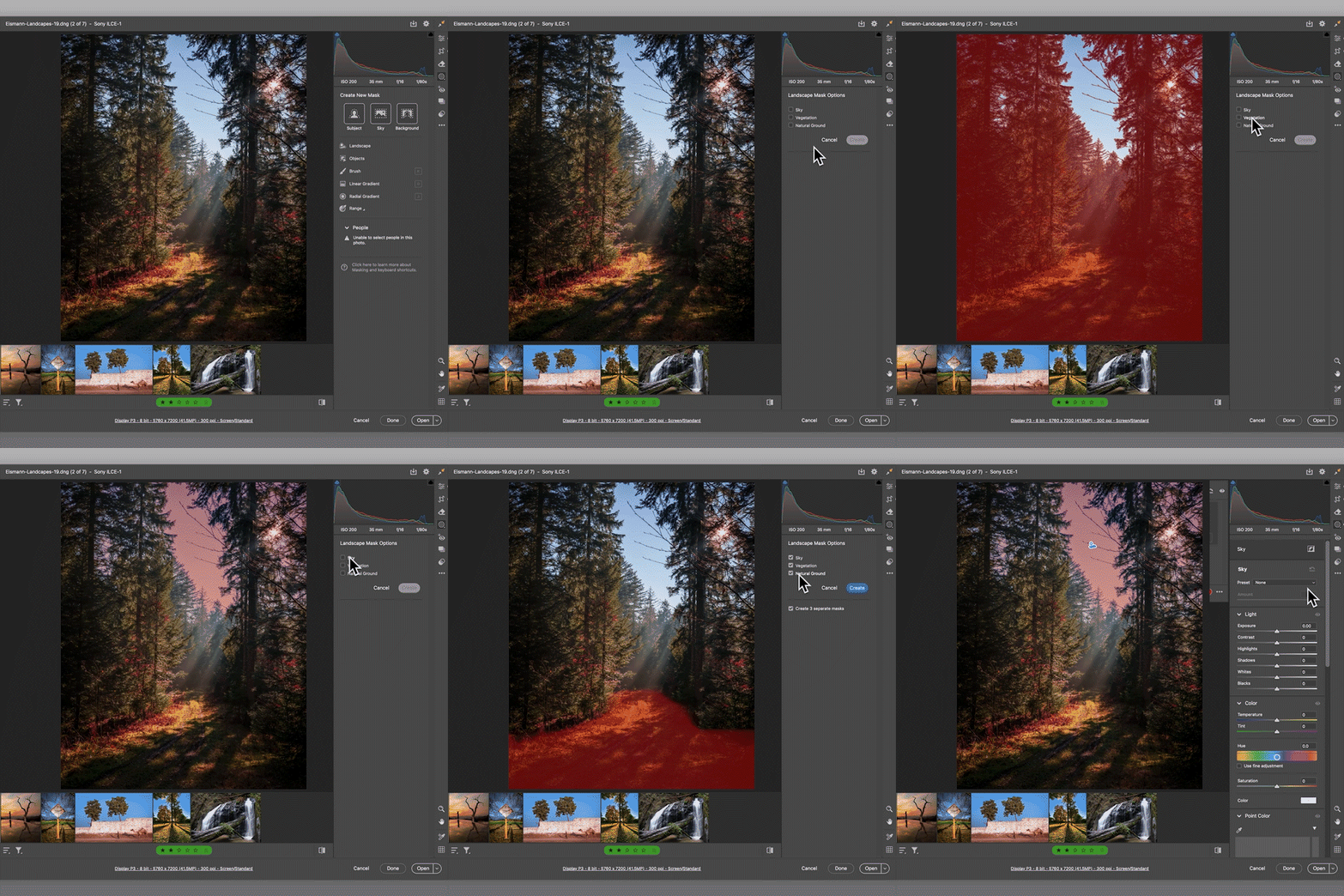
NEW! Landscape Masking:

Say hello to the Select > Landscape mask — your new go-to for editing landscape photos. Lightroom automatically detects elements like sky, vegetation, and ground, creating separate masks for each. Fine-tune each part of your image with precision. Read more about it here

LrDMasking_v3.gif


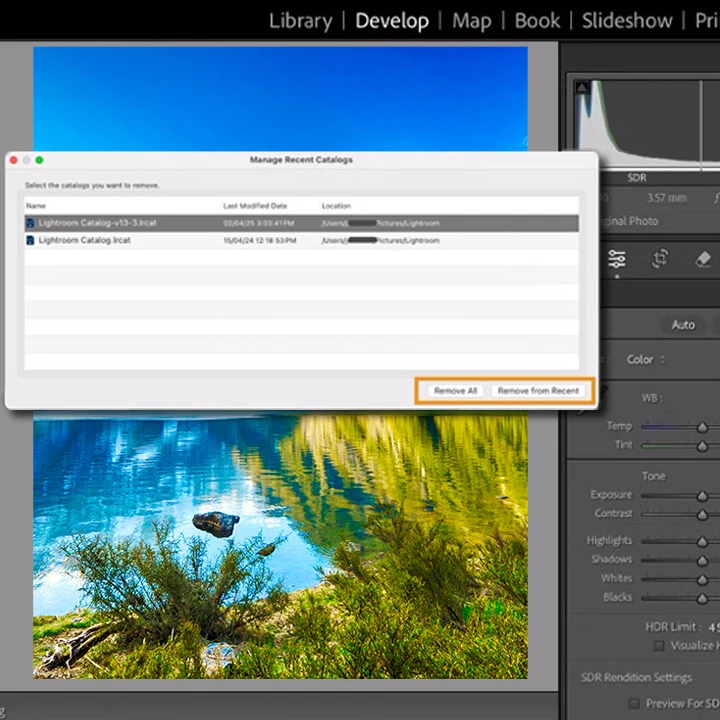
Manage Catalogs with Ease:

You can now manage your recent catalogs directly from the File > Manage Catalog menu. This feature allows you to remove catalogs you no longer use from the recent list—keeping your workspace clean and focused. Learn more about this update here.

lrc-catalog.jpg


How to Update LrC.png

To update Lightroom Classic to version 14.3, open the Creative Cloud desktop app, find Lightroom Classic in the list of installed apps, and click UpdateMore detailed instructions for updating.


We’d love to hear from you!

Try out the new Lightroom Classic 14.3, and let us know your thoughts. Feel free to reach out if you have any questions or need more tips!

Picture 1.png

If this was helpful, please click the Upvote icon in the top left corner of this post. Your feedback helps us improve the experience. Thank you!


We’d love to see what you’ve created and hear about your experience or feedback! Click 'Reply' below.

Click 'Follow' below to bookmark this post for easy reference.

For other questions, feel free to start a new post in the community.

TOPICS
macOS , Windows
3.0K
Translate
Report
Community guidelines
Be kind and respectful, give credit to the original source of content, and search for duplicates before posting. Learn more
community guidelines
Enthusiast ,
Apr 24, 2025 Apr 24, 2025

Lightroom Classic 14.6???


It's Lightroom Classic 14.3 as far as I know!

Translate
Report
Community guidelines
Be kind and respectful, give credit to the original source of content, and search for duplicates before posting. Learn more
community guidelines
Adobe Employee ,
Apr 24, 2025 Apr 24, 2025

@drtonyb Apologies for the typo earlier — it’s been corrected now. Really appreciate your patience!

Translate
Report
Community guidelines
Be kind and respectful, give credit to the original source of content, and search for duplicates before posting. Learn more
community guidelines
LEGEND ,
Apr 25, 2025 Apr 25, 2025

Unmentioned above, but yet still a valuable new tool is that the new Landscape masking includes an Architecture mask!

Translate
Report
Community guidelines
Be kind and respectful, give credit to the original source of content, and search for duplicates before posting. Learn more
community guidelines
Enthusiast ,
Apr 25, 2025 Apr 25, 2025

I was quite disappointed that the Camera Raw "Technology Previews", particularly Denoise of RAW (no DNG) were not available in this release.  I really do not understand the reasoning for restricting these functions to CR.  LRc users, I would think, are just as able as CR users to decide to use them or not and to provide feedback.

Translate
Report
Community guidelines
Be kind and respectful, give credit to the original source of content, and search for duplicates before posting. Learn more
community guidelines
Adobe Employee ,
Apr 25, 2025 Apr 25, 2025

@jrsforums  This was asked and answered in your post on LrForums:
 https://www.lightroomqueen.com/community/threads/skipping-ahead-adobe-denoise.52674/#post-1351979 

Rikk Flohr: Adobe Photography Org
Translate
Report
Community guidelines
Be kind and respectful, give credit to the original source of content, and search for duplicates before posting. Learn more
community guidelines
Enthusiast ,
Apr 25, 2025 Apr 25, 2025

It was asked and an answer was given by someone.  The answer was because of syncing to LR Mobile.  I and others do not agree that this should be a reason not to offer the new technology to LRc.  Other items are available in LRc which are not available for syncing to Mobile...for example enhanced Denoise and Adaptive Profiles (I believe...do not use Mobile much at all)

Translate
Report
Community guidelines
Be kind and respectful, give credit to the original source of content, and search for duplicates before posting. Learn more
community guidelines
Adobe Employee ,
Apr 25, 2025 Apr 25, 2025

"Lightroom Mobile" was not mentioned in that answer. 

Lightroom and Lightroom Classic both sync with the cloud first. They sync with other clients (each other and mobile) after that. Files in the Lightroom environment need to play nicely, even if the UI or functionality is missing or limited on any client in the ecosystem.

One alternative would be to hold any new technologies out of Camera Raw until they are stable in the Lightroom environments. That is of little benefit and omits valuable feedback we could receive from professionals before deploying on a wider scale.

Rikk Flohr: Adobe Photography Org
Translate
Report
Community guidelines
Be kind and respectful, give credit to the original source of content, and search for duplicates before posting. Learn more
community guidelines
Enthusiast ,
Apr 25, 2025 Apr 25, 2025

I understand the factors/difficulties.....does not mean that it makes me happy 😃 ...more sad 😩😢

Translate
Report
Community guidelines
Be kind and respectful, give credit to the original source of content, and search for duplicates before posting. Learn more
community guidelines
New Here ,
Apr 29, 2025 Apr 29, 2025

Once I updated my Lightroom and started experiencing issues with the masking and presets functions. The program is not letting place or use any of my presets along with any sort of copy or paste function. Everytime I click the preset I recieve a message stating "Some masking models have failed to download. Please try again later." I have waited and tried for three days to correct the issue and nothing has worked anyone have any recommendations?

Translate
Report
Community guidelines
Be kind and respectful, give credit to the original source of content, and search for duplicates before posting. Learn more
community guidelines
Adobe Employee ,
Apr 29, 2025 Apr 29, 2025

Hi @Matthew29644182mmfs,


Thanks for reaching out. The issue you’re seeing with presets in Lightroom—specifically the error “Some masking models have failed to download”—has been reported by others as well, and the team is actively investigating it.


To stay updated, you can upvote and follow this community thread: https://adobe.ly/4iBMVYX

Additionally, Rikk Flohr, a product team member, has kindly requested that affected users reply to that thread with additional info to help speed up the investigation.

If you have any further questions, please feel free to reach out!

Best,

Anshul Saini

Translate
Report
Community guidelines
Be kind and respectful, give credit to the original source of content, and search for duplicates before posting. Learn more
community guidelines
Explorer ,
May 17, 2025 May 17, 2025

With 14.3.x GPU is not usable on M3 MacBook Air any more

Translate
Report
Community guidelines
Be kind and respectful, give credit to the original source of content, and search for duplicates before posting. Learn more
community guidelines
Explorer ,
May 26, 2025 May 26, 2025
LATEST

Thanks for the update.

Will you make your GPU usable again one day for masking or I have to use Lr6 for the next 10 years ?

Translate
Report
Community guidelines
Be kind and respectful, give credit to the original source of content, and search for duplicates before posting. Learn more
community guidelines