Exit
  • Global community
    • Language:
      • Deutsch
      • English
      • Español
      • Français
      • Português
  • 日本語コミュニティ
  • 한국 커뮤니티
0

How to find the actual capture date/time of a photo?

New Here ,
Jan 07, 2023 Jan 07, 2023

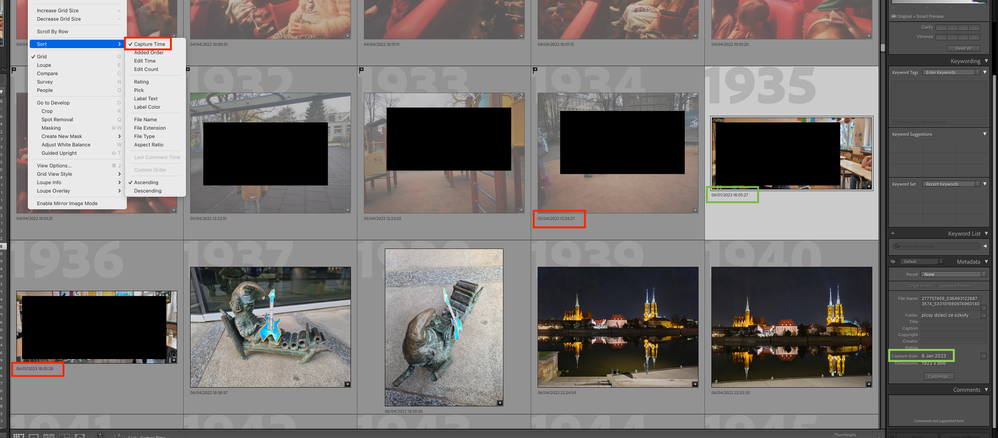
I have a photo that seems to have a corrupted capture date, as it is set to a later date (seems like an import date or something). 

This date is seen in grid view, in loupe view, in metadata in edit metadada, I've checked with exteral exif reader and all agree on this "newer" date.

However LR correctly sorts this image according to it's actual capture date. (I happe to rouhly know when this picture was taken).

How do I extract this actual date from LR?

It's the picture with "Green box" in my screenshot.

Screenshot 2023-01-07 at 13.18.40.png

TOPICS
macOS
468
Translate
Report
Community guidelines
Be kind and respectful, give credit to the original source of content, and search for duplicates before posting. Learn more
community guidelines
Community Expert ,
Jan 07, 2023 Jan 07, 2023
LATEST

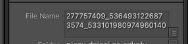
With a Filename for the selected image-
2023-01-08 09_50_53-How to find the actual capture date_time of a phot... - Adobe Support Community .jpg

Are you sure you havn't imported photos from the Smart Previews cache?

An example of one of my Smart Previews

2023-01-08 09_54_36-58EE.jpg


And Dimensions 1923x666px is also strange!! Are you supposedly looking at original camera files?


Regards. My System: Windows-11, Lightroom-Classic 15.0, Photoshop 27.0, ACR 18.0, Lightroom 9.0, Lr-iOS 10.4.0, Bridge 16.0 .

Translate
Report
Community guidelines
Be kind and respectful, give credit to the original source of content, and search for duplicates before posting. Learn more
community guidelines