Exit
  • Global community
    • Language:
      • Deutsch
      • English
      • Español
      • Français
      • Português
  • 日本語コミュニティ
  • 한국 커뮤니티
0

Import von Fotos von Sony Alpha 4

Community Beginner ,
Oct 08, 2022 Oct 08, 2022

Hallo

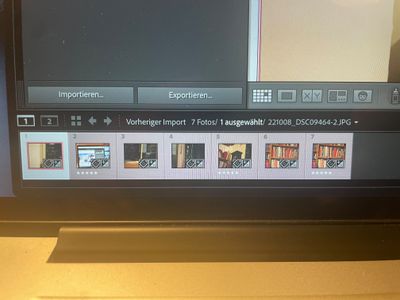
Ein kleines Problem wenn ich meine Fotos  in der Sony alpha iv & iii markiere z. 5 Sterne kann ich diese Markierung nicht in Lightroom übertragen bzw. selektieren, d.h. ich möchte nur die markierten öffnen .?


Weis einer einen Rat ?


TOPICS
macOS
280
Translate
Report
Community guidelines
Be kind and respectful, give credit to the original source of content, and search for duplicates before posting. Learn more
community guidelines
Community Expert ,
Oct 08, 2022 Oct 08, 2022

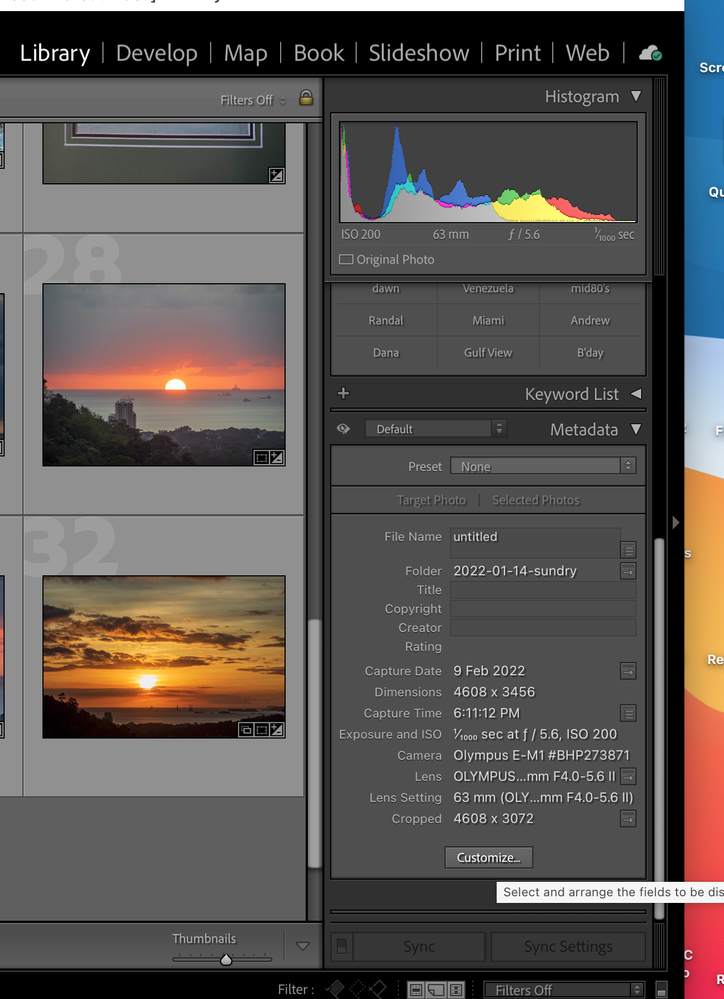
In Lightroom Classic Library Module you can select what Metadata is displayed in the Right side panel.

 See the screen capture.

Screenshot 2022-10-08 at 7.50.34 AM.png


Hopefully another Sony user could explain how they deal with that setting.


Regards, Denis: iMac 27” mid-2015, macOS 11.7.10 Big Sur; 2TB SSD, 24 GB Ram, GPU 2 GB; LrC 12.5,; Lr 6.5, PS 24.7,; ACR 15.5,; (also Laptop Win 11, ver 24H2, LrC 15.1, PS 27.1; ) Camera Oly OM-D E-M1.
Translate
Report
Community guidelines
Be kind and respectful, give credit to the original source of content, and search for duplicates before posting. Learn more
community guidelines
Community Beginner ,
Oct 08, 2022 Oct 08, 2022

Thanks for the information. If you mean the Field "Filter" That doesn`t Work.


Translate
Report
Community guidelines
Be kind and respectful, give credit to the original source of content, and search for duplicates before posting. Learn more
community guidelines
Community Expert ,
Oct 08, 2022 Oct 08, 2022

No, you need to Customize the info that displays in the Metadata section of panel at the right side. See the screen capture I posted. Click on the Customize button to get the list for you to select your choices.

Regards, Denis: iMac 27” mid-2015, macOS 11.7.10 Big Sur; 2TB SSD, 24 GB Ram, GPU 2 GB; LrC 12.5,; Lr 6.5, PS 24.7,; ACR 15.5,; (also Laptop Win 11, ver 24H2, LrC 15.1, PS 27.1; ) Camera Oly OM-D E-M1.
Translate
Report
Community guidelines
Be kind and respectful, give credit to the original source of content, and search for duplicates before posting. Learn more
community guidelines
LEGEND ,
Oct 08, 2022 Oct 08, 2022

So, your Sony has 1-5 stars, LrC has 0-5 stars. That does not match.


In the back of my mind is a earlier posting, not necessarily Sony, but a difference in available rating led to LrC not supporting the in camera rating. This may have been a issue between another app being used to cull photos and LrC after that app was used to rate photos pre import. Issue is a difference in standard used.


Also, in what metadata field does the Sony store the star rating in vs where LrC thinks they should be?


/followup/

Does your camera have two card slots? Are you using both slots? If so, did the star rating get saved to just the photos on one slot, likely the primary slot? Might not apply to Sony, appears it can apply to Canon.

Translate
Report
Community guidelines
Be kind and respectful, give credit to the original source of content, and search for duplicates before posting. Learn more
community guidelines
Community Beginner ,
Oct 08, 2022 Oct 08, 2022
LATEST

IMG_7214 2.jpg


Thanks for your Ideas It helps and now it Works !!!!!!

Translate
Report
Community guidelines
Be kind and respectful, give credit to the original source of content, and search for duplicates before posting. Learn more
community guidelines