


Copy link to clipboard
Copied
Hi there,
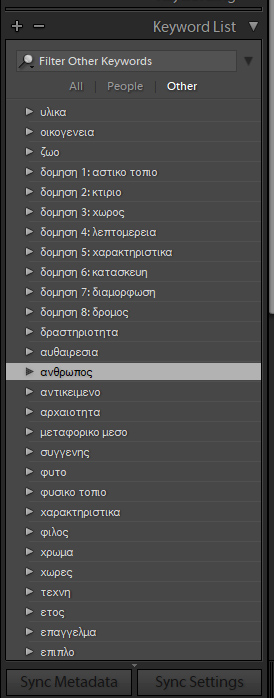
since the last upgrade, lightroom re-ordered my hierarchical keywords and these are no longer in alphabetical order. Do you know if there is a way to re-adjust that or change it? Do you think the it's a problem that I write my keywords in Greek?
thanks
Pantelis


 1 Correct answer

Try adding following config to config.lua:
LibrarySort.useOldSort = true
To locate the config.lua, Open Lightroom > Preferences > Presets
Click on "Show Lightroom Presets Folder..."
It should take you to folder ending with ... /Application Support/Adobe/Lightroom/
If config.lua is already present in Lightroom folder, just add,
LibrarySort.useOldSort = true
in the config.lua file. If the file is not present create a file named config.lua and add the same configuration there.

 14
Replies
14
14
Replies
14


Copy link to clipboard
Copied
Please do Help > System Info and report the exact version of LR you're running and the version of Mac or Windows. There are some existing bugs that may or may not affect you.
Copy link to clipboard
Copied
Hello
I have Windows 10 Home and Adobe Photoshop Lightroom Classic CC 7.0.1 Camera Raw 10.0
In the previous version of lightroom the ordering of the keywords was correct.
thanks
Copy link to clipboard
Copied
There have been recent bugs in the sort order of presets on Mac, but nothing reported for keywords or for Windows.
Try these initial troubleshooting steps:
1. Reboot.
2. Reset LR's preferences: https://www.lightroomqueen.com/articles-page/how-do-i-reset-lightrooms-preferences/
Sprinkling that magic fairy dust often fixes things when LR's user interface goes wonky.
Copy link to clipboard
Copied
Here's a bug report about German keywords not sorting properly: LR Classic: Some keywords not in alphabetical order | Photoshop Family Customer Community

Copy link to clipboard
Copied
Doesn't work well if you mix languages in the keywords list.
Almost all my keywords are English.
However, if I add "École Militaire" to an image, the beginning of the sort order of the largely English keywords gets scrambled and this phrase appears towards the beginning of the list.
If I edit the keyword and change the first letter to an English E, then it sorts itself out.
Copy link to clipboard
Copied
Doesn't work well if you mix languages in the keywords list.
Do you mean that the workaround posted here doesn't work well? Or do you mean LR 7 (Classic) without the workaround?
Copy link to clipboard
Copied
Without the workaround, running LR 7.0.1 on macOS 10.13.1
[Edit] Should have said that at the start of the keyword list are a whole series of "words" that are either wholly numeric or have leading numbers.
These got split, so sequence was broadly:
- A few that had leading numbers
- A few 'English' that started with A
- Word starting with accented character
- More numeric leaders
- Rest of the words that begin with A
- Continued probably as it should
Copy link to clipboard
Copied
Try the workaround -- it's worked for others, including me.
Also, please add all these details of your issue to the bug report previously linked above, Lightroom Classic: Some keywords not in alphabetical order | Photoshop Family Customer Community, and click Me Too at the top. That will make it more likely Adobe will prioritize a fix, which is especially important now that they've communicated they're focusing their efforts going forward on performance and Develop, not on other modules.
Copy link to clipboard
Copied
Try adding following config to config.lua:
LibrarySort.useOldSort = true
To locate the config.lua, Open Lightroom > Preferences > Presets
Click on "Show Lightroom Presets Folder..."
It should take you to folder ending with ... /Application Support/Adobe/Lightroom/
If config.lua is already present in Lightroom folder, just add,
LibrarySort.useOldSort = true
in the config.lua file. If the file is not present create a file named config.lua and add the same configuration there.
Copy link to clipboard
Copied
Thanks a lot for your response. Adding that setting in my config.lua solved
the sorting problem.
2017-11-08 7:56 GMT+02:00 abhishek_india <forums_noreply@adobe.com>:
Keywords list order created by abhishek_india
<https://forums.adobe.com/people/abhishek_india> in Lightroom Classic CC
- View the full discussion
<https://forums.adobe.com/message/9953427#9953427>

Copy link to clipboard
Copied
That solved my problem! Tanks

Copy link to clipboard
Copied
I had the same problem and this answer solved it. Keyword list is a mixture of English, German and French. Except for French accents and German Umlauts, but this for me is no big problem.

Copy link to clipboard
Copied
I'm not sure if my issue is the same here, I want my keyword tags in my order. I want for instance Vermont to come before autumn but when I do anything else and I come back to the keyword tags box all my keywords are alphabetical again... Why does Adobe not get this?
Copy link to clipboard
Copied
I want my keyword tags in my order. I want for instance Vermont to come before autumn but when I do anything else and I come back to the keyword tags box all my keywords are alphabetical again... Why does Adobe not get this?
Many people have requested this feature. Please add your constructive opinion to this feature request: Lightroom: Custom sort order of keywords (instead of alphabetic). | Photoshop Family Customer Commun... . Be sure to click Vote and Follow in the upper-right corner. This will make it a little more likely that Adobe might implement this, and you'll be immediately notified if/when they do.


Get ready! An upgraded Adobe Community experience is coming in January.
Learn more
 AdChoices