


- Accueil
- Lightroom Classic
- Discussions
- Turning off the switch for a panel DOES affect the...
- Turning off the switch for a panel DOES affect the...
Lightroom 6: all my develop panels are suddenly turned off!
Copier le lien dans le Presse-papiers
Copié
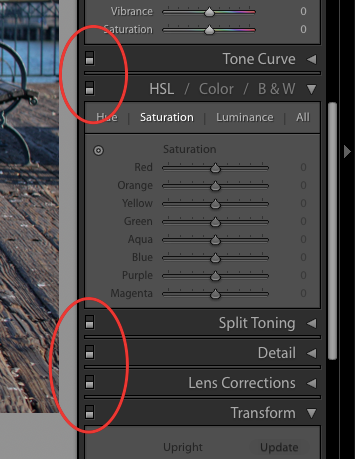
I'm not sure how or why this happened, but suddenly, all my develop panels (those in the right sidebar) are turned off for every photo in my catalogue. The little on/off switch is in the "off" position for everything. Does anyone know why or how this happens and how to fix it?


 20
Réponses
20
20
Réponses
20



Copier le lien dans le Presse-papiers
Copié
Yeah is the image showing as missing?
Post the EXACT version number by going to the Help menu and selecting System Info.
Did you do any Updates recently?
Copier le lien dans le Presse-papiers
Copié
No, the images are not missing. In fact, as I browse the grid view, all the thumbnails start changing back to the original photo, before all my edits! (Which I guess makes sense, since Lightroom thinks all my edits are turned off.)
Exact version: 6.14 [ 1149743 ]
The only recent update I can think of (that could cause issues here) is the "macOS Catalina 10.15.5 Supplemental Update", which was installed on June 5th.


Copier le lien dans le Presse-papiers
Copié
”macOS Catalina 10.15.5”!! Lightroom is not supported fully in ”Catalina” proceed with caution and do not uninstall Lightroom as you will not be able to re-install since it does not have a 64 bit installer.
Copier le lien dans le Presse-papiers
Copié
Sigh. I knew this day would come eventually, I just didn't think it would be today. To the best of your knowledge, can I upgrade to the newest version of Lightroom Classic and have everything "just work"? Is Lightroom Classic supported on Catalina?
Copier le lien dans le Presse-papiers
Copié
Yes it is. It should be no problem for you to use a trial for 7 days.

Copier le lien dans le Presse-papiers
Copié
Vibrance and Saturation are not turned off, so the image is there and apparently it can be edited. I understand that this is a nuisance, but what stops you from simply turning the panels on again?
Copier le lien dans le Presse-papiers
Copié
Um, I'm not going to manually turn on every panel for tens of thousands of photos, especially when I never turned them off to begin with.
Copier le lien dans le Presse-papiers
Copié
In a post above you said your images are reverting to before you edited them, Cause is, in your opinion, the panels are turned off. That Assumption is incorrect. Whether the develop panels are on or off does not affect already edited images. Those edits, changes, are written to the catalog file and will not change by some one or thing turning off the develop module sections.
Copier le lien dans le Presse-papiers
Copié
No, I think you misunderstood me. I didn't say the images were reverting; I said the thumbnails were reverting. That's because all the edits are being disabled.
Copier le lien dans le Presse-papiers
Copié
Turn on or off the section in the right hand side panel of the develop module has No affect on what you see in the thumbnails or in the full image when only one image is being shown.
That little toggle, On/Off, has no affect on already edited images or thumbnails of already edited images.
Copier le lien dans le Presse-papiers
Copié
This is not true, because I'm seeing the behavior myself. When I go back into the grid view, all the thumbnails start changing back to the original photos (before my edits).

Copier le lien dans le Presse-papiers
Copié
Turning off the switch for a panel DOES affect the image shown in the main screen. film strip and navigator if that panel contains edits. If it didnt than why would the switch be there.
Copier le lien dans le Presse-papiers
Copié
Lightroom shouldn't be turning off the panel switches by itself. Another user reported this behavior a few months ago in another thread so it could be one of Lightrooms many random bugs/glitches. Having to manually turn the switches back on for thousands of photos would be an exercise in fustration.
Copier le lien dans le Presse-papiers
Copié
Yes, agreed, it's very frustrating. I don't know why this happened all of a sudden, but the timing of the most recent Catalina update is a bit suspicious. I've become increasingly frustrated with Lightroom 6 in modern versions of macOS and I think this is the straw to break the camel's back. I'll probably just upgrade and see if it fixes all my issues.
Copier le lien dans le Presse-papiers
Copié
Select all your photos and have a photo with ALL the panels turned off as the MOST selected. Turn Autosync ON. Turn the panels on in the MOST selected photo. All the other photos will have the panels turned on. Turn Autosync OFF.
Copier le lien dans le Presse-papiers
Copié
That sounds like it'll work too. I think I might bite the bullet and upgrade, since that'll presumably fix all the issues I'm having with running such an old version in Catalina.
Copier le lien dans le Presse-papiers
Copié
Thanks for this suggestion, but it doesn't quite work fully. I just realized that I've somehow lost all my crop settings too, even though they show up in the list of edits, and that can't be auto-synced in the same way. It's almost like that panel has been turned "off" too.
Upgrading to Lightroom Classic 9 does not fix anything. The same problems exist there.
At this point, I may try to revert to an old catalog backup. I was already at my wit's end with Lightroom and I think this is breaking me.
Copier le lien dans le Presse-papiers
Copié
I have a bit of an update. After some more digging, I realized that all my photos with edits had 2 or 3 mysterious entries in the edit history:

I have NO IDEA how these got here. I'm seeing the export entry on photos that I haven't looked at in years. And I have no idea what "Multiple Settings" means; I certainly didn't do that. If I click the history item just below that, voila! My photo is back to normal.
It would seem that my catalog got corrupted in a really bizarre way. It looks like if I restore the last backup before 4/26 (the date of the last "export" history item), then everything is back to normal and all my develop panels are turned on again.
tl;dr: my catalog got corrupted somehow. Always do your monthly backups and save them to the cloud!

Copier le lien dans le Presse-papiers
Copié
Have you found a solution how to delete all these "Multiple settings" entries in the history? I've exact the same problem.
Oliver
Copier le lien dans le Presse-papiers
Copié
Since this is indeed the same problem, here are a few hints on how to proceed.
The log entry "Multiple settings" in the history leads to the fact that the switches of the control panels in the development mode are all deactivated. If you delete the entry in the log, as well as the log settings above it, the switches are all enabled again. Why and when exactly this entry was added to the history is beyond my knowledge. Anyway, it would be interesting to know how exactly this can happen.
Since the whole thing affects me but only to 2018, because on the database I have set up again a few weeks ago and since then re-imported everything in photos, it is relatively easy to manage. The problem does not occur with the newly imported photos. With the photos up to 2018 I have to delete the log entries with two clicks as described above and can then continue to work normally.
However, it would be great if there would be a solution to solve the problem in one go, preferably on the part of Adobe. If the entry is in the LRC database and you know where to find it, that would also be a way to do it.
If anyone has any better ideas, I would be happy to hear them.
Oliver


Préparez-vous ! Une expérience Adobe Community améliorée arrive en janvier.
En savoir plus
 AdChoices