
kaiyoma
Known Participant
June 15, 2020
Question

Lightroom 6: all my develop panels are suddenly turned off!

  • June 15, 2020
  • 4 replies
  • 1430 views

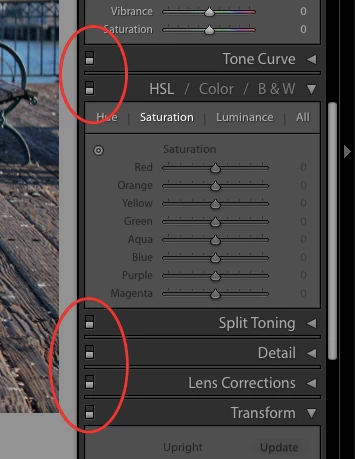
I'm not sure how or why this happened, but suddenly, all my develop panels (those in the right sidebar) are turned off for every photo in my catalogue. The little on/off switch is in the "off" position for everything. Does anyone know why or how this happens and how to fix it?
 

This topic has been closed for replies.

4 replies

kaiyoma
kaiyomaAuthor
Known Participant
June 16, 2020

I have a bit of an update. After some more digging, I realized that all my photos with edits had 2 or 3 mysterious entries in the edit history:


I have NO IDEA how these got here. I'm seeing the export entry on photos that I haven't looked at in years. And I have no idea what "Multiple Settings" means; I certainly didn't do that. If I click the history item just below that, voila! My photo is back to normal.


It would seem that my catalog got corrupted in a really bizarre way. It looks like if I restore the last backup before 4/26 (the date of the last "export" history item), then everything is back to normal and all my develop panels are turned on again.


tl;dr: my catalog got corrupted somehow. Always do your monthly backups and save them to the cloud!

Inspiring
January 13, 2023

Have you found a solution how to delete all these "Multiple settings" entries in the history? I've exact the same problem.

Oliver

Bob Somrak
Legend
June 15, 2020

Select all your photos and have a photo with ALL the panels turned off as the MOST selected.  Turn Autosync ON.  Turn the panels on in the MOST selected photo.  All the other photos will have the panels turned on.  Turn Autosync OFF.

M4 Pro Mac Mini. 48GB
kaiyoma
kaiyomaAuthor
Known Participant
June 15, 2020

That sounds like it'll work too. I think I might bite the bullet and upgrade, since that'll presumably fix all the issues I'm having with running such an old version in Catalina.

JohanElzenga
Community Expert
Community Expert
June 15, 2020

Vibrance and Saturation are not turned off, so the image is there and apparently it can be edited. I understand that this is a nuisance, but what stops you from simply turning the panels on again?

-- Johan W. Elzenga
kaiyoma
kaiyomaAuthor
Known Participant
June 15, 2020

Um, I'm not going to manually turn on every panel for tens of thousands of photos, especially when I never turned them off to begin with.

Just Shoot Me
Legend
June 15, 2020

In a post above you said your images are reverting to before you edited them, Cause is, in your opinion, the panels are turned off. That Assumption is incorrect. Whether the develop panels are on or off does not affect already edited images. Those edits, changes, are written to the catalog file and will not change by some one or thing turning off the develop module sections.

Just Shoot Me
Legend
June 15, 2020

Yeah is the image showing as missing?

Post the EXACT version number by going to the Help menu and selecting System Info.


Did you do any Updates recently?

kaiyoma
kaiyomaAuthor
Known Participant
June 15, 2020

No, the images are not missing. In fact, as I browse the grid view, all the thumbnails start changing back to the original photo, before all my edits! (Which I guess makes sense, since Lightroom thinks all my edits are turned off.)


Exact version: 6.14 [ 1149743 ]


The only recent update I can think of (that could cause issues here) is the "macOS Catalina 10.15.5 Supplemental Update", which was installed on June 5th.

DdeGannes
Community Expert
Community Expert
June 15, 2020

”macOS Catalina 10.15.5”!! Lightroom is not supported fully in ”Catalina” proceed with caution and do not uninstall Lightroom as you will not be able to re-install since it does not have a 64 bit installer.

Regards, Denis: iMac 27” mid-2015, macOS 11.7.10 Big Sur; 2TB SSD, 24 GB Ram, GPU 2 GB; LrC 12.5,; Lr 6.5, PS 24.7,; ACR 15.5,; (also Laptop Win 11, ver 24H2, LrC 15.0.1, PS 27.0; ) Camera Oly OM-D E-M1.