


- Accueil
- Lightroom Classic
- Discussions
- Re: Lightroom Classic CC 8.2 Enhance Details on Fu...
- Re: Lightroom Classic CC 8.2 Enhance Details on Fu...

Copier le lien dans le Presse-papiers
Copié
Hi everyone, just installed the new Lightroom 8.2 with the hope that after years and years, my X-Trans raw files (RAF) would see an improvement in Lightroom. All I see is a black screen in the preview window or if I try to generate the DNG file, it's the same black content. So anyone else having this issue with his Fuji X-T1 files ?
Thanks, Augustin .


 1 bonne réponse
Solved !!! Follow step 2 from the link and everything will be ok.
"Force Lightroom Classic CC to use OpenGL instead of DirectX"
Big improvement on the X-T1 sensor, finally got rid of those pesky "worms" 
Good luck !
https://helpx.adobe.com/ca/lightroom/kb/crash-gpu-directx-enabled.html

 61
Réponses
61
61
Réponses
61


Copier le lien dans le Presse-papiers
Copié
My RAF files are working OK with this new feature on W10. I think some issues have been flagged on older, less powerful versions of mac OS.
Copier le lien dans le Presse-papiers
Copié
Thanks for the answer. I also have installed the latest W10. So it must be something else...
Copier le lien dans le Presse-papiers
Copié
O.K. Interestingly I’m seeing good results from selected Fuji X Trans files (XT2) more so than from Canon CR2 files. It may be worth flagging this in the get satisfaction feedback forum where the Adobe engineers will get to see it.
https://feedback.photoshop.com/photoshop_family/categories/photoshop_family_photoshop_lightroom
Copier le lien dans le Presse-papiers
Copié
Thanks, I don't have an account there but I'll try to see if the problem is on my side first. Maybe ask a friend to try my RAW files on his computer. We'll see..

Copier le lien dans le Presse-papiers
Copié
Long shot, but just in case, in your Camera, what firmware version?
Copier le lien dans le Presse-papiers
Copié
Just checked, it's 5.40.
Copier le lien dans le Presse-papiers
Copié
The black screen, is that for any RAF, a new RAF, or just the DNG the new feature creates?
Copier le lien dans le Presse-papiers
Copié
any RAF
Copier le lien dans le Presse-papiers
Copié
So, any RAF that you have not clicked on /Photo/Enhanced Detail/ in the Library module?
Copier le lien dans le Presse-papiers
Copié
I'm in the develop module, after importing the RAF file. And I use the menu Photo/Enhanced Detail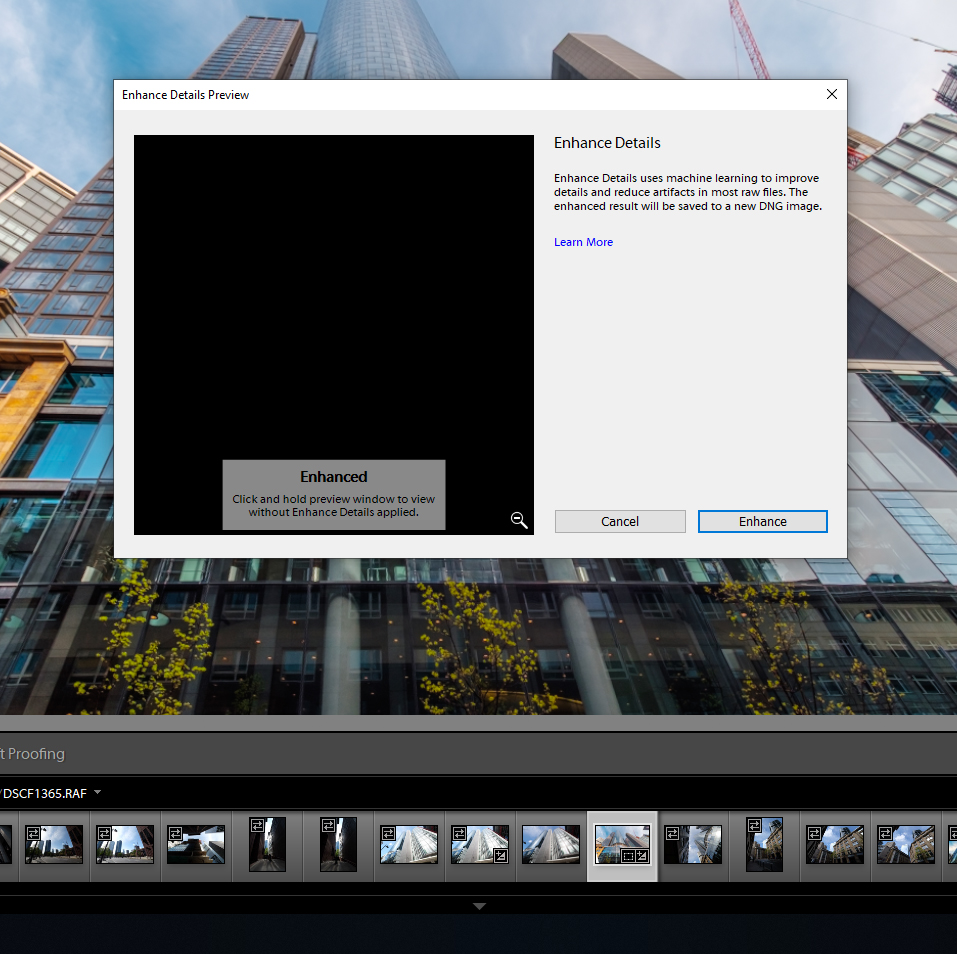
Copier le lien dans le Presse-papiers
Copié
If you are importing with embedded preview only, does it make any difference if you first generate a 1:1 preview?
Copier le lien dans le Presse-papiers
Copié
tried that too...same result
Copier le lien dans le Presse-papiers
Copié
also If I long click the image it shows me the original file (without enhance) (not a black result).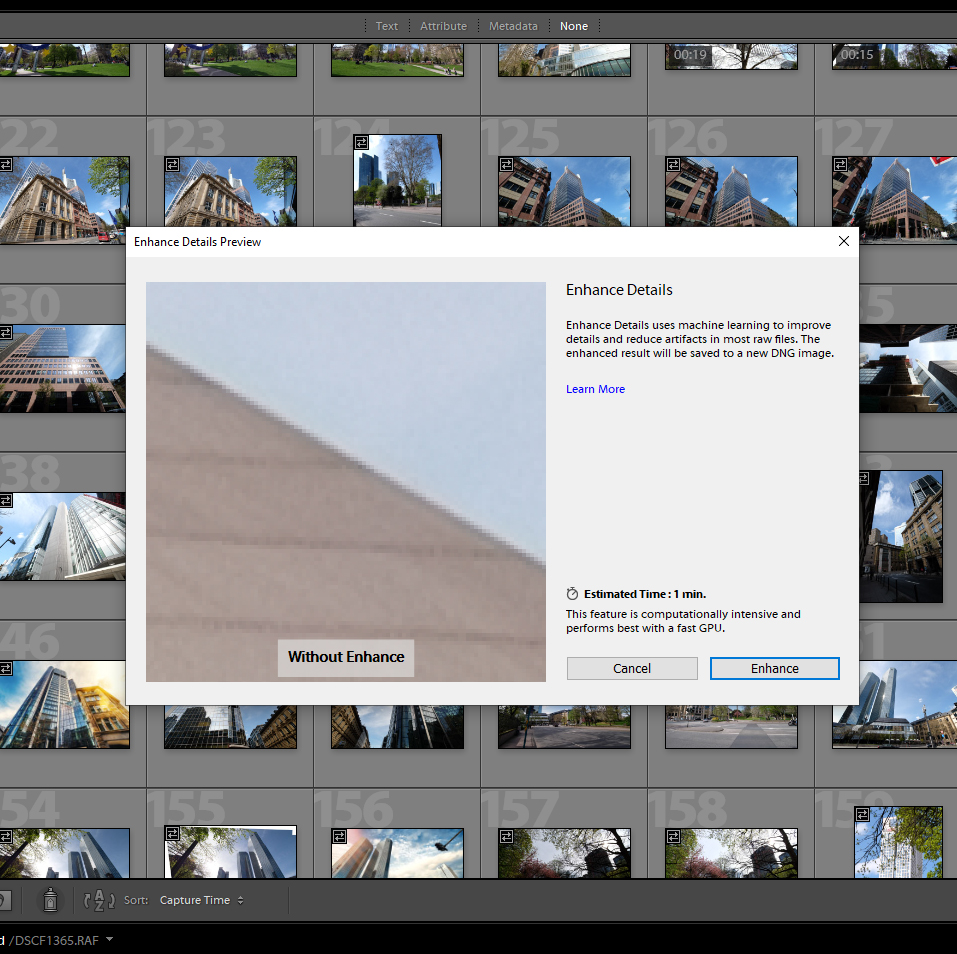
Copier le lien dans le Presse-papiers
Copié
Ok, now in my brand new and still working on experimenting, I notice that what I see in this preview is not the entire image, it is a zoomed in (what zoom value???), and you can move it around. So, are you sure it is not just zoomed in on a black area?
what happens if you click on enhance?
By the way it will create a DNG file.
Copier le lien dans le Presse-papiers
Copié
As I have described in the original post, the DNG file is also black. When I click on the image for the "without enhance" preview I can see a zoomed preview and yes, I can also move it around.
Copier le lien dans le Presse-papiers
Copié
Hmm that makes it more hit & miss. You can’t be expected render a DNG for every sample, to use in compare mode. The preview whilst greatly magnified is supposed to give some indication of whether rendering is worthwhile.
Copier le lien dans le Presse-papiers
Copié
Let us know if your friends system is of any help but otherwise don’t panic. I would say this is a tool for your highest rated images and for specialist usage. It’s not something I would use regularly on all images in every day workflow. But if I were making a fine art print or a book, certain subjects could benefit, prior to output sharpening.
When Canon introduced dual-pixel raw I didn’t shout wow! I referred to the changes as nano adjustments. With Enhance Detail the changes will be subtle and more noticeable with certain subjects. I’ve seen enhancements in foliage, birds wings, insects, neon lighting and some text. I had to search my catalog for quite a while to find anything suitable.
I have a couple of XT2 examples on my blog which also includes updates to LRCC. Scroll towards the bottom of the page for LR Classic and Enhance Details.
https://99jon.blogspot.com/2019/02/lightroom-february-2019-updates.html
Copier le lien dans le Presse-papiers
Copié
Oh the stories I could tell, it would take hours. Since I am a professional stock photographer, I had tons of problems with various review teams from diferent stock agencies. Sharpening is a nightmare in LR and well...a lot to talk about. I was hopping to not change my camera this year because of that cursed sensor.
Copier le lien dans le Presse-papiers
Copié
Got off my rear end, started my PC (Win 10) and launched LR classic CC, with v8.2. My rig X-T3.
So when I launch LR, everything looks fine, when I select a image and in the library module select /Photo/Enhanced Detail/ I get a popup preview screen, dark, apparently zoomed way in, would not say black. Is this the point you see black? or before?
Copier le lien dans le Presse-papiers
Copié
Back in the enhanced detail preview condition where it is black, notice the magnifying glass lower right corner, click on it
Copier le lien dans le Presse-papiers
Copié
clicked on it, the image appeared BUT the generated DNG is still black...
Copier le lien dans le Presse-papiers
Copié
And the standard inquiry. Use of GPU on or off?
Copier le lien dans le Presse-papiers
Copié
on, also tried it with off...same
Copier le lien dans le Presse-papiers
Copié
OK, last bit of pestering, and I see The comment by Jim Wilde (probably spot on).
Can you share with us your system information?
in LR /Help/System Information/Copy/ paste in a reply.


Préparez-vous ! Une expérience Adobe Community améliorée arrive en janvier.
En savoir plus
 AdChoices