


- Home
- Lightroom Classic
- Discussions
- Re: Looking for a compatible Light Room photo view...
- Re: Looking for a compatible Light Room photo view...

Copy link to clipboard
Copied
I need to send this as a package to a semi computer literate client to assist in the selection of photos that need to be edited, this app must be desktop compatible, simple for the client to use, and must allow the customer to star rate each photo so that when I get this back I know which photo in LR needs to be edited as the customers favorite.
[Moved from non-technical Forum Lounge to specific Program forum... Mod]
[Here is the list of all Adobe forums... https://forums.adobe.com/welcome]


 1 Correct answer


Faststone Image Viewer can be installed to run on a usb stick. It will allow photos to be tagged by a simple tick in a box.
Download FastStone Image Viewer

I think xNView is also available as a 'portable' version and has Tagging and Star rating.

BUT neither program is 'Compatible' with Lightroom. You would need to run the USB program and use a filter to view the files that have been tagged or rated.
You will still have to somehow select the same photos in Lr, as the exporte
...
 16
Replies
16
16
Replies
16


Copy link to clipboard
Copied
Hi Peter,
I’d recommend Lightroom mobile for the web.
Within Lightroom, sync your collection(s) of photos with Lightroom Mobile. Then, go to lightroom.adobe.com (and sign in with your Adobe ID) and you’ll find your synchronized photos.
You can share collections at that point, and with the link provided, you can invite your client to view the photos, they can “like” them, and they can add comments. The likes and comments will sync back to Lightroom on the desktop and you can view them from within your Library module.
So, the only photo viewer your client needs is a browser...
Mike
Copy link to clipboard
Copied
I forgot to add this helpful link... refer to the section on sharing:
Learn to use Lightroom on the web
Mike
Copy link to clipboard
Copied
Thank you Michael, my problem is it must be desktop, I have some 500 photos which I've cleaned up and these will be disseminated to about 6 family members to select their favorites for final editing, 3 of them live out in the stix (bush farms) with no internet connection.
Each family member needs to mark their favourites (star rating) and let me have these back, I need to correlate these and continue the work in LR.
not your normal problem!

Copy link to clipboard
Copied
Collections that are synced to your Lr Mobile account will be viewable in any browser. All you need is the link that is generated when you make the collection public.

Copy link to clipboard
Copied
Peter, to my knowledge there is no such thing as a "Lightroom compatible" image viewer. Technically speaking, Lightroom doesn't open images. The only file that Lightroom opens is the catalog which is a database file. Images are imported and added to the database and are displayed as image objects within that database. The only way you would be able to enable your people to add star ratings to the images would be to allow them to have access to the catalog, and that requires a database program. Without the Internet to allow them to use Lightroom.adobe.com to do this you are facing a difficult challenge.
Copy link to clipboard
Copied
My thoughts-
Use the Print module to design a print template showing Filename, select all the photos to print to a single multi-page PDF.
(Most recent Windows and Mac systems can "Print to PDF")
Send the PDF to the family members
Every computer should be capable of viewing PDF files.
Ask your family members to simply reply a typed text file list of the Filenames they want edited.
There are ways to edit a text list of filenames and enter them all together in the filter search box to select all the photos in the list in one step.
A forum page on this topic can be found at-
Copy link to clipboard
Copied
Are you not on Lightroom CC? Is that what you mean by 'it has to be desktop'?
If that's the case you might be able to do what you want with either google photos or flickr. Either will allow you to upload to a location online where your family can go to a URL, see the images and make comments.
Copy link to clipboard
Copied
The way I'm reading the problem is that the people needing to rate the images don't have any Internet at all. In other words, the images have to be delivered to the clients in person and they have to be able to look at them on their computer, without the Internet, be able to rate them, and then return the rated images and any comments and requests for changes. No e-mail, no browsers, etc.
Copy link to clipboard
Copied
The way I'm reading the problem is that the people needing to rate the images don't have any Internet at all.
That is also my 'take' on the OPs question.
Which is why I should have added in my post#6- Send the PDF to the family members- by a usb stick with a 'Return-paid mailer. (Include a PDF Reader installer on the usb stick)
And ask for the text file returned on the usb.
Copy link to clipboard
Copied
Hi Jim and Wobertc, yes you seem to have a understanding of the problem.
Just to add, I have exported the 500+ photo cataloge from LR and have a folder with all the images on a USB stick (this a simple process), what I am looking for is a application (.exe file) that I can include with this, all that I am looking for is a photo viewer that will allow the user to star rate the relevant photo and possibly add a comment, this needs to be sent back to me and the 5 star rated photos are the ones I will further enhance using LR and will ignore the rest.
So in summary I am looking for a Light Room compatible desktop photo-viewing application that offers a rating and comments feature that I can package with the photo's and send on a USB to the client for review and selection.

Copy link to clipboard
Copied
I don't think there's anything obvious.
I'd just tell them to move the images into different folders, using their operating system to examine files. Once you get the sticks back, you could import the stick folders.
Copy link to clipboard
Copied
Faststone Image Viewer can be installed to run on a usb stick. It will allow photos to be tagged by a simple tick in a box.
Download FastStone Image Viewer

I think xNView is also available as a 'portable' version and has Tagging and Star rating.

BUT neither program is 'Compatible' with Lightroom. You would need to run the USB program and use a filter to view the files that have been tagged or rated.
You will still have to somehow select the same photos in Lr, as the exported files on the USBs from several family members will not be referenced in Lr. And the suggestion I made above can do this if you make a list of selected files-
eg. xNView-
 and then use this list in the Search Filter of Lightroom. (see link in Post#6) *IF the exported files have the same filename as the originals.!!
John Beardsworth's suggestion Post#11 is possibly the easiest.!!

Copy link to clipboard
Copied
wobertc wrote
I think xNView is also available as a 'portable' version and has Tagging and Star rating.
BUT neither program is 'Compatible' with Lightroom. You would need to run the USB program and use a filter to view the files that have been tagged or rated.

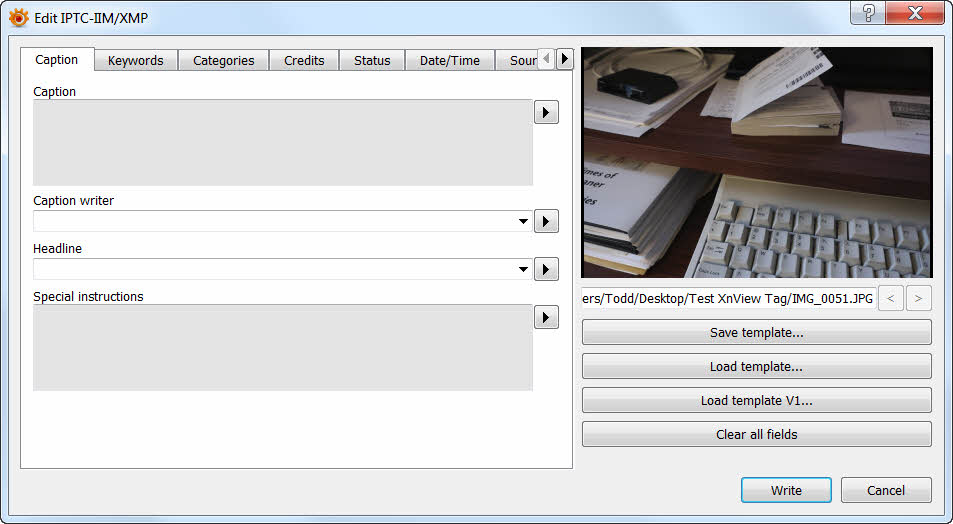
XnviewMP version has the ability to edit IPTC and XMP data (CTRL + I keys), which is readable by LR:
https://www.xnview.com/en/xnviewmp/
Copy link to clipboard
Copied
Here is another option to consider.... from within the Lightroom Web module, create a web gallery and export it to a USB stick. The web gallery can be viewed offline, those viewing can indicate favorites and make comments. The web gallery exported from Lightroom will open in Windows Explorer.
Try this with just a couple of images and see if it will satisfy your requirements.
Copy link to clipboard
Copied
Thank you very much to all who responded to this post, much appreciated.
I have gone with Wobertc's suggestion as in Post 12, not ideal but time is becoming a problem.
I wonder if Adobe would not want to consider this, it wont take much to do so as all that is wanted is already built into PS/LR, all they have to do is create a Lite version as a photo viewer with ratings and comments, nothing else really.
p.s. Must be desktop driven and be mobile so as to accompany the photo folder.
Great to give this to the bride, bridegroom etc for inputs, at least you're not making decisions on their behalf and only spend time enhancing those photo's that are important to them (not you).
Thanks to all again.
Copy link to clipboard
Copied
Here is the link to make a feature request: Photoshop Family Customer Community
If you post it maybe others will chime in.


Get ready! An upgraded Adobe Community experience is coming in January.
Learn more
 AdChoices