Exit
  • Global community
    • Language:
      • Deutsch
      • English
      • Español
      • Français
      • Português
  • 日本語コミュニティ
  • 한국 커뮤니티
0

LR edit in > PS it returns "unable to prepare" error

Community Beginner ,
Apr 13, 2022 Apr 13, 2022

I just moved from a Mini to an Apple Studio.  Having issue when using the Edit in > Photoshop 2022 function.  It returns "Unable to Prepare" error.  All of the previous answers related to Windows machines.

TOPICS
macOS
227
Translate
Report
Community guidelines
Be kind and respectful, give credit to the original source of content, and search for duplicates before posting. Learn more
community guidelines

correct answers 1 Correct answer

Community Expert , Apr 14, 2022 Apr 14, 2022

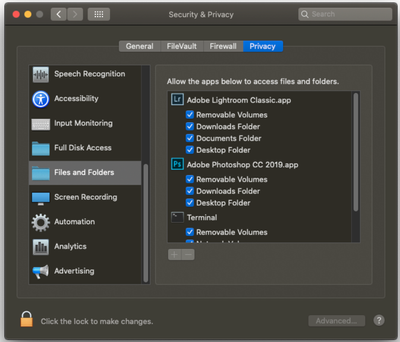
No answers from Mac users yet!  Have you checked "Permissions" for the original files in the new Apple Studio system?

In particular Look at Files and Folders. Make sure LrC can access everything.
Rob_Cullen_0-1649982411684.png

Other Forum answers have suggested faulty drives (not unheard of in new systems!), and 'Missing' files that need re-linking (but usually a different error message).


Translate
Community Expert ,
Apr 14, 2022 Apr 14, 2022

No answers from Mac users yet!  Have you checked "Permissions" for the original files in the new Apple Studio system?

In particular Look at Files and Folders. Make sure LrC can access everything.

Rob_Cullen_0-1649982411684.png

Other Forum answers have suggested faulty drives (not unheard of in new systems!), and 'Missing' files that need re-linking (but usually a different error message).


Regards. My System: Windows-11, Lightroom-Classic 15.1, Photoshop 27.2, ACR 18.1.1, Lightroom 9.1, Lr-iOS 10.4.0, Bridge 16.0.1 .

Translate
Report
Community guidelines
Be kind and respectful, give credit to the original source of content, and search for duplicates before posting. Learn more
community guidelines
Community Beginner ,
Apr 15, 2022 Apr 15, 2022
LATEST

Worked perfectly and instantly. Many thanks. 

Translate
Report
Community guidelines
Be kind and respectful, give credit to the original source of content, and search for duplicates before posting. Learn more
community guidelines
