Exit
  • Global community
    • Language:
      • Deutsch
      • English
      • Español
      • Français
      • Português
  • 日本語コミュニティ
  • 한국 커뮤니티
0

LrC icone en mode grille en haut droite avec 3 barres et flèche vers le bas.

Community Beginner ,
May 08, 2022 May 08, 2022

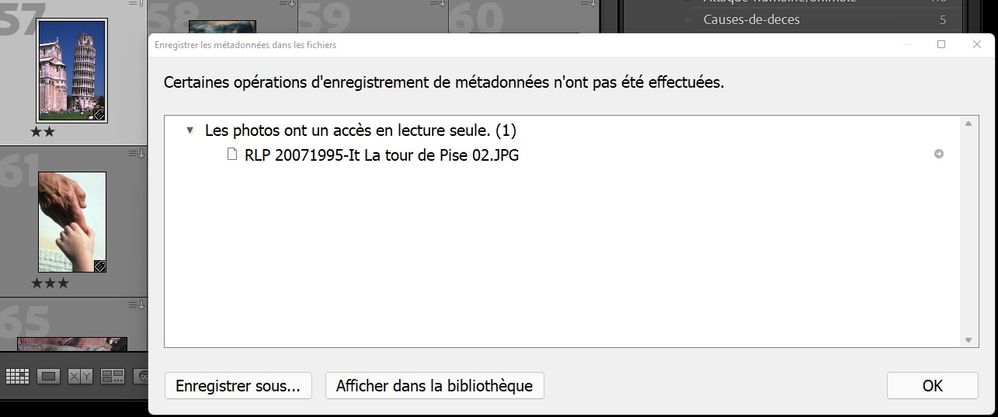
Lorsque je sauvegarde (Ctrl S) cette photo, on me dit ...

Certaines opérations d'enregistrement de métadonnées n'ont pas été effectuées.

Les photos ont un accès em lecture seule. 

Enregistrer sous...

Lorsque je clique sur "Enregistrer sous", on m'amène dans l'explorateur et on veut que je crée et sauvegarde une filière en mode .txt

Je n'y comprend plus rien.
Capture d’écran 2022-05-08 145540.jpg

TOPICS
Windows
220
Translate
Report
Community guidelines
Be kind and respectful, give credit to the original source of content, and search for duplicates before posting. Learn more
community guidelines
LEGEND ,
May 08, 2022 May 08, 2022

This photo has read-only access. Something in your operating system is preventing you from writing to this photo. Check the permissions on the photo, also check the Properties attribute to see if that is read only.

Translate
Report
Community guidelines
Be kind and respectful, give credit to the original source of content, and search for duplicates before posting. Learn more
community guidelines
Community Beginner ,
May 08, 2022 May 08, 2022

I have 250 photos of my catalogue of 32,000 with the same problem. They were imported in the 90's and I worked on them in many versions of LR and on different computers, and you finally solved my problem. I have to open each in the explorer, check the property and the attribut in French says lecture seule, meaning read only. I remove that check and Ctrl S finally works and the icon is gone.

Thanks dj_paige

Roch LP

Translate
Report
Community guidelines
Be kind and respectful, give credit to the original source of content, and search for duplicates before posting. Learn more
community guidelines
Community Beginner ,
May 16, 2022 May 16, 2022
LATEST

Je crois répondre une deuxième fois : la réponse que j'ai reçu de DJ Paige m'a permis de solutionner mon problème. Je ne pouvais pas faire une sauvegarde "Ctrl S" parce que la filière était classifiée en lecture seule. Pour la rendre accessible je l'ai ouverte dans l'Explorateur de windows et désactivé cette lecture seule, ensuite sorti de l'explorateur et Ctrl S fonctionne. Parfois avec d'autres photos il fallait que je neutralise la protection que je trouve au bas de ses métadonnées.

RochLP ; merci.


Translate
Report
Community guidelines
Be kind and respectful, give credit to the original source of content, and search for duplicates before posting. Learn more
community guidelines

