
Exit
  • Global community
    • Language:
      • Deutsch
      • English
      • Español
      • Français
      • Português
  • 日本語コミュニティ
  • 한국 커뮤니티
0

My Basic Row is missing. How do I get it back?

New Here ,
Jul 08, 2013 Jul 08, 2013

Screen Shot 2013-07-08 at 3.33.39 PM.png

26.9K
Translate
Report
Community guidelines
Be kind and respectful, give credit to the original source of content, and search for duplicates before posting. Learn more
community guidelines

correct answers 1 Correct answer

People's Champ , Jul 08, 2013 Jul 08, 2013

Right click on Tone Curve and put a check next to Basic

Translate
People's Champ ,
Jul 08, 2013 Jul 08, 2013

Right click on Tone Curve and put a check next to Basic

Translate
Report
Community guidelines
Be kind and respectful, give credit to the original source of content, and search for duplicates before posting. Learn more
community guidelines
New Here ,
Jul 08, 2013 Jul 08, 2013

Thanks!!!

Translate
Report
Community guidelines
Be kind and respectful, give credit to the original source of content, and search for duplicates before posting. Learn more
community guidelines
New Here ,
May 03, 2014 May 03, 2014

Thanks Rick. The question IS... how did that get hidden in the first place?? It was there when I upgraded. Is there some odd key-command that can toggle it off and on? 

Translate
Report
Community guidelines
Be kind and respectful, give credit to the original source of content, and search for duplicates before posting. Learn more
community guidelines
Community Beginner ,
Jan 12, 2015 Jan 12, 2015

My laptop MAC has no mouse, so I hit command, and 1 instead of the right clicking. works every time

Translate
Report
Community guidelines
Be kind and respectful, give credit to the original source of content, and search for duplicates before posting. Learn more
community guidelines
Community Beginner ,
Feb 11, 2015 Feb 11, 2015

Thanks for this, it does work and gives me back all my controlls

Translate
Report
Community guidelines
Be kind and respectful, give credit to the original source of content, and search for duplicates before posting. Learn more
community guidelines
New Here ,
Sep 18, 2015 Sep 18, 2015

Oh, Sawwhet THANK YOU SO MUCH!!!!!!!!

Translate
Report
Community guidelines
Be kind and respectful, give credit to the original source of content, and search for duplicates before posting. Learn more
community guidelines
LEGEND ,
Sep 18, 2015 Sep 18, 2015

You can also show the Develop panels by using the menu command Window > Panels > Histogram / Basic / Tone Curve etc.

Translate
Report
Community guidelines
Be kind and respectful, give credit to the original source of content, and search for duplicates before posting. Learn more
community guidelines
New Here ,
Aug 19, 2013 Aug 19, 2013

Wow - have been looking for this answer, thank you very much!

Translate
Report
Community guidelines
Be kind and respectful, give credit to the original source of content, and search for duplicates before posting. Learn more
community guidelines
New Here ,
Aug 13, 2014 Aug 13, 2014

How about on a Mac?

Translate
Report
Community guidelines
Be kind and respectful, give credit to the original source of content, and search for duplicates before posting. Learn more
community guidelines
People's Champ ,
Aug 13, 2014 Aug 13, 2014

It is the same procedure Mac or PC

Translate
Report
Community guidelines
Be kind and respectful, give credit to the original source of content, and search for duplicates before posting. Learn more
community guidelines
New Here ,
Aug 28, 2014 Aug 28, 2014

I have been working in the basic develop mode for about an hour and accidentally clicked something that removed the "Basic" editing. I've tried to right click on the "tone curve" but that doesn't help.

Help!...

Translate
Report
Community guidelines
Be kind and respectful, give credit to the original source of content, and search for duplicates before posting. Learn more
community guidelines
Community Expert ,
Aug 28, 2014 Aug 28, 2014

The right click context panel is the only way to show or hide a panel. Also make sure you haven't just scrolled down and hidden it.
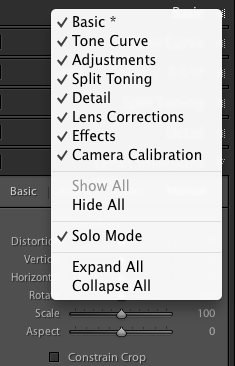
Screen Shot 2014-08-28 at 20.11.42.png

Sean McCormack. Author of 'Essential Development 3'. Magazine Writer. Former Official Fuji X-Photographer.
Translate
Report
Community guidelines
Be kind and respectful, give credit to the original source of content, and search for duplicates before posting. Learn more
community guidelines
New Here ,
Aug 28, 2014 Aug 28, 2014

Thanks Sean! I found it finally. It was under modules and it looks as though I unselected by by accident.

Translate
Report
Community guidelines
Be kind and respectful, give credit to the original source of content, and search for duplicates before posting. Learn more
community guidelines
New Here ,
Sep 24, 2014 Sep 24, 2014

I am truly grateful for this simple fix.  It was really bugging me.  Thanks.  'al

Translate
Report
Community guidelines
Be kind and respectful, give credit to the original source of content, and search for duplicates before posting. Learn more
community guidelines
Engaged ,
Aug 22, 2018 Aug 22, 2018

Hit this function by accident today (Aug 2018). Spent ten minutes trying to figure out what happened. I often wonder why such obscure features in Adobe software exist?

Translate
Report
Community guidelines
Be kind and respectful, give credit to the original source of content, and search for duplicates before posting. Learn more
community guidelines
Community Expert ,
Aug 22, 2018 Aug 22, 2018
LATEST

Because people wanted to hide panels they weren’t using.

Sean McCormack. Author of 'Essential Development 3'. Magazine Writer. Former Official Fuji X-Photographer.
Translate
Report
Community guidelines
Be kind and respectful, give credit to the original source of content, and search for duplicates before posting. Learn more
community guidelines
