


- Home
- Lightroom Classic
- Discussions
- Re: no search function in library?
- Re: no search function in library?

Copy link to clipboard
Copied
Hi! I do not have a search function at the top of the screen in the library mode like there is supposed to be. I have the filter bar, but not the search space which is supposed to be above it. Can anybody help me??
Thanks in advance!


 1 Correct answer

Right at the Top where it says "Library Filter:". Select where it says TEXT.

 9
Replies
9
9
Replies
9



Copy link to clipboard
Copied
Search is in the Filter bar. Do you have Text selected?
Copy link to clipboard
Copied
Sorry, I still do not see it. Here is a screen shot:

Copy link to clipboard
Copied
Right at the Top where it says "Library Filter:". Select where it says TEXT.
Copy link to clipboard
Copied
Got it thanks! But if I understand correctly, that only searches keywords. According to this tutorial Search and find photos | there is supposed to be a more universal image recognition type search available as shown in this screen shot:

Copy link to clipboard
Copied
Your last screen shot of some Video is showing LR CC the Cloud Centric version of LR. Not LR Classic CC the Traditional, Desktop Focused, version.
Which version are you using?
Copy link to clipboard
Copied
Just Shoot:
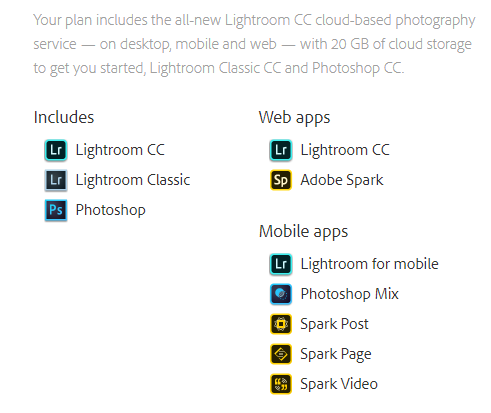
Thanks for your responses! I am not clear which version, apparently the classic? Here is a snip of my account page:

Copy link to clipboard
Copied
Your screenshot in post #2 is from Adobe Photoshop Lightroom (old name; new name "Classic"). The Catalog name is shown in the window title.
It is NOT what is now called "Lightroom CC", which does not use a Catalog. If you upgrade yours to latest version then it will be labelled "Classic".
Once you click on "Text" you should see some options below that, as shown in my own screenshot (post #6).
"Lightroom CC" (new name) is a completely separate program which works in a different way. Confusing? you bet! Your subscription permits you to use one, the other, or both. Their respective merits and downsides are a whole separate discussion but IMO it's best to continue as you are, for now, absent some compelling reason to change.
Lightroom CC (the cloud based option) is still in its infancy so who knows how these two products might grow closer together, or else further apart, going forward.
Copy link to clipboard
Copied
Thanks much for all your help, I think I understand now.
Copy link to clipboard
Copied
So far as Lightroom Classic (for the new Lightroom CC, I don't know) Text search need not restrict itself to keywords, unless you select to do that using the dropdown menu -or otherwise to search for your text just within filenames, just within captions etc.

If you search for text using "any searchable field" this also picks up photos that belong to a collection, or a folder, with that word in its name. It is maximally inclusive in other words. You can add another filter of a different kind too, or you can start from a more selective folder or collection based view, which you are searching within, rather than searching within the entire Catalog always.
I have in the past tried a plugin "TextMeta" by the late Rob Cole, which added options to search or define Smart Collections based on a parent folder field etc also. But given a modicum of keywording and Collections (without needing to go crazy with either), the supplied search and filter options have proved enough for me, without that.


Get ready! An upgraded Adobe Community experience is coming in January.
Learn more
 AdChoices