


- Home
- Lightroom Classic
- Discussions
- P: All history lost when upgrading catalog
- P: All history lost when upgrading catalog
P: All history lost when upgrading catalog

Copy link to clipboard
Copied
Hello. I updated to LR 12 classic this morning. After it converted my catalog, it crashed stating that the catalog was corrupt. It then repaired it. It then crashed again, stating that the catalog was corrupt.
The first corrupt catalog is 1.6GB. The second is 1.2GB.
It then repaired it again. This final catalog is 300MB and contains zero history. The photos are in their last edited state, but I can not go back to previous steps nor copy settings to another file.


 63
Replies
63
63
Replies
63


Copy link to clipboard
Copied
I just repeated the same exercize with the same LR11 catalog, and got the same results. For the record, I'm running Windows 11 Home 64-bit (10.0, Build 22621). For the time being, I have reverted to LR11.5. I'm looking forward to a fix, as the new object and people selection tools look great.


Copy link to clipboard
Copied
I am sorry to hear about your issue. I do have a couple of recommendations you might want to try:
- Restoring from a recent backup. It is possible a backup catalog may update, assuming the corruption is recent.
- Contact support and ask them for a catalog repair. You would send in your latest working copy of the Lightroom
Classic 11.5 catalog and they would attempt repair and return it to you. https://helpx.adobe.com/contact
It is likely that the corruption is impeding the upgrade process and will need to be repaired before you can successfully upgrade.
Copy link to clipboard
Copied
Thanks Rick.Out of curiosity, I opened it in 11.5 with the 'Test integrity of this catalog' option selected. It took a few minutes, and then LR opened. Would you expect to find corruption with that?

Copy link to clipboard
Copied
I have this problem too. I updated to v12 last week. After exiting and attempting to back up, I got this error message "We're sorry, the catalogue named "Lightroom Catalogue-v12" failed the requested integrity check and cannot be backed up. Lightroom will attempt to repair the catalog the next time you open it". I opened it again the following morning and the repair seems to have worked. However, I noticed my catalogue file size had dropped from 1Gb to 500Mb. Perhaps this is where I should mention that I manually delete my history once I'm happy with my images - generally after a few days or weeks. The only history I had was from a recent trip to North Wales, when I saw my catalogue file size increase from 500Mb to 1Gb. I opened LR last night to manually remove the history, which was when I found it had already gone. That would explain the file size dropping back down again. Whilst I'm not too bothered because I would have done this manually, it's clearly not supposed to work this way. Everything else seems OK and I can copy and paste the develop settings, even though the history has gone. My hand painted masks are still there and the sliders are where I left them.


Copy link to clipboard
Copied
I know my comment will not be of immediate help, but this situation really shows the importance of a good backup system. In addition to using the LrC backup function to backup the catalog to different drive, I also copy the unzipped catalog file to yet another drive for additional insurance.

Copy link to clipboard
Copied
deleated, my bad

Copy link to clipboard
Copied
I am sending you an e-mail offlist.
We can take a look at your catalog.
Thanks,
Sunil
Copy link to clipboard
Copied
Uploading a copy of the catalog now. Thank you Sunil.

Copy link to clipboard
Copied
I have the same problem (running Windows 11 Home 64-bit). Converting an 1.9 GB catalog worked fine, but on the next start LR 12 classic reported an currupt catalog. After the repair the catalog has 1.4 GB and the development protcol is gone, the panel shows nothing.
I did this twice (deleteted the LR 12 catalog and opened/converted the LR 11 catalog again in LR 12 classic) with the same result.
Maybe I'll go back to LR 11.5 and wait for an solution to this problem.

Copy link to clipboard
Copied
I posted a question re loss of history a few days ago, in my case some files have history, some have partial history and some have no history. There must be a way to solve this???
Copy link to clipboard
Copied
That's odd. I didn't look at every file (I think it's on the order of 30,000 in that particular catalog), but every one I did had no history.
Did yours show up like mine, in their edited form?
Copy link to clipboard
Copied
Yes all images were as edited but without re-importing the original file I can't revert back to an earlier version of the edit.
Copy link to clipboard
Copied
If you make a virtual copy of a V 11.5 image, can you reset it? I don't have the issue of missing history, but just to test it, I made a virtual copy of an image edited in V 11.5 and was able to reset it to the original state upon import.
Copy link to clipboard
Copied
Doesn't work for me, history just shows 'Create virtual copy...'
Copy link to clipboard
Copied
Did you try to reset the virtual copy. My point is that's a way to keep from re-importing the originals.

Copy link to clipboard
Copied
At KR Seals and Pikkymaster, sorry to interrupt, I just wish to make a point,.
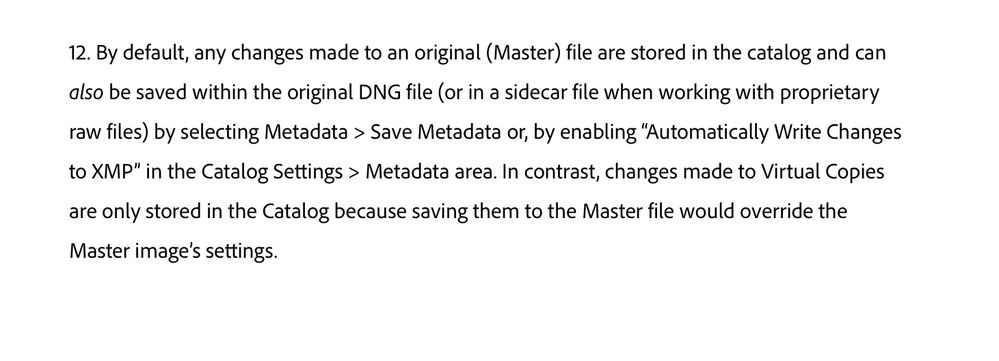
"Virtual Copies" are just data stored in the Catalog file, it is not a copy of the Original file and it will disappear if the original is removed from the Catalog or deleted from the disk.
The Virtual copy's thumbnail will show a curled up in the bottom left.
The first entry in the history will indicate when it was created. You cannot go back to earlier history steps when you have a virtual copy selected.
To see the earlier history steps you will have to select the original image file.
Maybe you are confusing with Snapshots, see the link below,
https://www.youtube.com/watch?v=ZkPsxvd-VAc
Copy link to clipboard
Copied
Also very important, read the last three lines in the attached screen capture which is taken from the link I shared in the post above.
Copy link to clipboard
Copied
Hi, just spent a long time with Adobe via chat, it would appear the problem arose last Dec when upgrading to V11. All history has been fine since then but all pics prior to that upgrade have lost the history. I was advised that there is no way of retrieving the history for these older pics.
Copy link to clipboard
Copied
So was that likely due to a problem in upgrading your Catalog from an earlier version to LrC 11?
If so its not likely reverting to a backup Catlog that's over a year old is a viable option. Very unfortunate.
Copy link to clipboard
Copied
May have been, honestly can't remember now. I'm going to see if I have an older backup anywhere as I could import pics from an older catalog into a newer one - I think!!
Copy link to clipboard
Copied
If this is correct, I'm not sure if this is this is the same problem that hypcx
Zooey123 and me are experiencing.
Before upgrading to LR 12, I didn't notice any problems with he history. On my computer the problems came after the upgrade and the described "database currupt" crashes.
I'm missing the history of photos that I'm imported and developed two weeks ago with V11.5, not only with older versions before V11.
Copy link to clipboard
Copied
It's very odd I've had no problem at all with LR12.
Copy link to clipboard
Copied
That is a distinct problem from mine. I lost history for edits made the same morning as the upgrade.
Copy link to clipboard
Copied
Perhaps I wasn't as clear as intended in my answer regarding making a Virtual Copy in lieu or reimporting. Here is what the OP said: without re-importing the original file I can't revert back to an earlier version of the edit. " I should have pointed out that re-importing would not result in reverting back to an earlier version of the edited image, it would result in returning to the original unedited state. I suggested making a virtual copy to avoid "re-importing". In my testing, I selected an image, did some adjustments, deleted the history, made a virtual copy and was able to reset the virtual copy back to the un-edited state. I thought making, then resetting the virtual copy would gie the OP an option to avoid the trouble of re-importing.


Find more inspiration, events, and resources on the new Adobe Community
Explore Now
 AdChoices

