
charlesl75177870
Participating Frequently
March 27, 2025

P: Color issue with Raw files from Sony A1 ii and lightroom classic 14.2 and Photoshop 26.5

  • March 27, 2025
  • 45 replies
  • 10482 views

I've been having color issues using adobe color profile and LRC 14.2 and PS 26.5 and my Sony A1 ii.  I have a Sony a9iii and a7rv with no issues and LRC 14.1 the colors are fine.  The work around right now is converting the raw to dng in LRC 14.1 before editing in PS.  I reached out to Adobe and they confirmed the issues with the samples I provided.  Since it's isolated to the A1 ii it's not a monitor or icc issue.  see the issue in the pic below
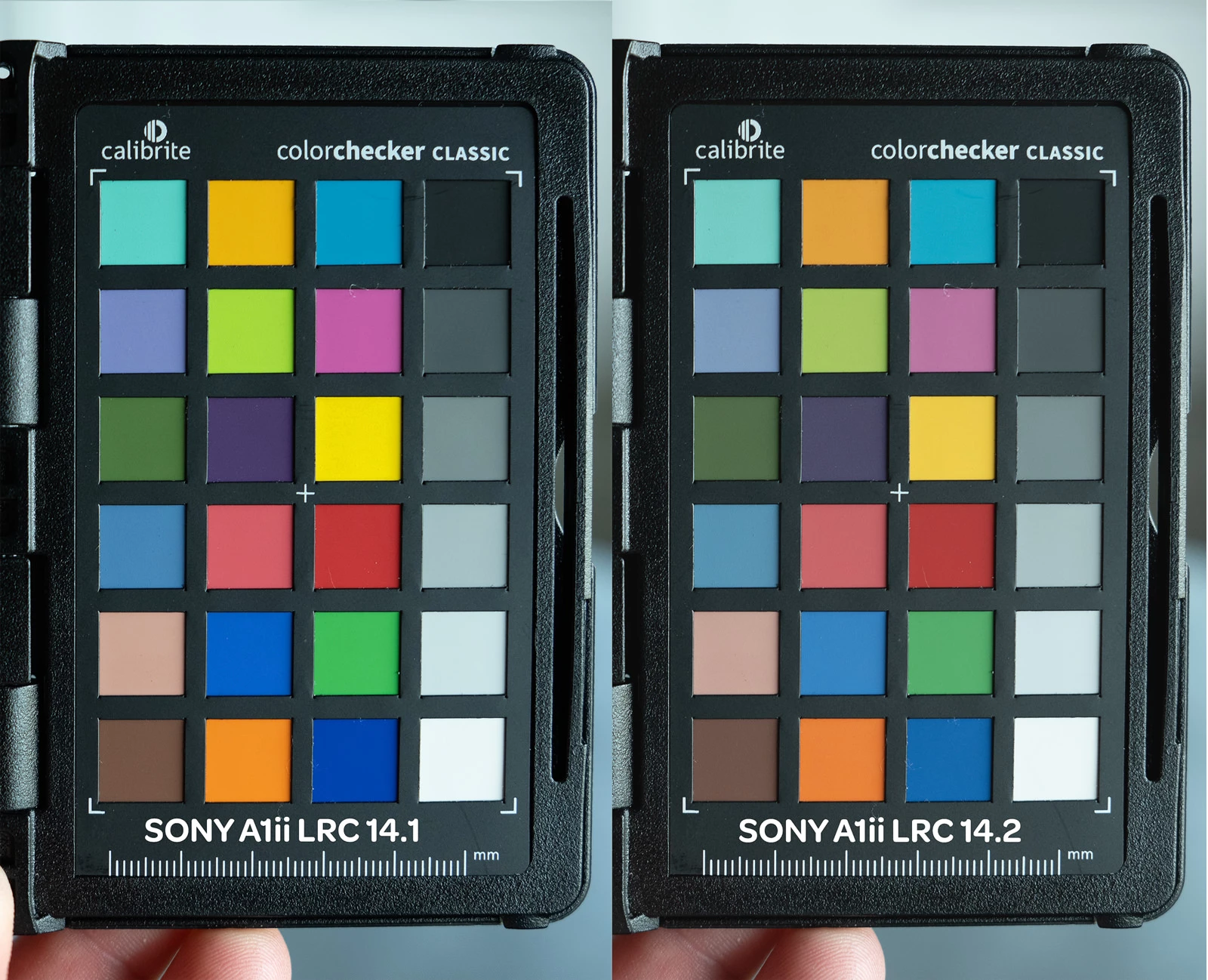
45 replies

charlesl75177870
Participating Frequently
August 2, 2025

Thanks for the work and info!  I'm on a Windows PC so I had to change the .dcp file in the LRCC folder as well as the Camera Raw folder.  If you are on a PC use the 14.1 dcp file from mathieu323314395hg5 but put them here - 


c://program files/adobe/adobe lightroom classic/resources/camerprofiles/adobe standard

c://programdata/adobe/cameraraw/cameraprofiles/adobe standard


Hope this helps until Adobe addresses and fixes the issue.

Participating Frequently
July 28, 2025

I have the same problem

Inspiring
July 26, 2025

Hi, I've tried everything but adobe don't give a damn we're not enough to complain so the only way is to use the dcp profile of version 14.1 and I don't think adobe will change that.

Participant
July 25, 2025

Hi Adobe,


I’m a professional photographer using the Sony A1 II (ILCE-1M2), and I’ve been dealing with a frustrating color rendering issue in both Lightroom Classic and Camera Raw for several months now.


The default Adobe Standard profile for this camera renders colors incorrectly — especially in the blues, which appear flat, desaturated, and shift toward an unnatural “sugar paper” tone. This isn’t a minor variation: it’s clearly visible and makes the profile unusable for professional work.


After much trial and error, I found a workaround by manually replacing the profile with an older version. That older profile delivers much better and more natural color, especially in blue tones, and solves the issue completely for now. However, I can’t say for sure whether it’s perfectly calibrated for the A1 II sensor, since I would need to compare it with another Sony body under controlled conditions. What is certain is that the current default profile is clearly wrong.


This issue affects all Adobe platforms, including Lightroom Mobile, which I regularly use for live events and on-the-go editing. Because of this profile problem, I can no longer use Lightroom Mobile for my professional work — which is a serious limitation in my workflow.


What makes this even more frustrating is that both I and many of my colleagues are paying for these tools every month — and Adobe has recently increased subscription prices. It’s unacceptable that a core issue like this, affecting a flagship professional camera, is left unaddressed for so long despite repeated reports.


Please fix the Adobe Standard profile for the Sony A1 II as soon as possible. Many professionals rely on consistent, reliable color rendering every day — this is not just a minor glitch.


Thank you,

Francesco Ferrarini

Participant
July 6, 2025

Same problem here. Only LR 14.1 looks correct. Latest versions of 14 are displaying raw images incorrectly when in develop. 

Imthesucher
Known Participant
July 5, 2025

I have exactly the same problem... I need an update. I work with Lightroom and my A1 II every day, and it's catastrophic. Please help!

Participant
July 6, 2025

I am having the same problem. How is this not fixed yet!! Still no fix in 14.4. Honestly how does Adobe even get away with this. Maybe this will be the last straw and finally will make the full switch to capture one

Participant
July 6, 2025

Follow Matheiu's instrucitons above and I added some more detail below, but that workaround worked for me and only took about 10 minutes max


Inspiring
July 3, 2025

Now I doubt that Adobe will do anything, it's July and the problem is still there. Honestly, I think it's outrageous. In the meantime, I'm putting the A1 II in the bag and working with my A7 IV.

attached are the proofs on my drive


https://drive.google.com/drive/folders/1oo64BINq_rNvj9gsX7fGlbmIhvA2q7H9?usp=sharing


charlesl75177870
Participating Frequently
July 5, 2025

I submitted a ticket in March of 2025 and still an issue.  I think now that the camera is more readily available, and more people complain, it should be made a priority.  Anyone that finds this tread, please report the issue to Adobe.  This is unacceptable especially if you use mutiple bodies and need to match color


Inspiring
July 5, 2025

@charlesl75177870  I've found a solution and I'm attaching it to you until Adobe does something about it. I've also created a post on the forum but it's closing me down and transferring my post to an existing topic.


I have finally found a solution for the color problem of the sony A1 II and it works as on version 14.1 or capture one without color desaturation for more realistic colors.

I downloaded version 14.1 on another mac and I retrieved in “/Applications/Adobe Lightroom Classic/Adobe Lightroom Classic.app/Contents/Resources/CameraProfiles/adobe standard” the adobe DCP profile of the SONY ILCE-1M2 and I replaced it on my version 14.4 and no more worries.

Proceed in the same way for each new version of lightroom if adobe doesn't fix the problem, so keep the dcp file in your documents to replace it if necessary.

to avoid having to recover the dcp file for version 14.1, I've put it on my drive to help you


https://drive.google.com/drive/folders/1m6K5Pp7hlbuT2FLsxIK9MCPouJSjhpGR?usp=sharing

cinziab97538341
Participant
June 16, 2025

Hello, I'm new here! I'm still experiencing this issue with Lightroom 14.4, I tried to downgrade to 14.1 but it didn't help.

Any tips would be really apreciated!

Thanks in advance

charlesl75177870
Participating Frequently
June 17, 2025

It works, you just need to convert the files to dng before editing or opening in ps

cinziab97538341
Participant
June 17, 2025

Unfortunately, it doesn't work. I tried several options for the DNG conversion without success. The colors in the .ARW file are slightly better than in the DNG, but still far from how they appear in Sony's Imaging Edge software.


Participant
May 25, 2025

Whew!!! I am so glad I'm not the only one experiencing this with my Sony a1ii. I was my first time shooting with it today and was about to return my camera after seeing the files in LR 14.3.1. So happy to know I can revert to an earlier version, but this definitely needs to be fixed! How is this thread 2 months old and nothing has been done in the updates from Adobe!? 

Participant
May 26, 2025

Which version of Photoshop is correct to use to get the right color profile?
Did I get it right or once you go through camera raw you'll have the issue, and Camera Raw can't be reverted? 

Participant
May 29, 2025

I don't use camera raw, so I'm not sure about that. But reverting back to 14.1 fixed it for me. 

Participant
May 10, 2025

Same issue here as well. Previews look correct until you click on the image and then the colour washes out. Had to downgrade from 14.3 too 14.1

charlesl75177870
Participating Frequently
May 12, 2025

Hopefully enough people will contact adobe to warrent a fix!