


- Accueil
- Lightroom Classic
- Discussions
- Re: Facebook interface disabled
- Re: Facebook interface disabled

Copier le lien dans le Presse-papiers
Copié
Yes, I'm aware that the interface to Facebook is disabled, but WHY have you removed ALL my published catalogues??? As I have published more than 1000 images to Facebook, I'm now completely blind on which image and when!!!! I have no problem to understand the disabling of the direct publishing, despite the fact that it leaves LR sometwhat crippled in the usability, but why did you remove all my history???????


 1 bonne réponse


We have re-enabled access to collections for a temporary time period. Publishing capabilities will continue to remain disabled. Please transfer the former Facebook collection to your personal collections.
More instructions can be found here: https://helpx.adobe.com/lightroom/kb/facebook-publish-service-error.html
For Albums online removed by Facebook, you will need to contact Facebook support.

 83
Réponses
83
83
Réponses
83


Copier le lien dans le Presse-papiers
Copié
Which version are you using e.g. LR Classic 7.4, LRCC 1.4 or LR6 or earlier?
Copier le lien dans le Presse-papiers
Copié
The very latest CC Classic-version 7.4.
Copier le lien dans le Presse-papiers
Copié
OK thanks. I will get your post moved to the Classic forum.
Copier le lien dans le Presse-papiers
Copié
Thanks! 
Copier le lien dans le Presse-papiers
Copié
I don’t personally use Facebook but maybe somebody else can help. Are you saying that the collections in Publish services are empty?
Copier le lien dans le Presse-papiers
Copié
They are not empty, they removed the collections entirely! So I have no idea from a LR point of view what images I've published and when! That's may problem, the entire publishing history has been wiped out!
Copier le lien dans le Presse-papiers
Copié
So, there's no way whatsoever to recover 6 years of publishing history due to the fact that the service has been disabled and hence all the collections removed???


Copier le lien dans le Presse-papiers
Copié
Try temporarily reverting to an earlier version of LR and enabling the FB plugin. Go through the published collections and copy the photos to regular collections.
Another idea might be to see if an older version of the FB plugin works inside the current version of LR. The plugin is in the Contents/Plugins folder.
I've not tested either idea, but I do agree that Adobe shouldn't have disabled the plugin. Of course, it's not their fault that FB blocked uploading of photos.
Copier le lien dans le Presse-papiers
Copié
Thanks John!
I'll try your suggestion later today! I think though it depends on if it's the plugin or the lrcat that has disabled the function. Anyway, I'll give a try later and will post the result!

Copier le lien dans le Presse-papiers
Copié
https://forums.adobe.com/people/john+beardsworth wrote
Try temporarily reverting to an earlier version of LR and enabling the FB plugin. Go through the published collections and copy the photos to regular collections.
Another idea might be to see if an older version of the FB plugin works inside the current version of LR. The plugin is in the Contents/Plugins folder.
I don't believe either approach will work. By way of example, I have a copy of Lr 6 still installed and the FB plugin is disabled. Any attempt to enable it results in message that photos can no longer be uploaded to FB, and it then reverts to disabled.
Copier le lien dans le Presse-papiers
Copié
Thank for the reply Ian!
So, due to the Cambridge Analytica action and FB's reaction I've (all of us!) lost my complete history of uploads as I've used the LR-plugin exclusively. I guess the next step would be sending a request to Adobe to enable the "collection" function without enable the actual upload...
Copier le lien dans le Presse-papiers
Copié
I've confirmed that for myself too, Ian. I also tried replacing the built-in FB plugin with a simple publish plugin that uses the same ID, but this was also unsuccessful.
Copier le lien dans le Presse-papiers
Copié
By a coincidence I just discovered that the actual collection still exists but due to the disabled service it's hidden. I looked at an image I knew I had published to Facebook and when I right-clicked it still had the reference to that collection, so by clicking on that collection I could actually "save" all the published images to a new "local" collection!
Copier le lien dans le Presse-papiers
Copié
I have a working script that copies FB collections as a collection set. Send me a message if you want to try it.
Copier le lien dans le Presse-papiers
Copié
Thanks John!
You got a PM.

Copier le lien dans le Presse-papiers
Copié
this is great unless you had multiple collections ..... which i did.
have you tried john's workaround shown below?
Copier le lien dans le Presse-papiers
Copié
or i should say shown above?
Copier le lien dans le Presse-papiers
Copié
We have re-enabled access to collections for a temporary time period. Publishing capabilities will continue to remain disabled. Please transfer the former Facebook collection to your personal collections.
More instructions can be found here: https://helpx.adobe.com/lightroom/kb/facebook-publish-service-error.html
For Albums online removed by Facebook, you will need to contact Facebook support.
Copier le lien dans le Presse-papiers
Copié
I have made available my free script to automatically convert FB collections to regular collections.
Copier le lien dans le Presse-papiers
Copié
John, I never got your script to work, in the sense that it didn't appear beside the Help menu. I've switched from my default Swedish to English, no change. A big thanks though for providing the script!
Copier le lien dans le Presse-papiers
Copié
The clue is that you never got the Help menu to display - you haven't set up the Scripts folder in the right place. Are you on Mac or PC? And have you enabled the "Store presets with this catalog" preference (presets tab)? If so, temporarily disable this setting.
On Mac, this shows the folder in which the Scripts folder should be created.
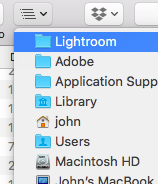
Copier le lien dans le Presse-papiers
Copié
Wonderful! Thank you very, very much! Just verifified it and transferring all my published facebook collections to personal collections!
Very happy!

Copier le lien dans le Presse-papiers
Copié
I'm using Lightroom 4 and have recently found that around 20 of my albums have disappeared on Facebook (title showing, but no pictures), all of which I created using the Facebook plugin in Lightroom. I am aware that this issue occurred back in 2017 and was fixed at the time, but this is a more recent occurrence for me. I have the photos all backed up on external hard drives, but of course spent countless hours creating these individual albums over the years and hope to restore them in their original form if at all possible. I would never have used the plugin if I knew it could be so easily compromised, and luckily I stopped using it some time ago. I am no longer able to authenticate the plugin at this stage for any testing, as I get this message when I go to authorize it: "App Not Setup: This app is still in development mode, and you don't have access to it. Switch to a registered test user or ask an app admin for permissions." Any help would be greatly appreciated!!

Copier le lien dans le Presse-papiers
Copié
/updated/
First off, Publishing Service do not keep photos, they just point to them. It is like a collection, a collection used to define what to export, how, and where to export.
/update/
ahh, you just want to re-publish, not that the collection is missing, but that clicking on Publish fails. See next reply.


Trouvez plus d’idées, d’événements et de ressources dans la nouvelle communauté Adobe
Explorer maintenant
 AdChoices