Exit
  • Global community
    • Language:
      • Deutsch
      • English
      • Español
      • Français
      • Português
  • 日本語コミュニティ
  • 한국 커뮤니티
0

Problem accessing library from Book Module

Community Beginner ,
Feb 26, 2022 Feb 26, 2022

I started a book in the book module. Accessed library, edited images and then dragged them up to book pages no problem.

Last night, I clicked "create saved book."

Today, opened book from collections tab but am unable to open library without losing the book on the screen. Instead, I get a screen with empty pages and no content.

Am unable to access the library, edit and keep the book on the display, i.e. in essence "i'm locked out of my book and LRC wants me to start all over again from scratch.

The directory I'm working with has 600+ image in structured file.

I was taking images from files in library module. When that didn't work, I created a new collection set out of the file.

Still unable to access images in collection set and maintain access to the book. LRC cues up new unsaved book template.

Anyone have any ideas out there?


Thanks

LRC 11.2

macOS 10.15.5

134
Translate
Report
Community guidelines
Be kind and respectful, give credit to the original source of content, and search for duplicates before posting. Learn more
community guidelines
Community Expert ,
Feb 26, 2022 Feb 26, 2022
LATEST

I clicked "create saved book."

Yes, this is the only way to save your book design work.

It creates a special type of Collection in the Book Collection panel. It is NOT a Standard Collection. And creating new collections will NOT re-open the book edits. (It starts a new book)

You must always reopen a 'Saved' book by either-

1) A [Double-click] on the 'Saved Book Collection', or
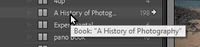
2022-02-27 10_53_48-Lightroom Catalog-v11 - Adobe Photoshop Lightroom Classic - Library.jpg

2) [Click] on the small white arrow that appears at the end of a 'Saved Book Collection' when you hover the mouse cursor.
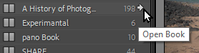
Rob_Cullen_0-1645923261010.png

If you want extra photos in the Book you  must add them to the 'Saved Book Collection'

Keyboard [G] will reopen the 'Saved Book Collection' in Library Grid view (appearing as it would any Collection).

If you then view 'All Photographs' to add extra photos re-open the Book by the above steps.


Regards. My System: Windows-11, Lightroom-Classic 15.1, Photoshop 27.2, ACR 18.1.1, Lightroom 9.1, Lr-iOS 10.4.0, Bridge 16.0.1 .

Translate
Report
Community guidelines
Be kind and respectful, give credit to the original source of content, and search for duplicates before posting. Learn more
community guidelines

