



Exit
  • Global community
    • Language:
      • Deutsch
      • English
      • Español
      • Français
      • Português
  • 日本語コミュニティ
  • 한국 커뮤니티
1

P: SDK: Custom video export presets don't appear when LR is running in a language other than English

LEGEND ,
Apr 19, 2025 Apr 19, 2025

Custom video export presets installed by LrExportSettings.addVideoExportPresets() don't appear in the Export window when LR's language is set to any language except English.  


This bug prevents users of my Any Video Preset plugin from using it in any language except English.


To reproduce on LR 14.2 / Mac OS 15.3.2:


1. Download and uncompress this plugin:

https://www.dropbox.com/scl/fi/bmdic60cynoad2rfdkkwl/video-preset-bug.lrdevplugin.2025-04-19.zip?rlk...


2. Exit LR, reset LR's preferences and start LR.


3. In File > Plug-in Manager, add the plugin "video-preset-bug.lrdevplugin" from step 1.


4. Do File > Plug-in Extras > Video Preset Bug, which loads a custom video export preset called "My Preset".


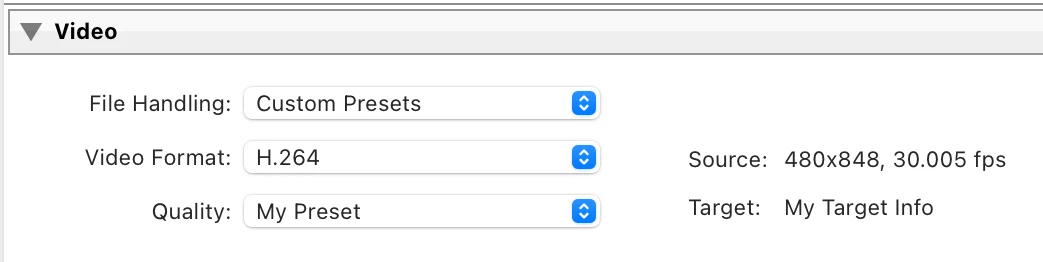
5. Select a video and do File > Export > Export... In the Export window's Video panel, observe there is a File Handling menu with the item Custom Presets, and the custom video preset "My Preset" appears (correct):
 

johnrellis_1-1745122324720.png


6. Exit LR, reset LR's preferences and start LR.


7. In Preferences > General, set Language to Deutsch. Restart LR.


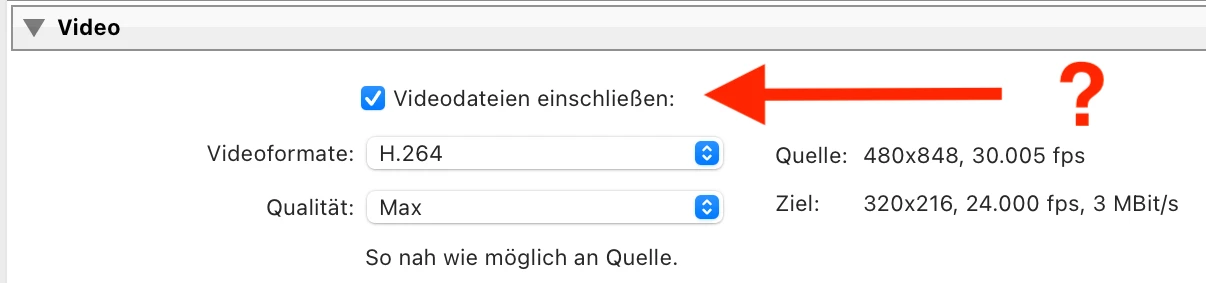
8. Repeat steps 3-5. But this time, observe that the Export window's Video panel doesn't contain the File Handling menu, and it isn't possible to select the custom video preset:
johnrellis_2-1745122582944.png


Bug Fixed
TOPICS
macOS , SDK , Windows
450
Translate
Report
Community guidelines
Be kind and respectful, give credit to the original source of content, and search for duplicates before posting. Learn more
community guidelines

correct answers 2 Pinned Replies

Adobe Employee , Apr 21, 2025 Apr 21, 2025

Thanks for the report, @johnrellis . We have a ticket open for this. 

Status Investigating
Translate
Adobe Employee , Oct 28, 2025 Oct 28, 2025

Hello everyone,


An update for Adobe Photography products has been released as part of the MAX cycle. This update addresses the reported issue.


If you don’t see the update in your Creative Cloud app, refresh it using [Ctrl/Cmd] + [Alt/Opt] + [R].

Please note: It may take up to 24 hours for the update to appear.


Thank you for your continued patience.

Status Fixed
Translate
3 Comments
Adobe Employee ,
Apr 21, 2025 Apr 21, 2025

Thanks for the report, @johnrellis . We have a ticket open for this. 

Rikk Flohr: Adobe Photography Org
Status Investigating
Translate
Report
Adobe Employee ,
Oct 28, 2025 Oct 28, 2025

Hello everyone,


An update for Adobe Photography products has been released as part of the MAX cycle. This update addresses the reported issue.


If you don’t see the update in your Creative Cloud app, refresh it using [Ctrl/Cmd] + [Alt/Opt] + [R].

Please note: It may take up to 24 hours for the update to appear.


Thank you for your continued patience.

Status Fixed
Translate
Report
LEGEND ,
Oct 28, 2025 Oct 28, 2025
LATEST

I verified that LR 15.0 produces the correct behavior for the bug recipe, thanks.

Translate
Report