

yamato713108855
Community Expert
Community Expert
July 4, 2023

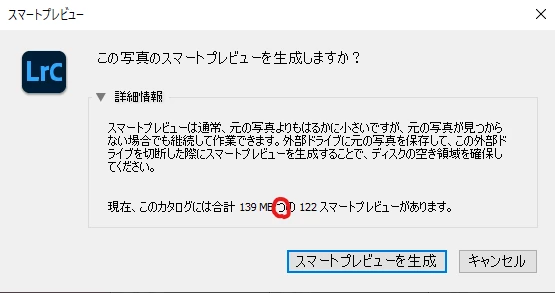
P: There is an error in the message when creating a smart preview.

  • July 4, 2023
  • 3 replies
  • 1203 views

It is a display problem in the Japanese version


Click the bottom of the histogram to create a smart preview.
There is an error in the message displayed at that time.

After the capacity MB, there is "つ" left.
"つ" is a classifier for expressing 1 to 9.
We don't use "つ" to indicate capacity.
It seems that the expression used in the previous version remains even after the specification change.


I think that "つ" is difficult to use as a unit to represent the number of smart previews, so I think that "個" is better.
This topic has been closed for replies.

3 replies

yamato713108855
Community Expert
Community Expert
February 28, 2024

@rlu 

"件" is not used in smart preview counting.
Used for counting cases, incidents, etc.

Rikk Flohr_Photography
Community Manager
Community Manager
February 21, 2024

Greetings all,


Updates for the Adobe Photography Products have been released.  The February 2024 updates contain an update for this issue. 

If you do not see the update in your Creative Cloud Application, you can refresh it by hitting [Ctrl/Cmd]+[Alt/Opt]+[ R ].

Note: It may take up to 24 hours for your update to be available in your Creative Cloud app.


Thank you for being so patient.

Rikk Flohr: Adobe Photography Org
johnrellis
Legend
July 8, 2023

@Rikk Flohr: Photography, this sounds like a translation bug.

yamato713108855
Community Expert
Community Expert
July 11, 2023

Lightroom development staff should get advice from Japanese staff.