


- Home
- Lightroom Classic
- Discussions
- Updated photoshop now won't edit photos sent from ...
- Updated photoshop now won't edit photos sent from ...

Copy link to clipboard
Copied
I updated Photoshop. I had already updated Lightroom.
In LIghtroom, when I right click>edit in Photoshop, Lightroom will import the photo to Photoshop but everything is gray and I can't edit anything. I can duplicate the layer by dragging it into a new layer but that is it. My shortcuts don't work either. I uninstalled both programs and reinstalled but still... the same thing. I opened a different catalog, same thing... I can access the file outside of Lightroom and open it in Photoshop.... but I need to be able to work in between Lightroom and Photoshop. 


 1 Correct answer

Well, today Adobe has updated PS, looks like it fixes the LR to PS issue

 13
Replies
13
13
Replies
13


Copy link to clipboard
Copied
It's a bug. Open PS first, then send from LR.
Copy link to clipboard
Copied
I had tried opening Photoshop first and then sending it to Photoshop... It didn't work. I went to Lightroom and reset any and everything I could find after I had reinstalled it deleting all of my preferences... and it worked... finally... after about 2 hours of time wasted messing around trying to figure this out. That will teach me to update... 😕
Copy link to clipboard
Copied
I suspect it'll happen again. Another suggestion I've seen is to disable the Home Screen - the setting is in Preferences, General. No idea if it works.

Copy link to clipboard
Copied
I had same problem for a while. <Edit in photoshop> did open photo in Photoshop but all edit functions was grey. Then problem become even worst so that even <Edit in photoshop> function in Lightroom was grey and photos don't open in Photoshop anymore. I still can open same photos directly in Photoshop and edit them, but the workflow between Lightroom and Photoshop is not working anymore.
I updated Photoshop to version 20.0.1 couple of weeks ago and Lightroom to version 8.0 (2019) some weeks earlier.
Obviously this is a bug, but opening PS first did not help in my case.
Copy link to clipboard
Copied
Well, today Adobe has updated PS, looks like it fixes the LR to PS issue

Copy link to clipboard
Copied
IT IS NOT FIXED!!!!!!!!!!!!!!!
Copy link to clipboard
Copied
I get a message on the updated LR today 11/24/21 that Lightroom was unable to prepare the selected file .... for editing. It will not be open. All closes and Nothing happens. Same as before your updates today in both LR / PS. I need to get files into PS darn!!!!!!! I need to make a book. I can't edit files in PS, or Topaz or nothing! Totally crippled.

Copy link to clipboard
Copied
With the last update of Photoshop (version 20.0.2) the bug is fixed. I've tested the functionality and it worked. You can send a picture from LR to Photoshop ("Edit in Photoshop") without starting Photoshop first or disable the home screen in PS.

Copy link to clipboard
Copied
Well, the LR to PS problem isn't solved on my iMac.
Photshop starts up, but still doesn't open (any) files. It drives me nuts. Everything is updatet on my iMac 5k.
Copy link to clipboard
Copied
A new issue.
read this : After update, I cant send photos to Photoshop to edit

Copy link to clipboard
Copied
Would love to know if there is a fix yet for this? I updated, uninstalled, reinstalled, and it's still not working.

Copy link to clipboard
Copied
This correct answer is gone. Can you please edit this to Unsolved.

Copy link to clipboard
Copied
The thread you posted in is almost two years old.
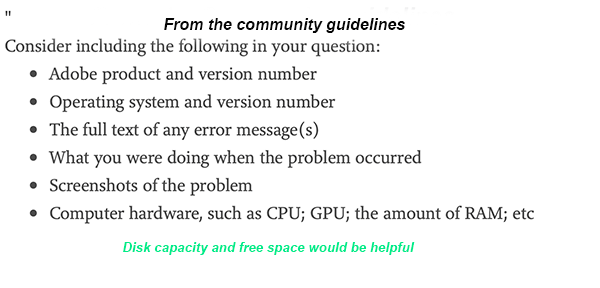
If you are having an issue with a newer version of LrC o0r Photoshop then you should start a new thread and provide the updated info.


Get ready! An upgraded Adobe Community experience is coming in January.
Learn more
 AdChoices