


- Home
- Lightroom Classic
- Discussions
- Re: Watermarks missing from export menu after inst...
- Re: Watermarks missing from export menu after inst...

Copy link to clipboard
Copied
So, I'm running Lightroom Classic and I downloaded some presets. They seem to have installed just fine, they're listed on the left side, they all seem to work, etc.
Then I tried to export a photo and my watermarks are all missing from the pulldown menu in the export box. I had about 8 watermarks and the only option I have now is "edit watermarks", the default. The weird part is that the watermarks are all still there in the folder where they were before, they just don't show up as an option in the pulldown.
What did I do? Is this a preference file issue?


 1 Correct answer

Ah, just have to check. Have you perhaps accidentaly in /preferences/presets/ selected to "Store presets with this catalog?"

 9
Replies
9
9
Replies
9


Copy link to clipboard
Copied
Hi Mattoutwest,
Sorry that some of your watermarks have gone missing from Lightroom Classic after installing some presets. That shouldn't be happening, let us help make this right.
Which version of Lightroom Classic are you using?
Could you please take a look at this similar discussion Watermarks has disappeared and let is know if the offered suggestions helps?
Thanks,
Akash
Copy link to clipboard
Copied
Thank you Akash.
I have version 8.3.1 of Lightroom Classic. The related thread (2386705) did not help. That person seems to have had a different issue. Their watermark options show up in the pulldown menu but don't actually appear on the photo. My watermarks disappeared from the export menu. Here's the sequence:
1. created several watermarks (13 total) - used them for several months successfully.
2. About 5 days ago I installed some presets by copying them to my "Develop Presets" folder inside the Lightroom settings folder.
3. I restarted Lightroom and the presets imported and seem to all work fine.
4. A couple days ago, I tried to export a photo but all my watermark options are gone from the export menu (see picture below).
5. The 13 watermark files are all still in the folder "Macintosh HD/Users/Me/Library/Application Support/Adobe/Lightroom/Watermarks"
I could probably re-create all the watermarks, it just seems like this is probably something really simple I overlooked.
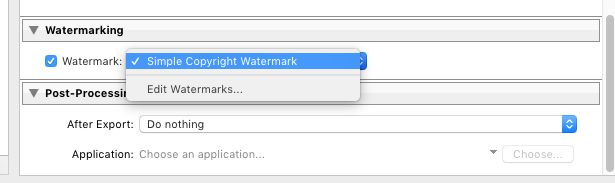
Thanks for any help.
Matt
Copy link to clipboard
Copied
When you choos Edit Watermarks, does the Watermark Editor come up, and are any of your saved ones shown?
Copy link to clipboard
Copied
No, when I click on Edit Watermarks, it just brings up the normal screen to create a new watermark. None of my existing watermarks are in the pulldown menu in the upper left.
Copy link to clipboard
Copied
Copy link to clipboard
Copied
/EDITIED/
In Finder, select one of your watermarks, select get info. Anything odd about the Sharing & Permissions (Me should have at least Read/Write, probably also the same and Read for the group Everyone, and in case some odd group called Staff)
Copy link to clipboard
Copied
Ah, just have to check. Have you perhaps accidentaly in /preferences/presets/ selected to "Store presets with this catalog?"
Copy link to clipboard
Copied
That was it. I'm not sure how that box got checked because I didn't even know it existed. I unchecked it and everything's back to normal. Thanks!

Copy link to clipboard
Copied
Seems counter-intuative, but that worked for me too ... thanks for the tip!


Get ready! An upgraded Adobe Community experience is coming in January.
Learn more
 AdChoices