


- Home
- Lightroom ecosystem (Cloud-based)
- Discussions
- Fixed: DNG imports after 6.2 update doesn't show t...
- Fixed: DNG imports after 6.2 update doesn't show t...

Copy link to clipboard
Copied
I follow the instructions to download presets and add them to my Lightroom mobile app. I open the DNG file in Lightroom, click the three dots on the top right, click create preset and save it as a new preset. But then when I go to my photos to use the preset, the photo doesn't change. The preset doesn't add any filter to my photo. Any ideas how to make the presets work??
{Moderator note: Edited the thread title, LRMI-4201708, 4201709}


 3 Correct answers


Hi,
you will need to update to the 6.2.1 version over the App Store if you don't already have it.
All presets created with 6.2.0 need to be deleted and recreated.
Thanks,
Ignacio

Hi,
please try out our latest version that has a fix for this issue.
Thanks,
Ignacio

Greetings,
Lightroom Mobile for iOS (iPhone & iPad) 6.2.1 was released earlier today and contains a fix for this issue.
If you previously downloaded Lightroom 6.2 you should install this update as soon as possible to avoid this issue.
Note: To fix images that were affected you need to do the following:
- Install 6.2.1
- Delete the file and move to trash
- Re-import the file again
Thank you for your patience.
Akash
 109
Replies
109
109
Replies
109


Copy link to clipboard
Copied
Wtf tides that mean? What's supported then?

Copy link to clipboard
Copied
Hey guys, I just updated the new version of lightroom mobile 6.2 and now when I import dng files with settings applied, the settings do not load! I sell mobile presets and customers download the .dng files and create presets from them once importing, so needless to say, I'm panicking. SOS!
Copy link to clipboard
Copied
Hi Jess,
Please read the thread here: https://community.adobe.com/t5/lightroom-for-mobile-apple-tv/downloaded-presets-won-t-work/td-p/1190...
Copy link to clipboard
Copied

Copy link to clipboard
Copied

Copy link to clipboard
Copied
Hi! I'm so sorry to be a pester, I'm sure ya'll are hard at work. Do you have an estimate of how long it'll take to get a patch for this bug? Just trying to give our customers a little bit more info other than "it's being worked on" 🙂
If there's any way to track this ticket too, I'd appreciate that!
Thanks for your time and efforts in fixing this problem, really appreciate it.

Copy link to clipboard
Copied
hi! is this going to be fixed within the next week?

Copy link to clipboard
Copied
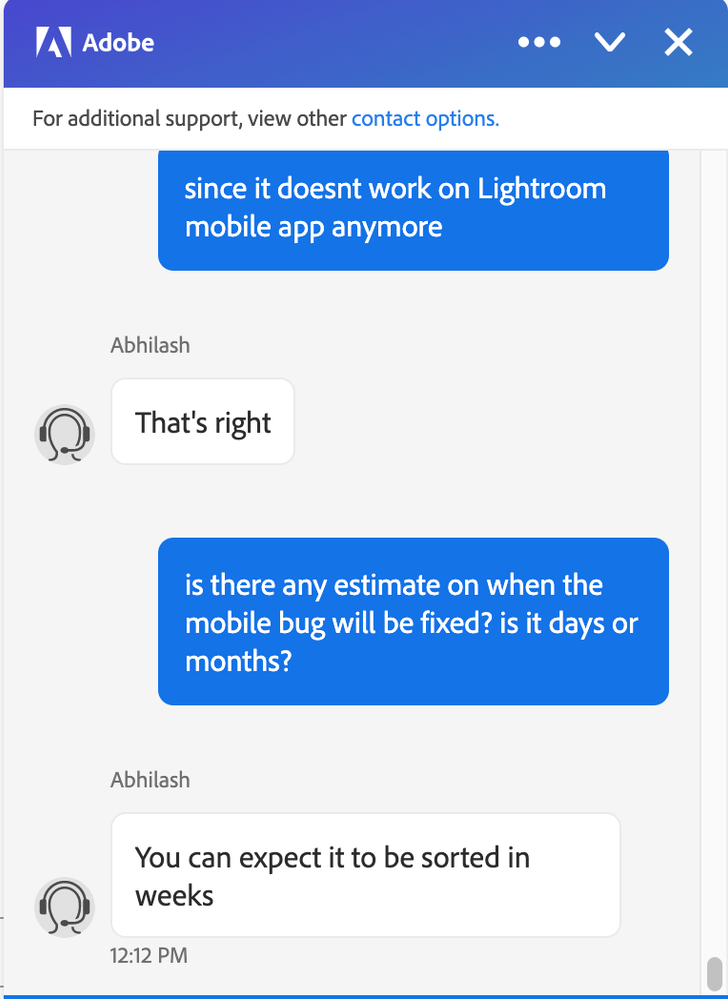
I've been told it will take weeks for this bug to be fixed from an Adobe customer service rep.
Copy link to clipboard
Copied
Agh! Weeks? Thats not very promising..I hope they have a saved version of 6.1 somewhere in their system and just revert to that in the meantime. Lots of small business rely on the feature. May I ask if you were just talking to someone in the support chat? I'm hoping to hear back from someone directly on the forums here. They seem to always have the most accurate information.
Copy link to clipboard
Copied
Yes just from their customer service chat. I've had to start issuing refunds for my presets so already losing money as a small business. Really hoping an Adobe Employee on here can provide an update.

Copy link to clipboard
Copied
All my costumers are asking me to refund them because its not working on the new version!!!! Its going to be fixed soon? HELPPPPP

Copy link to clipboard
Copied
same, now i know why it isn't working on them. just updated mine and it's not working anymore

Copy link to clipboard
Copied
After having opened a DNG (with a preset), the preset is not showing. I can only see the original photo, not the modified photo.
Could someone help me? Thanks


Copy link to clipboard
Copied
After having opened a DNG (with a preset),
Did you IMPORT a DNG?
Who suplied the DNG?
Was it supplied with the purpose of creating a Preset?
the preset is not showing.
"Not showing." where? In the Preset panel list? The Preset adjustments?
Have you created the Preset from the DNG in Edit mode?
What is the Preset supposed to do in editing?
I can only see the original photo, not the modified photo.
How do you know that what you see is the original photo? Were you supplied an original and a modified version?
Did you do a 'Reset' of the photo?
Are you using Lightroom-Desktop v4.2 or Lightroom-Mobile v6.2 or Lightroom-Free ?
Some more details may help arrive at an answer for you.

Copy link to clipboard
Copied
Me too
Copy link to clipboard
Copied
Thank you for your reply!
I usually import the DNG from an app called FLTR. I had no problem since yesterday. When I import the DNG, I usually create a new preset from this photo. I know it has the preset because I can literally the before and after by tapping on the photo.
Now, when I import the DNG, I see just the original photo, without any modifications, so I cannot save the preset.
I'm using Lightroom For Mobile.
I made a video so I hope you can understand better!
thank you again!
Copy link to clipboard
Copied
I forgot to say that I have this kind of problem with any DNG that has a preset, not only from tha app I mentioned.

Copy link to clipboard
Copied
I have the same thing after the last update of Lightroom, photos with settings in dng format are loaded into Lightroom now without settings. If you export your photo, then it is unloaded with the settings, and if you try to load it into the application, it is empty, loaded without settings. help me please

Copy link to clipboard
Copied
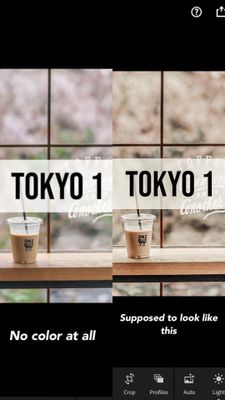
I also have the same trouble as state above. Usually after import dng file to lightroom the color of its preset will showing. However this doesn't showing. Have try to uninstall and re-install, download through different browser, still the same. Yes, I am importing dng photo and No, I don't reset the photo. I am using the latest version of lightroom in appstore. Please fix this issue. Thank you.
Copy link to clipboard
Copied
Same 😫

Copy link to clipboard
Copied
I have the same problem since the last update of Lightroom Mobile.
Copy link to clipboard
Copied
Hi, I also have the same trouble on importing dng. Usually after import dng file to lightroom the color of its preset will showing. However this doesn't showing. Have try to uninstall and re-install, download through different browser, still the same. Yes, I am importing dng photo and No, I don't reset the photo. I am using the latest version of lightroom in appstore. Please fix this issue. Thank you.
Copy link to clipboard
Copied
I sell presets online and 4 of my customers since yesterday have told me that they have the same issue. This was the first time ever that something like this happened. I verified their imports and the integrity of the files and there is nothing wrong with the Files or the process that they follow. The presets seem to be blank on their end, they miss the information.
Copy link to clipboard
Copied
the same thing happened to me
Copy link to clipboard
Copied
I'm having the same issue. Woke up to an influx of emails from customers who can't save my presets from DNGs - they seem to be experiencing the issue on version 6.2.0 whereas I'm on 6.1.0 and it's working fine.


Get ready! An upgraded Adobe Community experience is coming in January.
Learn more
 AdChoices