


- Home
- Lightroom ecosystem (Cloud-based)
- Discussions
- Re: Help deleting multiple presets on LR
- Re: Help deleting multiple presets on LR
Help deleting multiple presets on LR

Copy link to clipboard
Copied
I have hundreds of presets on Lightroom I’m trying to delete. I’ve figured out how to delete individual ones on mobile and my Mac, however I haven’t been able to find a way to delete multiple presets at a time like I should be able to and deleting one at a time is time consuming, not to mention it’s slowing LR down. Any suggestions on what I should do?


 8
Replies
8
8
Replies
8


Copy link to clipboard
Copied
In LR Classic, right click a preset and choose Show in Finder/Explorer. You can then delete them.
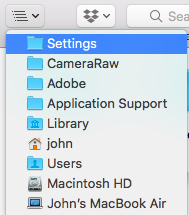
In LR CC, I think you'll have to navigate to the folder manually. On Mac, they're in a Settings folder buried in the Library. In Finder, get to Library by holding down Option which makes the Go menu show Library. It's an equivalent location on Windows.
Copy link to clipboard
Copied
Thank you for this helpful comment! I was finally able to find the user presets folder, however It was empty. I think I’ve it set up wrong until now and I’m not sure what to do next.
Copy link to clipboard
Copied
I should clarify that this is Lightroom CC, not classic.
Copy link to clipboard
Copied
And I should update, sorry correct, my advice re CC:
- On Mac ~/Library/Application Support/Adobe/Lightroom CC/Develop Presets/
- On Windows C:/Users/{you}/AppData/Roaming/Adobe/Lightroom CC/Develop Presets/
Or at least, it was there - I am just wondering if they changed it again! Hold on....
Copy link to clipboard
Copied
OK, here they are. They are inside the Lightroom Library.library file
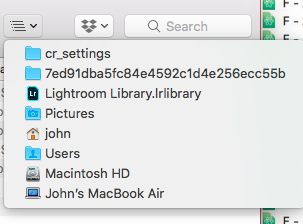
This is normally in Pictures on both packages or you can find it through Local Storage in LRCC's Preferences. On Mac, Alt click the file and Show Package Contents. You'll then find your presets are unhelpfully named - like the two I've highlighted.
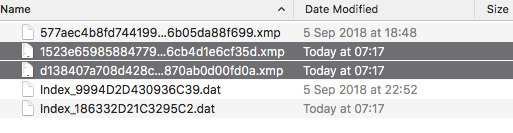
Sorry about my confusion!
Copy link to clipboard
Copied
no need to apoligize, it was helpful! I was able to find all the files, but none of them were their proper name or label even though almost all of mine are named. Is this common and is there anything I could do? I am already i’ll accidentally presets I want to keep.
Copy link to clipboard
Copied
Glad it was helpful - I learnt plenty too.
I don't think there's an easy way around the problem you've got. Adobe have integrated the ACR / Real Lightroom / "Lightroom CC" presets, which seems a good thing, but they have done it in a way that is completely unfriendly for the user. In your position, I'd be tempted to be brave and delete stuff, but with everything backed up.
For any PC users finding this thread, find the Storage Location in Preferences and then go to that folder in Explorer. My presets are being saved to C:\Users\John\AppData\Local\Adobe\Lightroom CC\Data\redacted\cr_settings.

Copy link to clipboard
Copied
Windows_users_yourname_appdata_local_adobe_lightroomcc_data_ cr settings


Get ready! An upgraded Adobe Community experience is coming in January.
Learn more
 AdChoices